Publish and subscribe overview
Publish and subscribe (pub/sub) enables microservices to communicate with each other using messages for event-driven architectures.
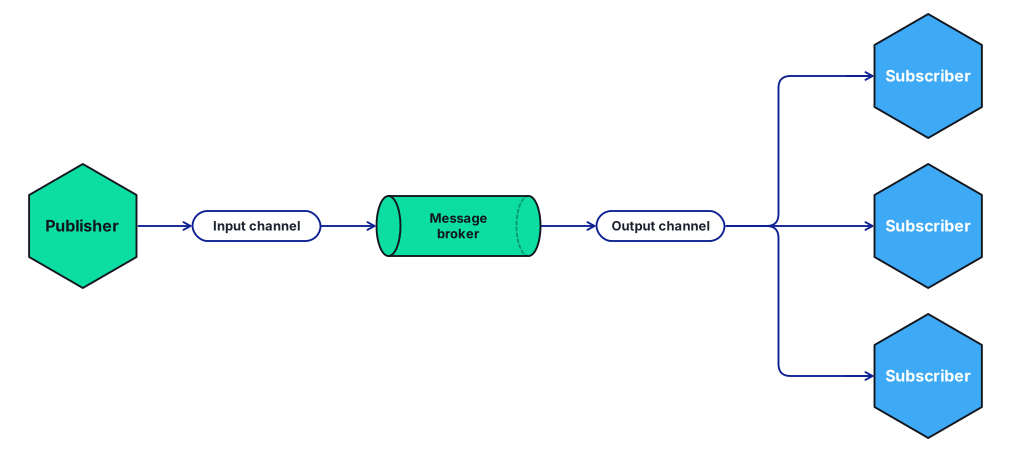
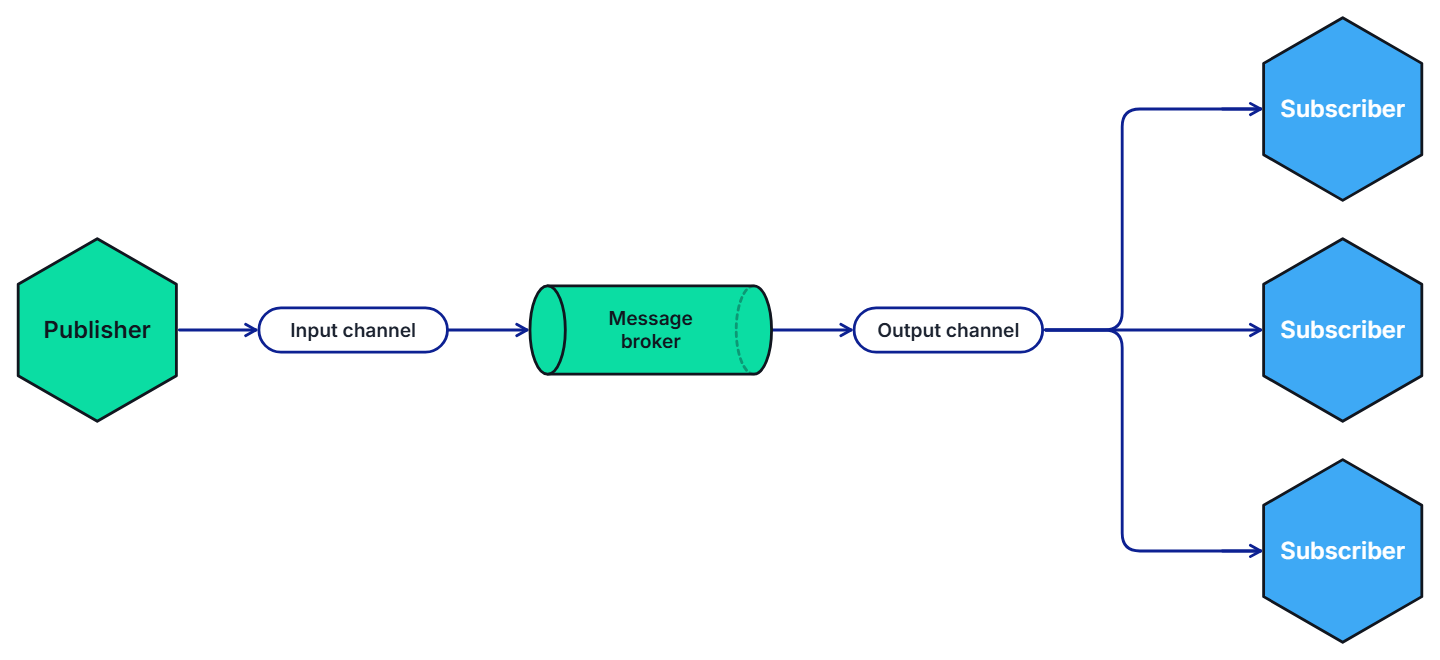
- The producer, or publisher, writes messages to an input channel and sends them to a topic, unaware which application will receive them.
- The consumer, or subscriber, subscribes to the topic and receives messages from an output channel, unaware which service produced these messages.
An intermediary message broker copies each message from a publisher’s input channel to an output channel for all subscribers interested in that message. This pattern is especially useful when you need to decouple microservices from one another.
Pub/sub API
The pub/sub API in Dapr:
- Provides a platform-agnostic API to send and receive messages.
- Offers at-least-once message delivery guarantee.
- Integrates with various message brokers and queuing systems.
The specific message broker used by your service is pluggable and configured as a Dapr pub/sub component at runtime. This removes the dependency from your service and makes your service more portable and flexible to changes.
When using pub/sub in Dapr:
- Your service makes a network call to a Dapr pub/sub building block API.
- The pub/sub building block makes calls into a Dapr pub/sub component that encapsulates a specific message broker.
- To receive messages on a topic, Dapr subscribes to the pub/sub component on behalf of your service with a topic and delivers the messages to an endpoint on your service when they arrive.
The following overview video and demo demonstrates how Dapr pub/sub works.
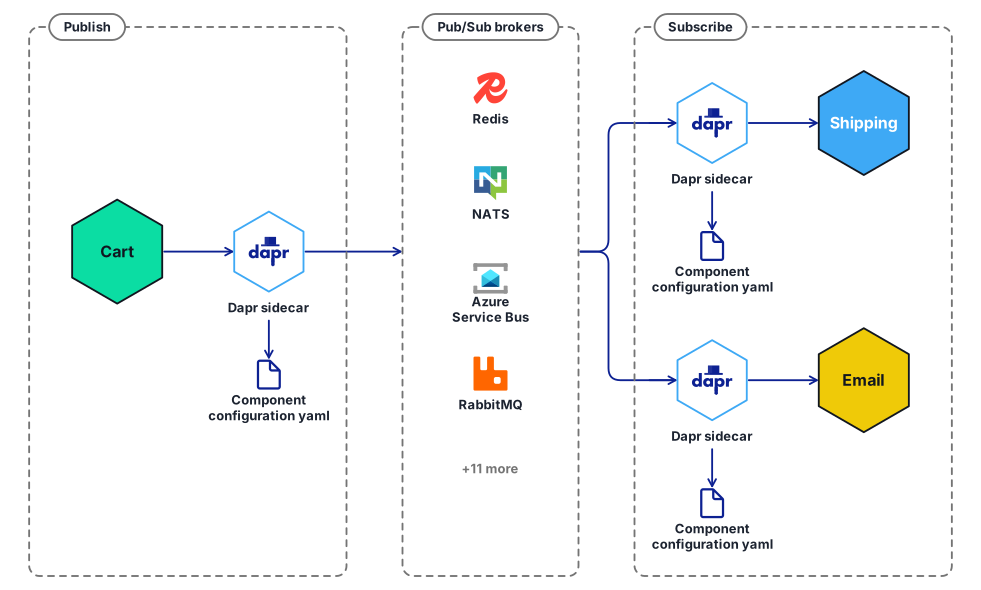
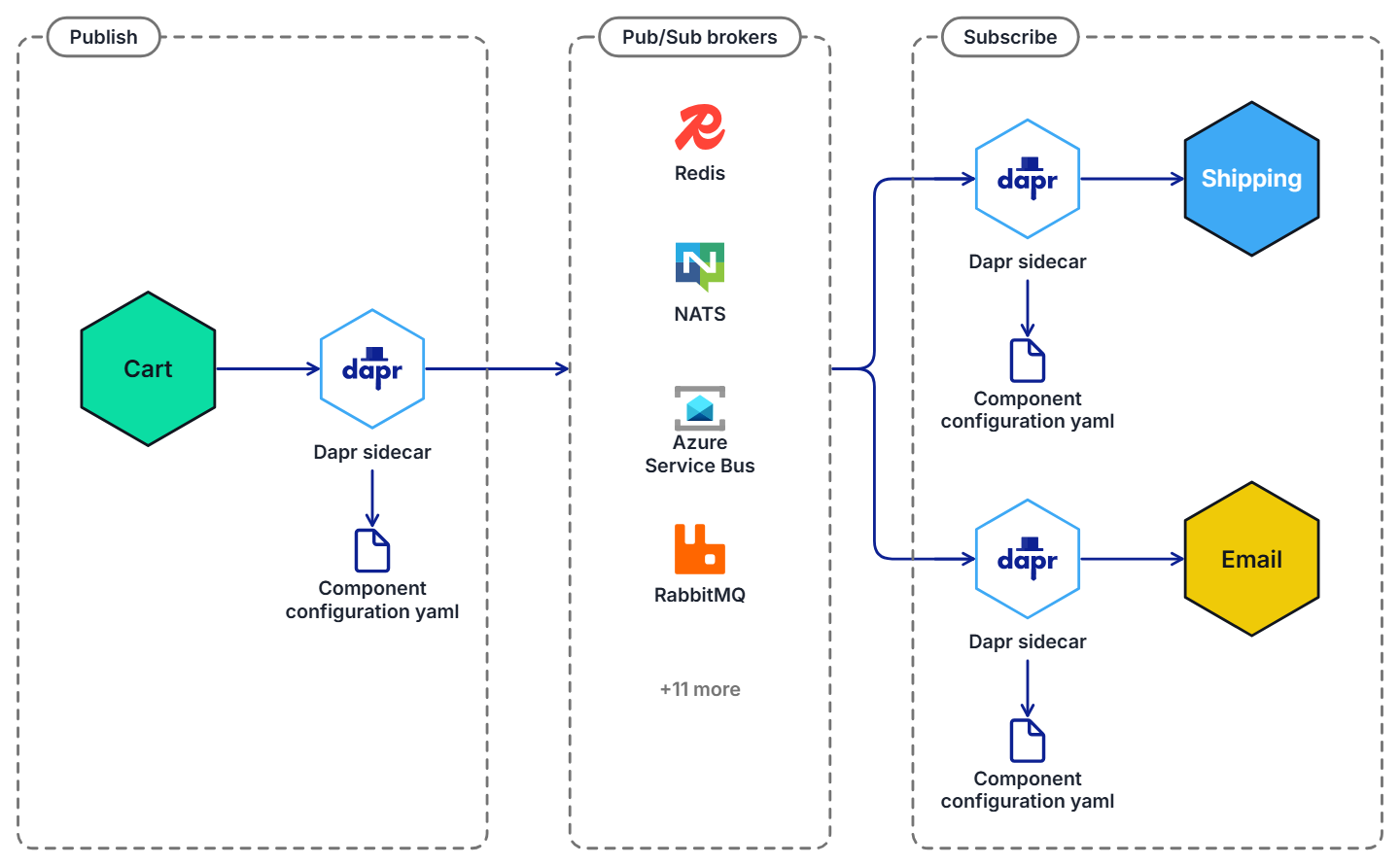
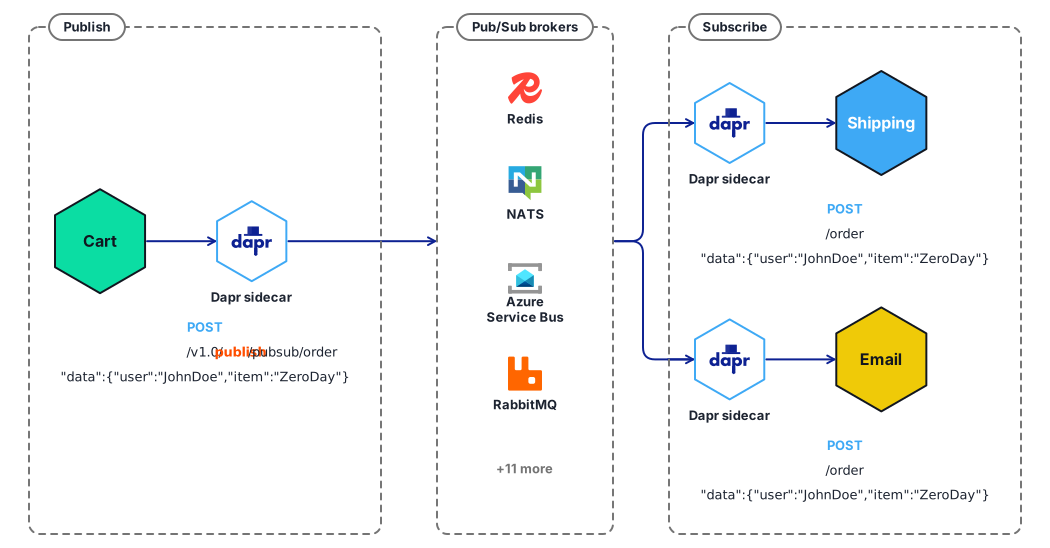
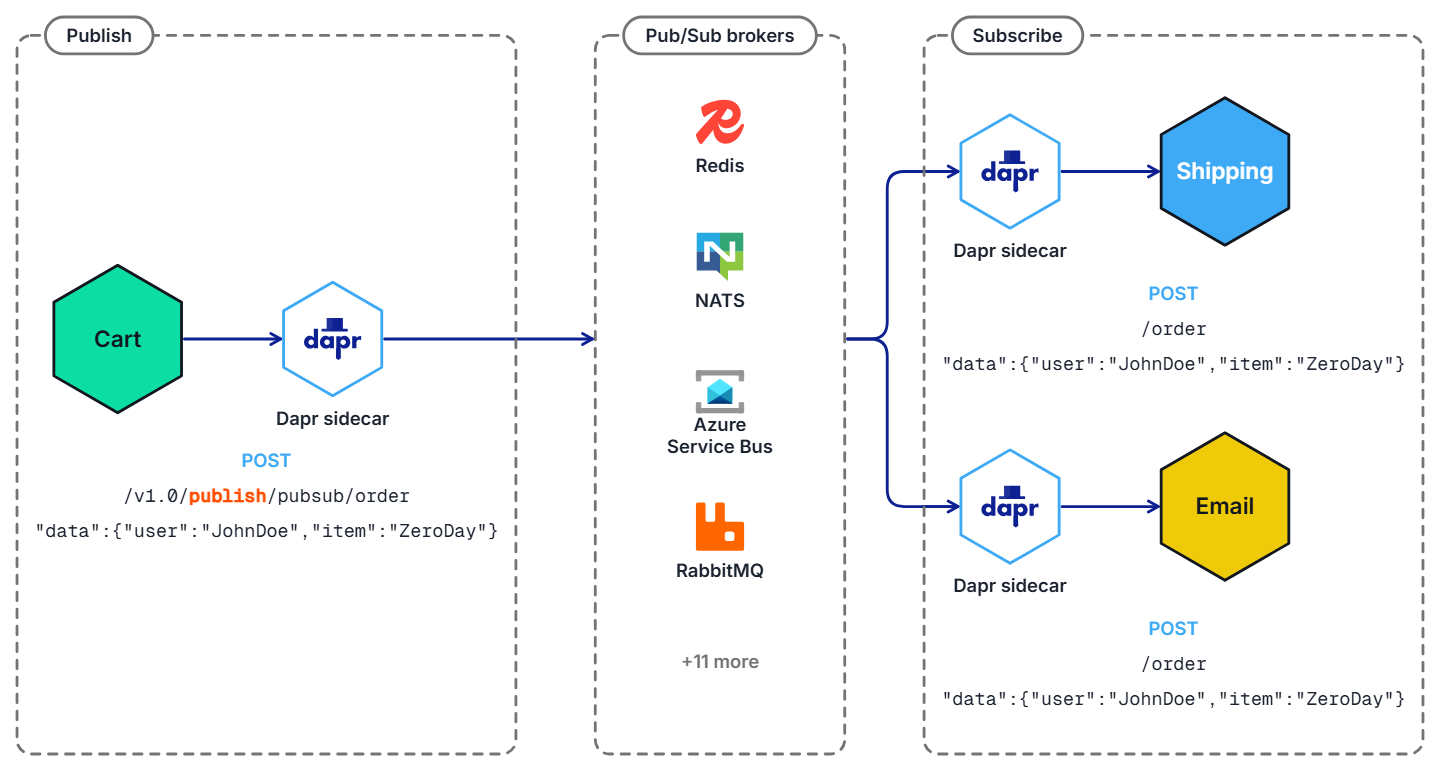
In the diagram below, a “shipping” service and an “email” service have both subscribed to topics published by a “cart” service. Each service loads pub/sub component configuration files that point to the same pub/sub message broker component; for example: Redis Streams, NATS Streaming, Azure Service Bus, or RabbitMQ.
In the diagram below, the Dapr API posts an “order” topic from the publishing “cart” service to “order” endpoints on the “shipping” and “email” subscribing services.
View the complete list of pub/sub components that Dapr supports.
Features
The pub/sub API building block brings several features to your application.
Sending messages using Cloud Events
To enable message routing and provide additional context with each message between services, Dapr uses the CloudEvents 1.0 specification as its message format. Any message sent by an application to a topic using Dapr is automatically wrapped in a Cloud Events envelope, using Content-Type header value for datacontenttype attribute.
For more information, read about messaging with CloudEvents, or sending raw messages without CloudEvents.
Communication with applications not using Dapr and CloudEvents
If one of your applications uses Dapr while another doesn’t, you can disable the CloudEvent wrapping for a publisher or subscriber. This allows partial adoption of Dapr pub/sub in applications that cannot adopt Dapr all at once.
For more information, read how to use pub/sub without CloudEvents.
Setting message content types
When publishing a message, it’s important to specify the content type of the data being sent. Unless specified, Dapr will assume text/plain.
- HTTP client: the content type can be set in a
Content-Typeheader - gRPC client and SDK: have a dedicated content type parameter
Message delivery
In principle, Dapr considers a message successfully delivered once the subscriber processes the message and responds with a non-error response. For more granular control, Dapr’s pub/sub API also provides explicit statuses, defined in the response payload, with which the subscriber indicates specific handling instructions to Dapr (for example, RETRY or DROP).
Receiving messages with topic subscriptions
Dapr applications can subscribe to published topics via three subscription types that support the same features: declarative, streaming and programmatic.
| Subscription type | Description |
|---|---|
| Declarative | The subscription is defined in an external file. The declarative approach removes the Dapr dependency from your code and allows for existing applications to subscribe to topics, without having to change code. |
| Streaming | The subscription is defined in the user code. Streaming subscriptions are dynamic, meaning they allow for adding or removing subscriptions at runtime. They do not require a subscription endpoint in your application (that is required by both programmatic and declarative subscriptions), making them easy to configure in code. Streaming subscriptions also do not require an app to be configured with the sidecar to receive messages. With streaming subscriptions, since messages are sent to a message handler code, there is no concept of routes or bulk subscriptions. |
| Programmatic | Subscription is defined in the user code. The programmatic approach implements the static subscription and requires an endpoint in your code. |
For more information, read about the subscriptions in Subscription Types.
Reloading topic subscriptions
Programmatic topic subscriptions require the Dapr sidecar to be restarted in order to be reloaded.
The Dapr sidecar dynamically reloads changed declarative topic subscriptions without restarting. This is enabled by default; to opt out, disable the HotReload feature in the Dapr application configuration.
In-flight messages are unaffected when reloading a subscription.
Message routing
Dapr provides content-based routing pattern. Pub/sub routing is an implementation of this pattern that allows developers to use expressions to route CloudEvents based on their contents to different URIs/paths and event handlers in your application. If no route matches, an optional default route is used. This is useful as your applications expands to support multiple event versions or special cases.
This feature is available to both the declarative and programmatic subscription approaches.
For more information on message routing, read Dapr pub/sub API reference
Handling failed messages with dead letter topics
Sometimes, messages can’t be processed because of a variety of possible issues, such as erroneous conditions within the producer or consumer application or an unexpected state change that causes an issue with your application code. Dapr allows developers to set dead letter topics to deal with messages that cannot be delivered to an application. This feature is available on all pub/sub components and prevents consumer applications from endlessly retrying a failed message. For more information, read about dead letter topics
Enabling the outbox pattern
Dapr enables developers to use the outbox pattern for achieving a single transaction across a transactional state store and any message broker. For more information, read How to enable transactional outbox messaging
Namespace consumer groups
Dapr solves multi-tenancy at-scale with namespaces for consumer groups. Simply include the "{namespace}" value in your component metadata for consumer groups to allow multiple namespaces with applications of the same app-id to publish and subscribe to the same message broker.
At-least-once guarantee
Dapr guarantees at-least-once semantics for message delivery. When an application publishes a message to a topic using the pub/sub API, Dapr ensures the message is delivered at least once to every subscriber.
Even if the message fails to deliver, or your application crashes, Dapr attempts to redeliver the message until successful delivery.
All Dapr pub/sub components support the at-least-once guarantee.
Subscription startup reliability
Dapr automatically retries failed subscription startups to improve reliability during deployment scenarios. This ensures your pub/sub applications remain resilient even when facing temporary connectivity or permission issues.
When Dapr encounters errors starting subscriptions, it shows an error message in the logs and continues to try to start the subscription.
Consumer groups and competing consumers pattern
Dapr handles the burden of dealing with consumer groups and the competing consumers pattern. In the competing consumers pattern, multiple application instances using a single consumer group compete for the message. Dapr enforces the competing consumer pattern when replicas use the same app-id without explicit consumer group overrides.
When multiple instances of the same application (with same app-id) subscribe to a topic, Dapr delivers each message to only one instance of that application. This concept is illustrated in the diagram below.
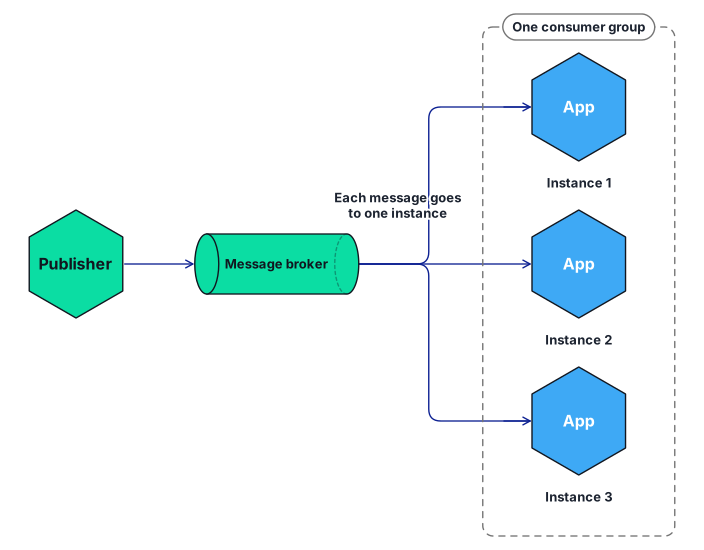
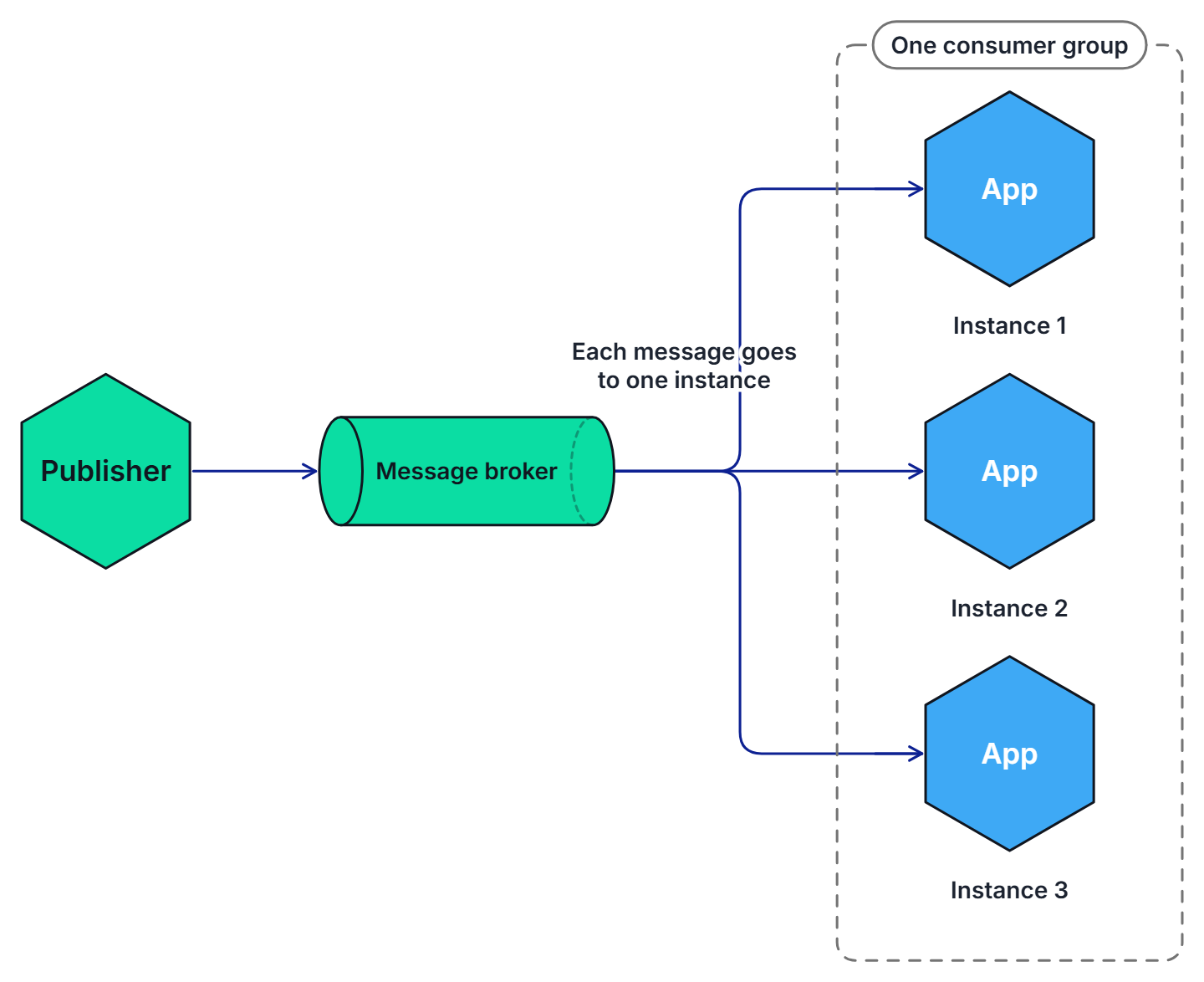
Similarly, if two different applications (with different app-id) subscribe to the same topic, Dapr delivers each message to only one instance of each application.
Not all Dapr pub/sub components support the competing consumer pattern. Currently, the following (non-exhaustive) pub/sub components support this:
Scoping topics for added security
By default, all topic messages associated with an instance of a pub/sub component are available to every application configured with that component. You can limit which application can publish or subscribe to topics with Dapr topic scoping. For more information, read: pub/sub topic scoping.
Message Time-to-Live (TTL)
Dapr can set a timeout message on a per-message basis, meaning that if the message is not read from the pub/sub component, then the message is discarded. This timeout message prevents a build up of unread messages. If a message has been in the queue longer than the configured TTL, it is marked as dead. For more information, read pub/sub message TTL.
Publish and subscribe to bulk messages
Dapr supports sending and receiving multiple messages in a single request. When writing applications that need to send or receive a large number of messages, using bulk operations allows achieving high throughput by reducing the overall number of requests. For more information, read pub/sub bulk messages.
Scaling subscribers with StatefulSets
When running on Kubernetes, subscribers can have a sticky consumerID per instance when using StatefulSets in combination with the {podName} marker. See how to horizontally scale subscribers with StatefulSets.
Try out pub/sub
Quickstarts and tutorials
Want to put the Dapr pub/sub API to the test? Walk through the following quickstart and tutorials to see pub/sub in action:
| Quickstart/tutorial | Description |
|---|---|
| Pub/sub quickstart | Send and receive messages using the publish and subscribe API. |
| Pub/sub tutorial | Demonstrates how to use Dapr to enable pub-sub applications. Uses Redis as a pub-sub component. |
Start using pub/sub directly in your app
Want to skip the quickstarts? Not a problem. You can try out the pub/sub building block directly in your application to publish messages and subscribe to a topic. After Dapr is installed, you can begin using the pub/sub API starting with the pub/sub how-to guide.
Inspect pub/sub locally
During local development, you can use the Dapr Dev Dashboard to see the subscriptions each of your applications registered, including the pub/sub component, topic, and route. You can also publish test messages to a subscription from the dashboard, which is a quick way to exercise a subscriber without running a publisher.
Next steps
- Learn about messaging with CloudEvents and when you might want to send messages without CloudEvents.
- Follow How-To: Configure pub/sub components with multiple namespaces.
- Review the list of pub/sub components.
- Read the API reference.