使用 Dynatrace OpenTelemetry Collector 收集追踪信息并发送到 Dynatrace
Dapr 使用 OpenTelemetry 协议(OTLP)与 Dynatrace Collector 集成。本指南将通过一个示例演示如何使用 Dapr 通过 Dynatrace 版本的 OpenTelemetry Collector 向 Dynatrace 推送追踪信息。
注意
本指南指的是 Dynatrace OpenTelemetry Collector,它使用与开源 Collector 相同的 Helm chart,但使用 Dynatrace 维护的镜像进行覆盖,以提供更好的支持和 Dynatrace 特定功能。前置条件
- 在 Kubernetes 上安装 Dapr
- 访问 Dynatrace 租户以及具有
openTelemetryTrace.ingest、metrics.ingest和logs.ingest作用域的 API 令牌 - Helm
设置 Dynatrace OpenTelemetry Collector 以推送到您的 Dynatrace 实例
要将追踪信息推送到您的 Dynatrace 实例,请在您的 Kubernetes 集群上安装 Dynatrace OpenTelemetry Collector。
使用您的 Dynatrace 凭证创建 Kubernetes secret:
kubectl create secret generic dynatrace-otelcol-dt-api-credentials \
  --from-literal=DT_ENDPOINT=https://YOUR_TENANT.live.dynatrace.com/api/v2/otlp \
  --from-literal=DT_API_TOKEN=dt0s01.YOUR_TOKEN_HERE
将
YOUR_TENANT替换为您的 Dynatrace 租户 ID,将YOUR_TOKEN_HERE替换为您的 Dynatrace API 令牌。使用 Dynatrace OpenTelemetry Collector 发行版以获得比开源版本更好的默认值和支持。下载并检查
collector-helm-values.yaml文件。这基于 k8s enrichment demo,并包含 Kubernetes 元数据增强以获得适当的 pod/namespace/cluster 上下文。使用 Helm 部署 Dynatrace Collector。
helm repo add open-telemetry https://open-telemetry.github.io/opentelemetry-helm-charts
helm repo update
helm upgrade -i dynatrace-collector open-telemetry/opentelemetry-collector -f collector-helm-values.yaml
设置 Dapr 以将追踪信息发送到 Dynatrace Collector
创建 Dapr 配置文件以启用追踪,并通过 OTLP 将追踪信息发送到 OpenTelemetry Collector。
更新以下文件以确保
endpointAddress指向 Kubernetes 集群中的 Dynatrace OpenTelemetry Collector 服务。如果在default命名空间中部署,通常是dynatrace-collector.default.svc.cluster.local。重要提示: 确保
endpointAddress不包含http://前缀,以避免 URL 编码问题:apiVersion: dapr.io/v1alpha1 kind: Configuration metadata: name: tracing spec: tracing: samplingRate: "1" otel: endpointAddress: "dynatrace-collector.default.svc.cluster.local:4318" # 使用您的 collector 服务地址更新应用配置:
kubectl apply -f collector-config-otel.yaml
使用追踪部署应用
通过向要包含在分布式追踪中的 Dapr 应用添加 dapr.io/config 注解来应用 tracing 配置,如以下示例所示:
apiVersion: apps/v1
kind: Deployment
metadata:
  ...
spec:
  ...
  template:
    metadata:
      ...
      annotations:
        dapr.io/enabled: "true"
        dapr.io/app-id: "MyApp"
        dapr.io/app-port: "8080"
        dapr.io/config: "tracing"
您可以同时注册多个追踪导出器,追踪日志将转发到所有已注册的导出器。
就是这样!无需包含任何 SDK 或对应用代码进行检测。Dapr 会自动为您处理分布式追踪。
查看追踪
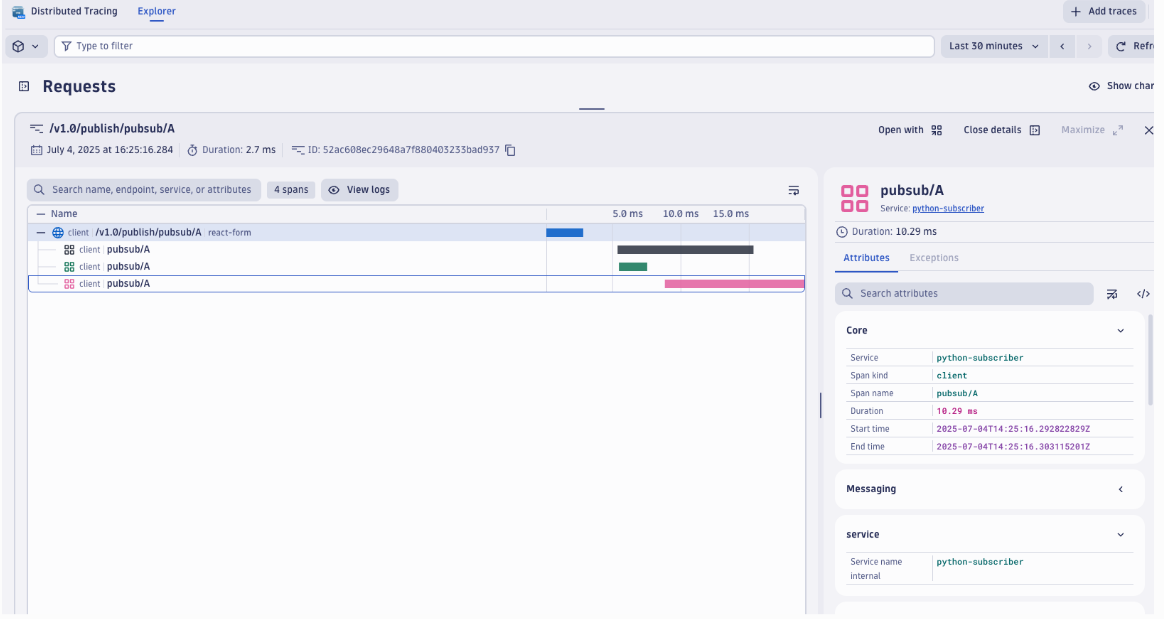
部署并运行一些应用。几分钟后,您应该会看到追踪信息出现在您的 Dynatrace 租户中:
- 在 Dynatrace UI 中导航到 Search > Distributed tracing。
- 按服务名称筛选以查看您的 Dapr 应用及其关联的追踪 span。
注意
只有通过 Dapr 边车暴露的 Dapr API 的操作(例如服务调用或事件发布)才会显示在 Dynatrace 分布式追踪中。禁用 OneAgent daprd 监控
如果您在集群中运行 Dynatrace OneAgent,您应该将 daprd 边车容器从 OneAgent 监控中排除,以防止此配置中的干扰。排除它可以防止任何可能破坏功能或导致追踪混乱的自动注入尝试。
将此注解添加到您的应用部署或在 dynakube 配置文件中全局添加:
metadata:
  annotations:
    dapr.io/enabled: "true"
    dapr.io/app-id: "MyApp"
    dapr.io/app-port: "8080"
    dapr.io/config: "tracing"
    container.inject.dynatrace.com/daprd: "false" # 排除 dapr sidecar 被 OneAgent 自动监控
相关链接
- 尝试 可观测性快速入门
- 了解如何设置追踪配置选项
- Dynatrace OpenTelemetry 文档
- 使用 Kubernetes 元数据增强 OTLP 遥测数据