This is the multi-page printable view of this section. Click here to print.
Conversation
1 - 对话概览
Alpha
对话 API 目前处于 alpha 阶段。Dapr 的对话 API 降低了大规模安全可靠地与大型语言模型 (LLM) 交互的复杂性。无论您是缺乏必要原生 SDK 的开发者,还是只想专注于 LLM 交互的提示工程的多语言团队,对话 API 都提供了一个一致的 API 入口点来与底层 LLM 提供商通信。
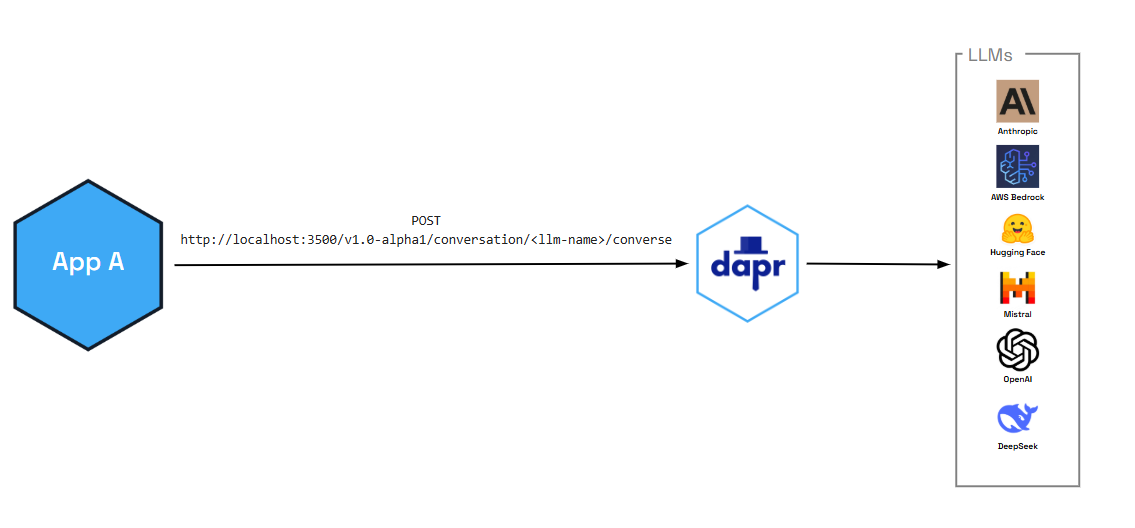
除了启用关键的性能和安全功能(如缓存和 PII 清理),对话 API 还提供:
- 工具调用能力:允许 LLM 与外部函数和 API 交互,实现更复杂的 AI 应用
- OpenAI 兼容接口:与现有 AI 工作流和工具无缝集成
您还可以将对话 API 与 Dapr 功能结合使用,例如:
- 弹性策略,包括处理重复错误的断路器、保护慢响应的超时机制,以及临时网络故障的重试
- 使用 OpenTelemetry 和 Zipkin 的可观测性,包括指标和分布式追踪
- 验证进出 LLM 请求的中间件
功能
以下功能是所有支持的对话组件 开箱即用的。
缓存
对话 API 支持两种缓存:
- 提示缓存:某些 LLM 提供商在本地缓存提示前缀,以加快重复提示的速度并降低成本。您可以通过 API 使用
promptCacheRetention参数在每个请求中启用此功能(例如,24h用于 OpenAI)。有关请求级选项,请参阅对话 API 参考。支持情况取决于提供商。 - 响应缓存:对话组件可以在边车中缓存完整的 LLM 响应。当您设置组件元数据字段
responseCacheTTL(例如10m)时,Dapr 会根据请求(提示和选项)缓存响应。重复的相同请求将从缓存提供,无需调用 LLM,从而降低延迟和成本。此缓存在内存中且每个边车独立。请在您的对话组件 spec 中配置。
响应格式化
您可以通过在请求中传递 responseFormat(JSON Schema)来请求模型的结构化输出。支持 Deepseek、Google AI、Hugging Face、OpenAI 和 Anthropic。请参阅对话 API 参考。
使用量指标
响应可以包含对话的令牌使用量(promptTokens、completionTokens、totalTokens)。请参阅 API 参考中的响应内容。
个人身份信息 (PII) 混淆
PII 混淆功能可识别并清除对话响应中任何形式的敏感用户信息。只需在输入和输出数据上启用 PII 混淆即可保护您的隐私,清除可能被用来识别个人的敏感细节。
PII 清理器会混淆以下用户信息:
- 电话号码
- 电子邮件地址
- IP 地址
- 街道地址
- 信用卡
- 社会安全号码
- ISBN
- 媒体访问控制 (MAC) 地址
- 安全哈希算法 1 (SHA-1) 十六进制
- SHA-256 十六进制
- MD5 十六进制
工具调用支持
对话 API 支持高级工具调用能力,允许 LLM 与外部函数和 API 交互。这使您能够构建复杂的 AI 应用,这些应用可以:
- 根据用户请求执行自定义函数
- 与外部服务和数据库集成
- 提供动态的上下文感知响应
- 创建多步骤工作流和自动化
工具调用遵循 OpenAI 的函数调用格式,便于与现有 AI 开发工作流和工具集成。
演示
观看在 Diagrid 的 Dapr v1.15 庆祝活动 上进行的演示,了解如何使用 .NET SDK 了解对话 API 的工作原理。
尝试对话 API
快速入门和教程
想让 Dapr 对话 API 接受测试吗?通过以下快速入门和教程了解实际效果:
| 快速入门/教程 | 描述 |
|---|---|
| 对话快速入门 | 了解如何使用对话 API 与大型语言模型 (LLM) 交互。 |
直接在您的应用中使用对话 API
想跳过快速入门吗?没问题。您可以直接在应用程序中试用对话构建块。在安装 Dapr 后,您可以开始使用对话 API,从操作指南开始。
后续步骤
2 - How-To: 使用对话 API 与 LLM 对话
Alpha
对话 API 目前处于 alpha 状态。让我们开始使用对话 API。在本指南中,您将学习如何:
- 设置可与对话 API 配合使用的可用 Dapr 组件(echo)。
- 将对话客户端添加到您的应用程序。
- 使用
dapr run运行连接。
设置对话组件
创建一个名为 conversation.yaml 的新配置文件,并保存到应用程序目录下的 components 或 config 子文件夹中。
选择您的首选对话组件规范用于您的 conversation.yaml 文件。
对于此场景,我们使用简单的 echo 组件。
apiVersion: dapr.io/v1alpha1
kind: Component
metadata:
  name: echo
spec:
  type: conversation.echo
  version: v1
使用 OpenAI 组件
要与真实的 LLM 交互,请使用其他支持的对话组件,包括 OpenAI、Hugging Face、Anthropic、DeepSeek 等。
例如,要将 echo 模拟组件替换为 OpenAI 组件,请使用以下内容替换 conversation.yaml 文件。您需要将 API 密钥复制到组件文件中。
apiVersion: dapr.io/v1alpha1
kind: Component
metadata:
  name: openai
spec:
  type: conversation.openai
  metadata:
  - name: key
    value: <REPLACE_WITH_YOUR_KEY>
  - name: model
    value: gpt-4-turbo
连接对话客户端
以下示例使用 Dapr SDK 客户端与 LLM 进行交互。
using Dapr.AI.Conversation;
using Dapr.AI.Conversation.Extensions;

var builder = WebApplication.CreateBuilder(args);

builder.Services.AddDaprConversationClient();

var app = builder.Build();

var conversationClient = app.Services.GetRequiredService<DaprConversationClient>();
var response = await conversationClient.ConverseAsync("conversation",
    new List<DaprConversationInput>
    {
        new DaprConversationInput(
            "Please write a witty haiku about the Dapr distributed programming framework at dapr.io",
            DaprConversationRole.Generic)
    });

Console.WriteLine("conversation output: ");
foreach (var resp in response.Outputs)
{
    Console.WriteLine($"\t{resp.Result}");
}
//dependencies
import io.dapr.client.DaprClientBuilder;
import io.dapr.client.DaprPreviewClient;
import io.dapr.client.domain.ConversationInput;
import io.dapr.client.domain.ConversationRequest;
import io.dapr.client.domain.ConversationResponse;
import reactor.core.publisher.Mono;

import java.util.List;

public class Conversation {

    public static void main(String[] args) {
        String prompt = "Please write a witty haiku about the Dapr distributed programming framework at dapr.io";

        try (DaprPreviewClient client = new DaprClientBuilder().buildPreviewClient()) {
            System.out.println("Input: " + prompt);

            ConversationInput daprConversationInput = new ConversationInput(prompt);

            // Component name is the name provided in the metadata block of the conversation.yaml file.
            Mono<ConversationResponse> responseMono = client.converse(new ConversationRequest("echo",
                    List.of(daprConversationInput))
                    .setContextId("contextId")
                    .setScrubPii(true).setTemperature(1.1d));
            ConversationResponse response = responseMono.block();
            System.out.printf("conversation output: %s", response.getConversationOutputs().get(0).getResult());
        } catch (Exception e) {
            throw new RuntimeException(e);
        }
    }
}
#dependencies
from dapr.clients import DaprClient
from dapr.clients.grpc._request import ConversationInput

#code
with DaprClient() as d:
    inputs = [
        ConversationInput(content="Please write a witty haiku about the Dapr distributed programming framework at dapr.io", role='user', scrub_pii=True),
    ]

    metadata = {
        'model': 'modelname',
        'key': 'authKey',
        'responseCacheTTL': '10m',
    }

    response = d.converse_alpha1(
        name='echo', inputs=inputs, temperature=0.7, context_id='chat-123', metadata=metadata
    )

    for output in response.outputs:
        print(f'conversation output: {output.result}')
package main

import (
	"context"
	"fmt"
	dapr "github.com/dapr/go-sdk/client"
	"log"
)

func main() {
	client, err := dapr.NewClient()
	if err != nil {
		panic(err)
	}

	input := dapr.ConversationInput{
		Content: "Please write a witty haiku about the Dapr distributed programming framework at dapr.io",
		// Role:     "", // Optional
		// ScrubPII: false, // Optional
	}

	fmt.Printf("conversation input: %s\n", input.Content)

	var conversationComponent = "echo"

	request := dapr.NewConversationRequest(conversationComponent, []dapr.ConversationInput{input})

	resp, err := client.ConverseAlpha1(context.Background(), request)
	if err != nil {
		log.Fatalf("err: %v", err)
	}

	fmt.Printf("conversation output: %s\n", resp.Outputs[0].Result)
}
use dapr::client::{ConversationInputBuilder, ConversationRequestBuilder};
use std::thread;
use std::time::Duration;

type DaprClient = dapr::Client<dapr::client::TonicClient>;

#[tokio::main]
async fn main() -> Result<(), Box<dyn std::error::Error>> {
    // Sleep to allow for the server to become available
    thread::sleep(Duration::from_secs(5));

    // Set the Dapr address
    let address = "https://127.0.0.1".to_string();

    let mut client = DaprClient::connect(address).await?;

    let input = ConversationInputBuilder::new("Please write a witty haiku about the Dapr distributed programming framework at dapr.io").build();

    let conversation_component = "echo";

    let request =
        ConversationRequestBuilder::new(conversation_component, vec![input.clone()]).build();

    println!("conversation input: {:?}", input.content);

    let response = client.converse_alpha1(request).await?;

    println!("conversation output: {:?}", response.outputs[0].result);
    Ok(())
}
运行对话连接
使用 dapr run 命令启动连接。例如,对于此场景,我们在一个 app ID 为 conversation 的应用程序上运行 dapr run,并指向 ./config 目录中的对话 YAML 文件。
dapr run --app-id conversation --dapr-grpc-port 50001 --log-level debug --resources-path ./config -- dotnet run
dapr run --app-id conversation --dapr-grpc-port 50001 --log-level debug --resources-path ./config -- mvn spring-boot:run
dapr run --app-id conversation --dapr-grpc-port 50001 --log-level debug --resources-path ./config -- python3 app.py
dapr run --app-id conversation --dapr-grpc-port 50001 --log-level debug --resources-path ./config -- go run ./main.go
dapr run --app-id=conversation --resources-path ./config --dapr-grpc-port 3500 -- cargo run --example conversation
预期输出
- '== APP == conversation output: Please write a witty haiku about the Dapr distributed programming framework at dapr.io'
高级功能
对话 API 支持以下功能:
提示缓存: 允许开发者在 Dapr 中缓存提示,从而获得更快的响应时间,并降低 LLM 提供商缓存插入提示的出口成本。
PII 清理: 允许对进入和离开 LLM 的数据进行混淆处理。
工具调用: 允许 LLM 与外部函数和 API 进行交互。
要了解如何启用这些功能,请参阅对话 API 参考指南。
Dapr SDK 仓库中的对话 API 示例
使用支持 SDK 仓库中提供的完整示例来体验对话 API。