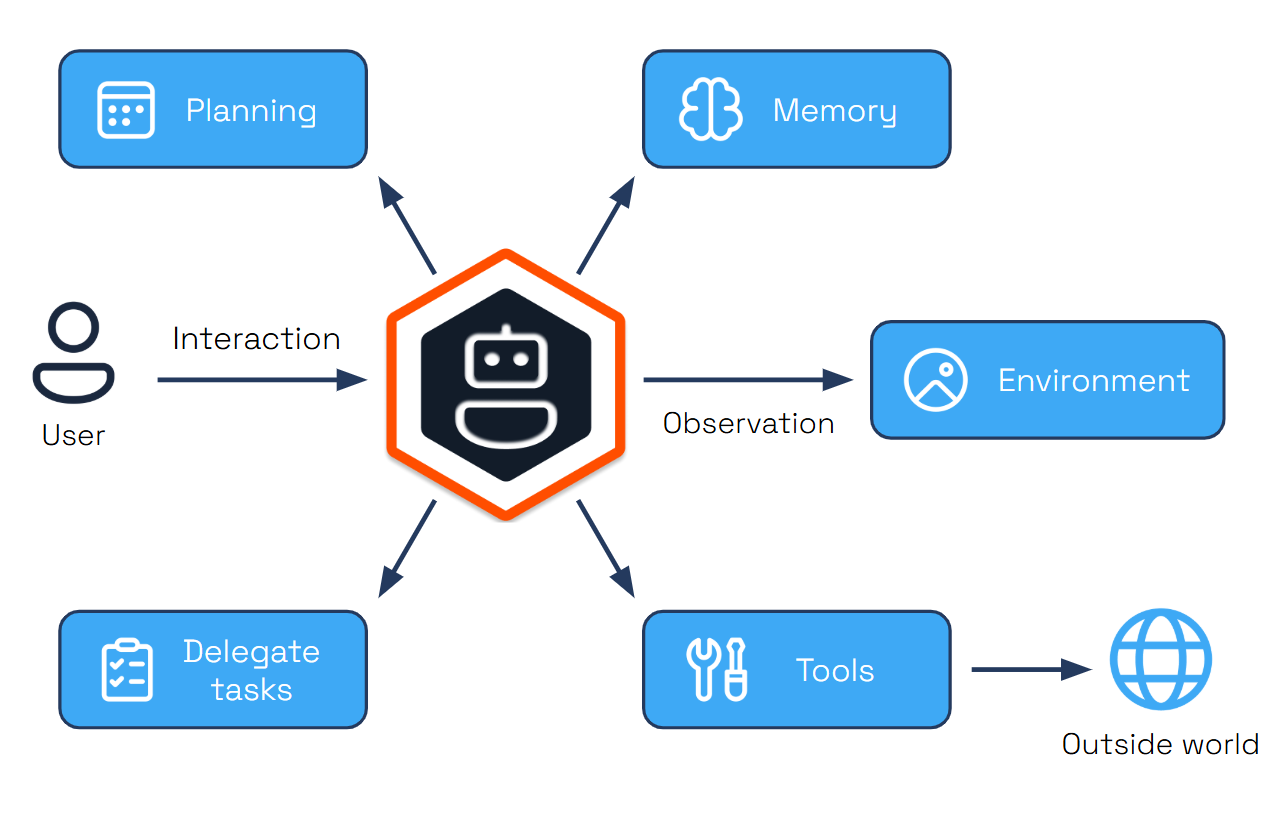
2 - Getting Started
How to install Dapr Agents and run your first agent
Dapr Agents Concepts
If you are looking for an introductory overview of Dapr Agents and want to learn more about basic Dapr Agents terminology, we recommend starting with the
introduction and
concepts sections.
Install Dapr CLI
While simple examples in Dapr Agents can be used without the sidecar, the recommended mode is with the Dapr sidecar. To benefit from the full power of Dapr Agents, install the Dapr CLI for running Dapr locally or on Kubernetes for development purposes. For a complete step-by-step guide, follow the Dapr CLI installation page.
Verify the CLI is installed by restarting your terminal/command prompt and running the following:
Initialize Dapr in Local Mode
Note
Make sure you have
Docker already installed.
Initialize Dapr locally to set up a self-hosted environment for development. This process fetches and installs the Dapr sidecar binaries, runs essential services as Docker containers, and prepares a default components folder for your application. For detailed steps, see the official guide on initializing Dapr locally.
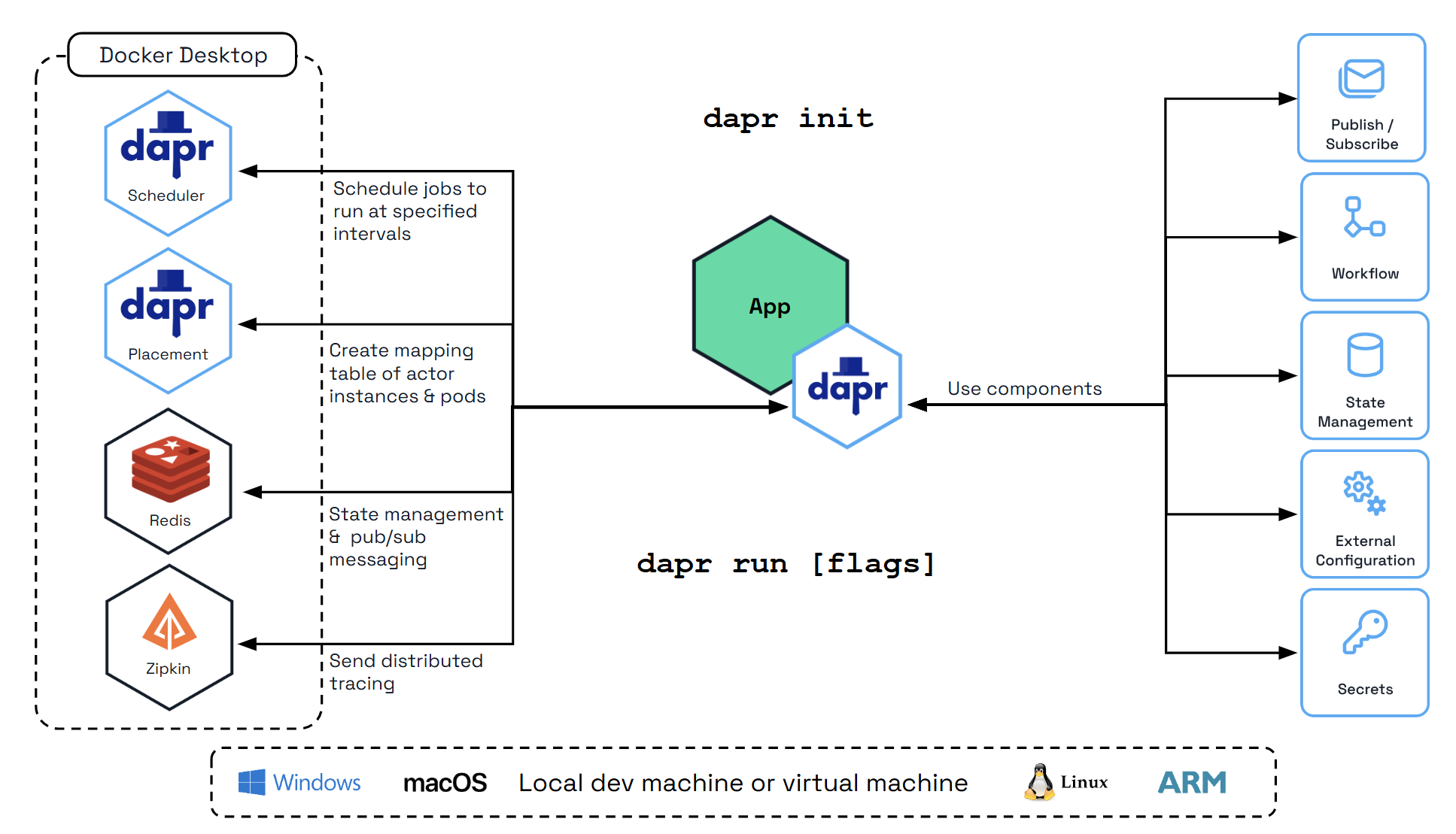
To initialize the Dapr control plane containers and create a default configuration file, run:
Verify you have container instances with daprio/dapr, openzipkin/zipkin, and redis images running:
Install Python
Note
Make sure you have Python already installed.
Python >=3.10. For installation instructions, visit the official
Python installation guide.
Create Your First Dapr Agent
Let’s create a weather assistant agent that demonstrates tool calling with Dapr state management used for conversation memory.
1. Create the Dapr components
Create a components directory and add two files:
historystore.yaml:
apiVersion: dapr.io/v1alpha1
kind: Component
metadata:
  name: historystore
spec:
  type: state.redis
  version: v1
  metadata:
  - name: redisHost
    value: localhost:6379
  - name: redisPassword
    value: ""
This component will be used to store the conversation history, as LLMs are stateless and every chat interaction needs to send all the previous conversations to maintain context.
openai.yaml:
apiVersion: dapr.io/v1alpha1
kind: Component
metadata:
  name: openai
spec:
  type: conversation.openai
  version: v1
  metadata:
  - name: key
    value: "{{OPENAI_API_KEY}}"
  - name: model
    value: gpt-5-2025-08-07
  - name: temperature
    value: 1
This component wires the default DaprChatClient to OpenAI via the Conversation API. Replace the {{OPENAI_API_KEY}} placeholder with your actual OpenAI key by editing the file directly. This API key is essential for agents to communicate with the LLM, as the default chat client talks to OpenAI-compatible endpoints. If you don’t have an API key, you can create one here. You can also tweak metadata (model, temperature, baseUrl, etc.) to point at compatible OpenAI-style providers.
Create weather_agent.py:
import asyncio
from dapr_agents import tool, Agent
from dapr_agents.agents.configs import AgentMemoryConfig
from dapr_agents.memory import ConversationDaprStateMemory
from dotenv import load_dotenv

load_dotenv()


@tool
def get_weather() -> str:
    """Get current weather."""
    return "It's 72°F and sunny"


async def main():
    memory_config = AgentMemoryConfig(
        store=ConversationDaprStateMemory(
            store_name="historystore",
            session_id="hello-world",
        )
    )

    agent = Agent(
        name="WeatherAgent",
        role="Weather Assistant",
        instructions=["Help users with weather information"],
        memory=memory_config,
        tools=[get_weather],
    )

    # First interaction
    response1 = await agent.run("Hi! My name is John. What's the weather?")
    print(f"Agent: {response1}")

    # Second interaction - agent should remember the name
    response2 = await agent.run("What's my name?")
    print(f"Agent: {response2}")


if __name__ == "__main__":
    asyncio.run(main())
This code creates an agent with a single weather tool and uses Dapr for memory persistence.
4. Set up virtual environment to install dapr-agent
For the latest version of Dapr Agents, check the PyPI page.
Create a requirements.txt file with the necessary dependencies:
Create and activate a virtual environment, then install the dependencies:
# Create a virtual environment
python3.10 -m venv .venv

# Activate the virtual environment
# On Windows:
.venv\Scripts\activate
# On macOS/Linux:
source .venv/bin/activate

# Install dependencies
pip install -r requirements.txt
5. Run with Dapr
dapr run --app-id weatheragent --resources-path ./components -- python weather_agent.py
This command starts a Dapr sidecar with the conversation component and launches the agent that communicates with the sidecar for state persistence. Notice how in the agent’s responses, it remembers the user’s name from the first chat interaction, demonstrating the conversation memory in action.
6. Enable Redis Insights (Optional)
Dapr uses Redis by default for state management and pub/sub messaging, which are fundamental to Dapr Agents’s agentic workflows. To inspect the Redis instance, a great UI tool to use is Redis Insight, and you can use it to inspect the agent memory populated earlier. To run Redis Insights, run:
docker run --rm -d --name redisinsight -p 5540:5540 redis/redisinsight:latest
Once running, access the Redis Insight interface at http://localhost:5540/
Inside Redis Insight, you can connect to a Redis instance, so let’s connect to the one used by the agent:
- Port: 6379
- Host (Linux): 172.17.0.1
- Host (Windows/Mac): host.docker.internal (example
host.docker.internal:6379)
Redis Insight makes it easy to visualize and manage the data powering your agentic workflows, ensuring efficient debugging, monitoring, and optimization.
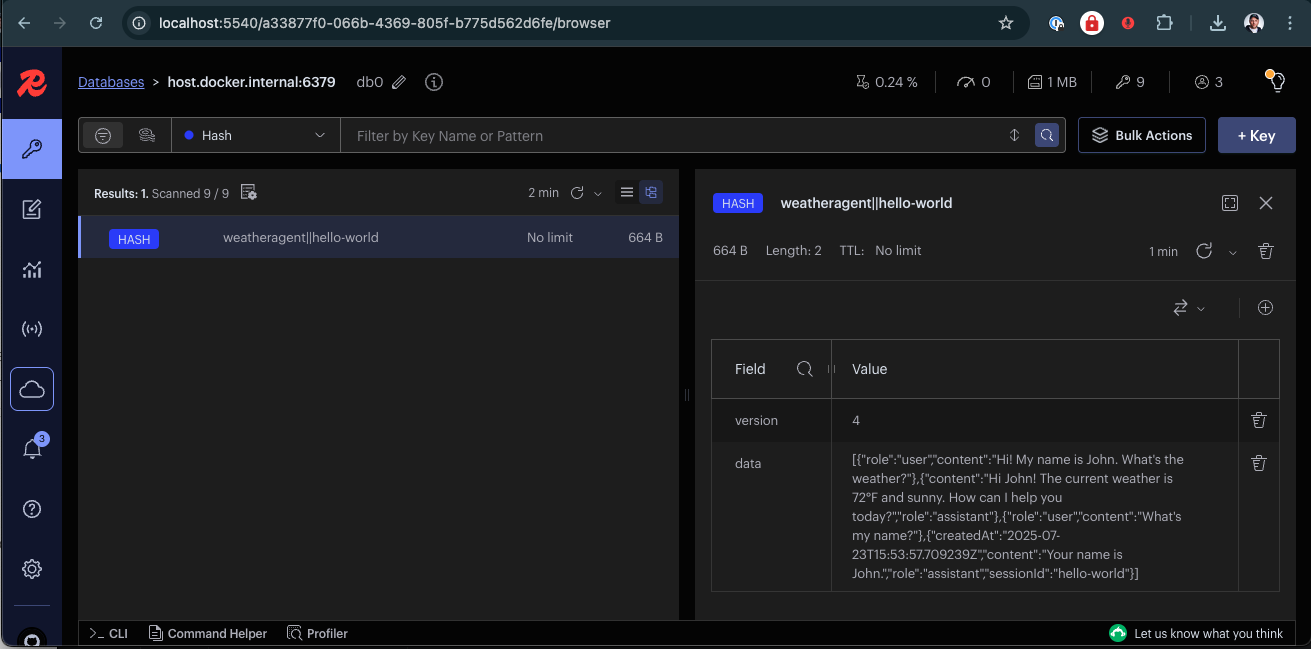
Here you can browse the state store used in the agent and explore its data.
Next Steps
Now that you have Dapr Agents installed and running, explore more advanced examples and patterns in the quickstarts section to learn about multi-agent workflows, durable agents, and integration with Dapr’s powerful distributed capabilities.
3 - Why Dapr Agents
Understanding the benefits and use cases for Dapr Agents
Dapr Agents is an open-source framework for building and orchestrating LLM-based autonomous agents that leverages Dapr’s proven distributed systems foundation. Unlike other agentic frameworks that require developers to build infrastructure from scratch, Dapr Agents enables teams to focus on agent intelligence by providing enterprise-grade scalability, state management, and messaging capabilities out of the box. This approach eliminates the complexity of recreating distributed system fundamentals while delivering agentic workflows powered by Dapr.
Challenges with Existing Frameworks
Many agentic frameworks today attempt to redefine how microservices are built and orchestrated by developing their own platforms for core distributed system capabilities. While these efforts showcase innovation, they often lead to steep learning curves, fragmented systems, and unnecessary complexity when scaling or adapting to new environments.
These frameworks require developers to adopt entirely new paradigms or recreate foundational infrastructure, rather than building on existing solutions that are proven to handle these challenges at scale. This added complexity diverts focus from the primary goal: designing and implementing intelligent, effective agents.
How Dapr Agents Solves It
Dapr Agents takes a different approach by building on Dapr, leveraging its proven APIs and patterns including workflows, pub/sub messaging, state management, and service communication. This integration eliminates the need to recreate foundational components from scratch.
By integrating with Dapr’s runtime and modular components, Dapr Agents empowers developers to build and deploy agents that work as collaborative services within larger systems. Whether experimenting with a single agent or orchestrating workflows involving multiple agents, Dapr Agents allows teams to concentrate on the intelligence and behavior of LLM-powered agents while leveraging a proven framework for scalability and reliability.
Principles
Agent-Centric Design
Dapr Agents is designed to place agents, powered by LLMs, at the core of task execution and workflow orchestration. This principle emphasizes:
- LLM-Powered Agents: Dapr Agents enables the creation of agents that leverage LLMs for reasoning, dynamic decision-making, and natural language interactions.
- Adaptive Task Handling: Agents in Dapr Agents are equipped with flexible patterns like tool calling and reasoning loops (e.g., ReAct), allowing them to autonomously tackle complex and evolving tasks.
- Multi-agent Systems: Dapr Agents’ framework allows agents to act as modular, reusable building blocks that integrate seamlessly into workflows, whether they operate independently or collaboratively.
While Dapr Agents centers around agents, it also recognizes the versatility of using LLMs directly in deterministic workflows or simpler task sequences. In scenarios where the agent’s built-in task-handling patterns, like tool calling or ReAct loops, are unnecessary, LLMs can act as core components for reasoning and decision-making. This flexibility ensures users can adapt Dapr Agents to suit diverse needs without being confined to a single approach.
Note
Agents can be used standalone and create workflows behind the scene, or act as autonomous steps in deterministic workflows.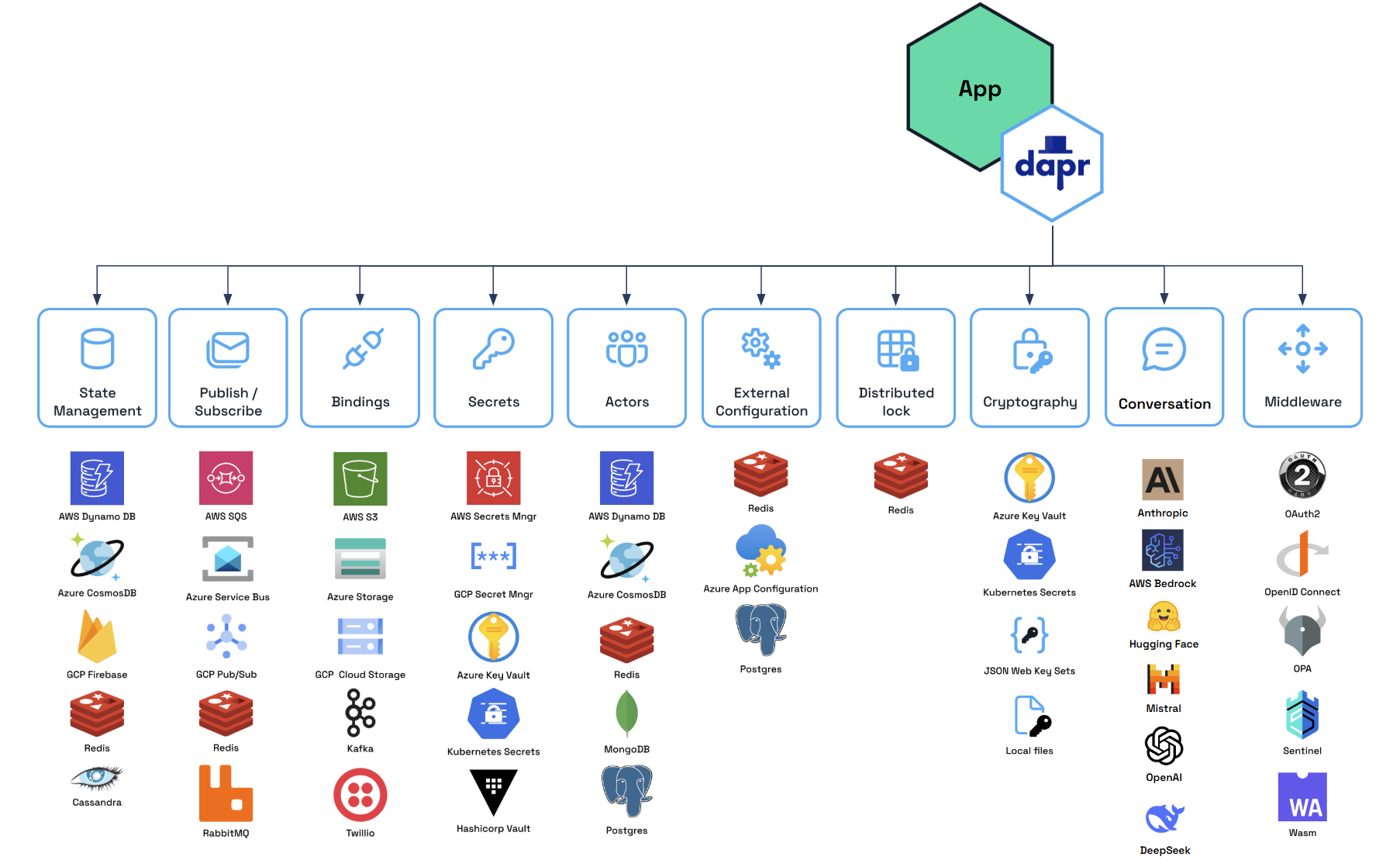
Backed by Durable Workflows
Dapr Agents places durability at the core of its architecture, leveraging Dapr Workflows as the foundation for durable agent execution and deterministic multi-agent orchestration.
- Durable Agent Execution: DurableAgents are fundamentally workflow-backed, ensuring all LLM calls and tool executions remain durable, auditable, and resumable. Workflow checkpointing guarantees agents can recover from any point of failure while maintaining state consistency.
- Deterministic Multi-Agent Orchestration: Workflows provide centralized control over task dependencies and coordination between multiple agents. Dapr’s code-first workflow engine enables reliable orchestration of complex business processes while preserving agent autonomy where appropriate.
By integrating workflows as the foundational layer, Dapr Agents enables systems that combine the reliability of deterministic execution with the intelligence of LLM-powered agents, ensuring reliability and scalability.
Note
Workflows in Dapr Agents provide the foundation for building durable agentic systems that combine reliable execution with LLM-powered intelligence.Modular Component Model
Dapr Agents utilizes Dapr’s pluggable component framework and building blocks to simplify development and enhance flexibility:
- Building Blocks for Core Functionality: Dapr provides API building blocks, such as Pub/Sub messaging, state management, service invocation, and more, to address common microservice challenges and promote best practices.
- Interchangeable Components: Each building block operates on swappable components (e.g., Redis, Kafka, Azure CosmosDB), allowing you to replace implementations without changing application code.
- Seamless Transitions: Develop locally with default configurations and deploy effortlessly to cloud environments by simply updating component definitions.
Note
Developers can easily switch between different components (e.g., Redis to DynamoDB, OpenAI to Anthropic) based on their deployment environment, ensuring portability and adaptability.Message-Driven Communication
Dapr Agents emphasizes the use of Pub/Sub messaging for event-driven communication between agents. This principle ensures:
- Decoupled Architecture: Asynchronous communication for scalability and modularity.
- Real-Time Adaptability: Agents react dynamically to events for faster, more flexible task execution.
- Event-Driven Workflows: : By combining Pub/Sub messaging with workflow capabilities, agents can collaborate through event streams while participating in larger orchestrated workflows, enabling both autonomous coordination and structured task execution.
Note
Pub/Sub messaging serves as the backbone for Dapr Agents’ event-driven workflows, enabling agents to communicate and collaborate in real time while maintaining loose coupling.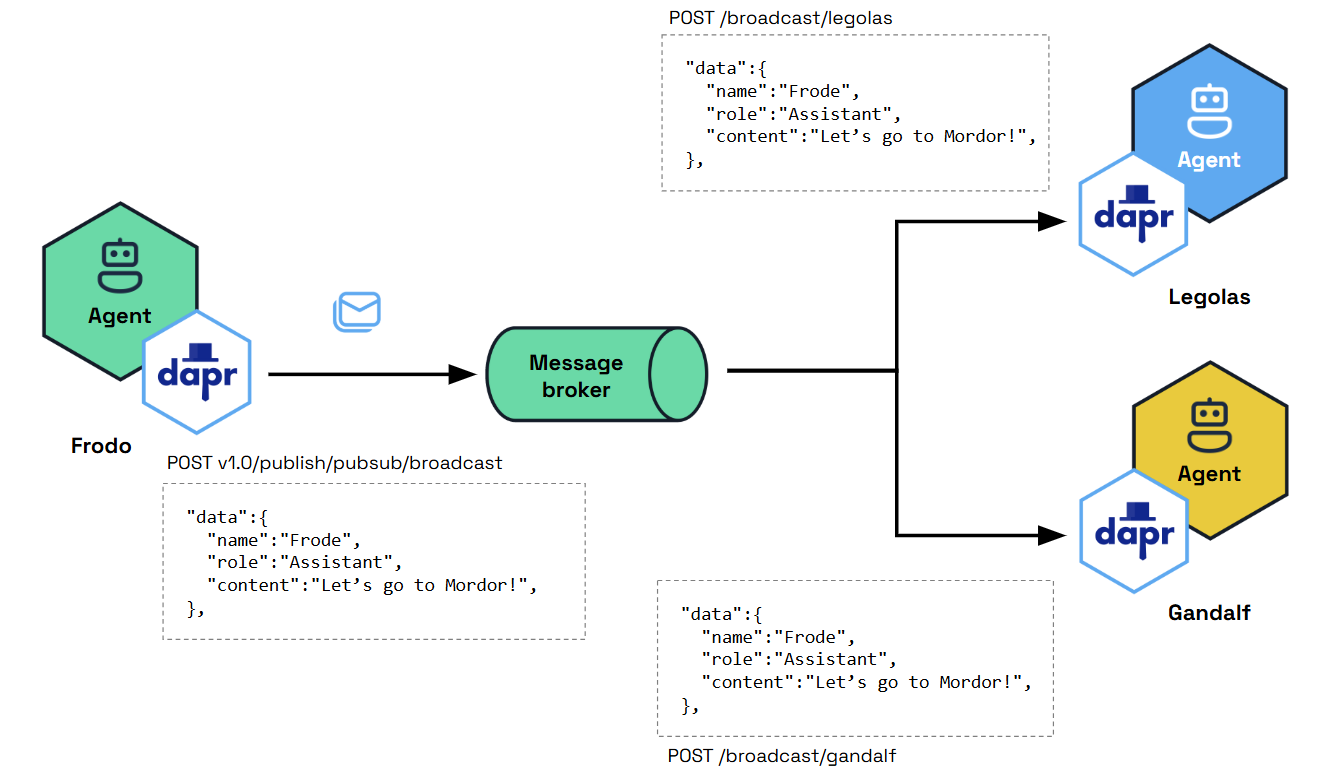
Decoupled Infrastructure Design
Dapr Agents ensures a clean separation between agents and the underlying infrastructure, emphasizing simplicity, scalability, and adaptability:
- Agent Simplicity: Agents focus purely on reasoning and task execution, while Pub/Sub messaging, routing, and validation are managed externally by modular infrastructure components.
- Scalable and Adaptable Systems: By offloading non-agent-specific responsibilities, Dapr Agents allows agents to scale independently and adapt seamlessly to new use cases or integrations.
Note
Decoupling infrastructure keeps agents focused on tasks while enabling seamless scalability and integration across systems.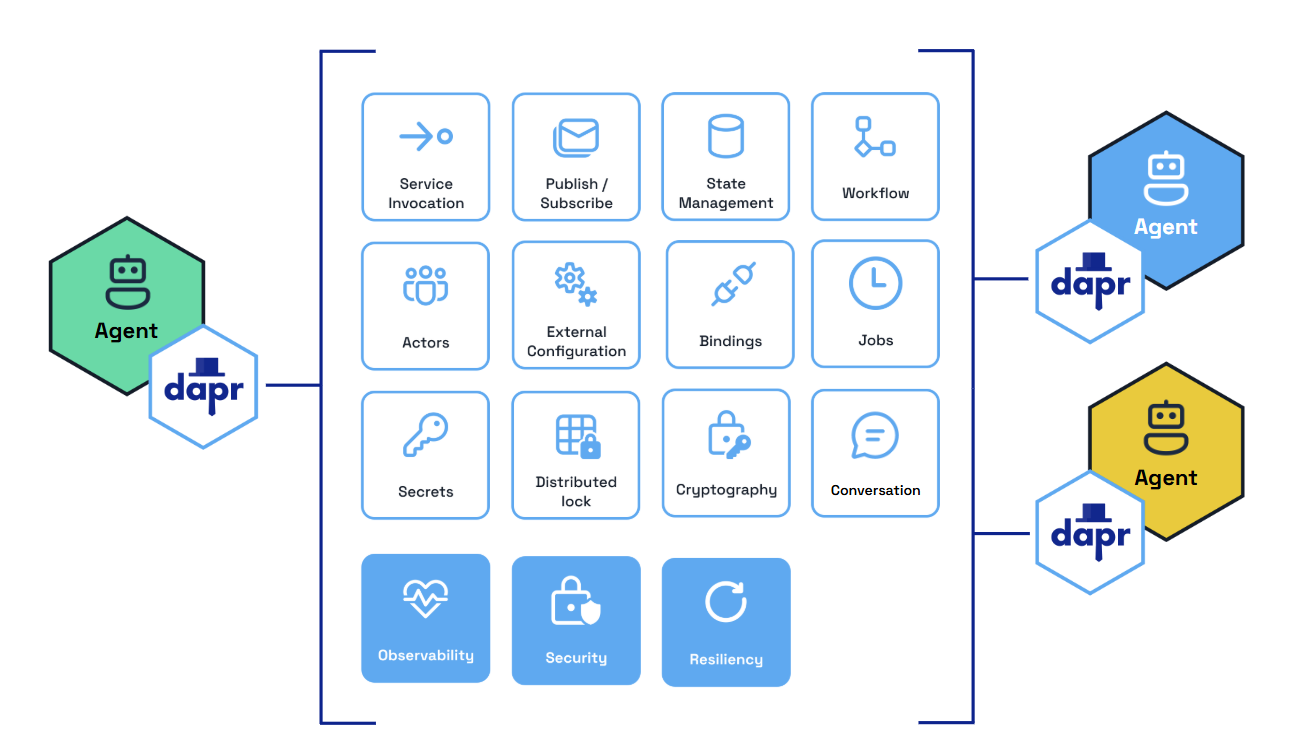
Dapr Agents Benefits
Scalable Workflows as First-Class Citizens
Dapr Agents uses a durable-execution workflow engine that guarantees each agent task executes to completion despite network interruptions, node crashes, and other disruptive failures. Developers do not need to understand the underlying workflow engine concepts—simply write an agent that performs any number of tasks and these will be automatically distributed across the cluster. If any task fails, it will be retried and recover its state from where it left off.
Cost-Effective AI Adoption
Dapr Agents builds on Dapr’s Workflow API, which represents each agent as an actor, a single unit of compute and state that is thread-safe and natively distributed. This design enables a scale-to-zero architecture that minimizes infrastructure costs, making AI adoption accessible to organizations of all sizes. The underlying virtual actor model allows thousands of agents to run on demand on a single machine with low latency when scaling from zero. When unused, agents are reclaimed by the system but retain their state until needed again. This design eliminates the trade-off between performance and resource efficiency.
Data-Centric AI Agents
With built-in connectivity to over 50 enterprise data sources, Dapr Agents efficiently handles structured and unstructured data. From basic PDF extraction to large-scale database interactions, it enables data-driven AI workflows with minimal code changes. Dapr’s bindings and state stores, along with MCP support, provide access to numerous data sources for agent data ingestion.
Accelerated Development
Dapr Agents provides AI features that give developers a complete API surface to tackle common problems, including:
- Flexible prompting
- Structured outputs
- Multiple LLM providers
- Contextual memory
- Intelligent tool selection
- MCP integration
- Multi-agent communications
Integrated Security and Reliability
By building on Dapr, platform and infrastructure teams can apply Dapr’s resiliency policies to the database and message broker components used by Dapr Agents. These policies include timeouts, retry/backoff strategies, and circuit breakers. For security, Dapr provides options to scope access to specific databases or message brokers to one or more agentic app deployments. Additionally, Dapr Agents uses mTLS to encrypt communication between its underlying components.
Built-in Messaging and State Infrastructure
- Service-to-Service Invocation: Enables direct communication between agents with built-in service discovery, error handling, and distributed tracing. Agents can use this for synchronous messaging in multi-agent workflows.
- Publish and Subscribe: Supports loosely coupled collaboration between agents through a shared message bus. This enables real-time, event-driven interactions for task distribution and coordination.
- Durable Workflow: Defines long-running, persistent workflows that combine deterministic processes with LLM-based decision-making. Dapr Agents uses this to orchestrate complex multi-step agentic workflows.
- State Management: Provides a flexible key-value store for agents to retain context across interactions, ensuring continuity and adaptability during workflows.
- LLM Integration: Uses Dapr Conversation API to abstract LLM inference APIs for chat completion, and provides native clients for other LLM integrations such as embeddings and audio processing.
Vendor-Neutral and Open Source
As part of the CNCF, Dapr Agents is vendor-neutral, eliminating concerns about lock-in, intellectual property risks, or proprietary restrictions. Organizations gain full flexibility and control over their AI applications using open-source software they can audit and contribute to.
4 - Core Concepts
Learn about the core concepts of Dapr Agents
Dapr Agents provides a structured way to build and orchestrate applications that use LLMs without getting bogged down in infrastructure details. The primary goal is to enable AI development by abstracting away the complexities of working with LLMs, tools, memory management, and distributed systems, allowing developers to focus on the business logic of their AI applications. Agents in this framework are the fundamental building blocks.
Agents
Agents are autonomous units powered by Large Language Models (LLMs), designed to execute tasks, reason through problems, and collaborate within workflows. Acting as intelligent building blocks, agents combine reasoning with tool integration, memory, and collaboration features to get to the desired outcome.
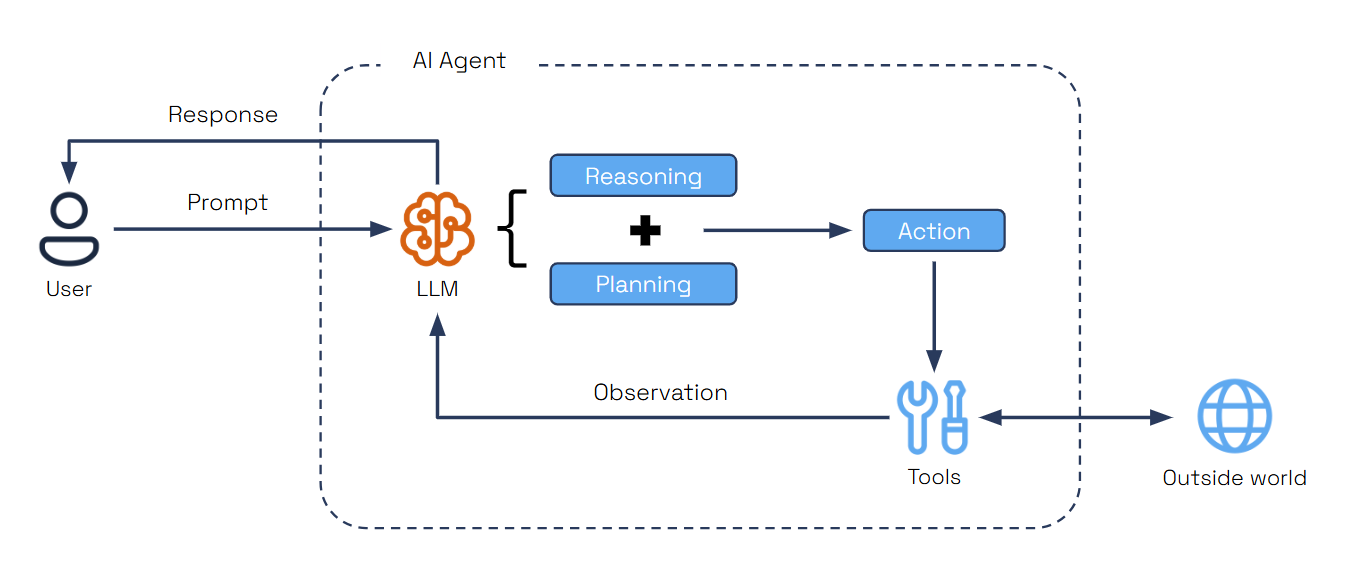
Dapr Agents provides two agent types, each designed for different use cases:
Agent
The standard Agent class is a conversational agent that manages tool calls and conversations using a language model. It provides, synchronous execution with built-in conversation memory.
@tool
def my_weather_func() -> str:
    """Get current weather."""
    return "It's 72°F and sunny"

async def main():
    weather_agent = Agent(
        name="WeatherAgent",
        role="Weather Assistant",
        goal="Provide timely weather updates across cities",
        instructions=["Help users with weather information"],
        tools=[my_weather_func],
        memory = AgentMemoryConfig(
            store=ConversationDaprStateMemory(
                store_name="historystore",
                session_id="some-id",
            )
        ),
    )

    response1 = await weather_agent.run("What's the weather?")
    response2 = await weather_agent.run("How about now?")
This example shows how to create a simple agent with tool integration. The agent processes queries synchronously and maintains conversation context across multiple interactions using Dapr State Store API.
Durable Agent
The DurableAgent class is a workflow-based agent that extends the standard Agent with Dapr Workflows for long-running, fault-tolerant, and durable execution. It provides persistent state management, automatic retry mechanisms, and deterministic execution across failures.
from dapr_agents.workflow.runners import AgentRunner

async def main():
    travel_planner = DurableAgent(
        name="TravelBuddy",
        role="Travel Planner",
        goal="Help users find flights and remember preferences",
        instructions=["Help users find flights and remember preferences"],
        tools=[search_flights],
        memory = AgentMemoryConfig(
            store=ConversationDaprStateMemory(
                store_name="conversationstore",
                session_id="travel-session",
            )
        )
    )

    travel_planner.start()
    runner = AgentRunner()

    try:
        itinerary = await runner.run(
            travel_planner,
            payload={"task": "Plan a 3-day trip to Paris"},
        )
        print(itinerary)
    finally:
        travel_planner.stop()
        runner.shutdown()
This example demonstrates creating a workflow-backed agent that runs autonomously in the background. The AgentRunner schedules the workflow for you, waits for completion, and ensures the agent can be triggered once yet continue execution across restarts.
Key Characteristics:
- Workflow-based execution using Dapr Workflows
- Persistent workflow state management across sessions and failures
- Automatic retry and recovery mechanisms
- Deterministic execution with checkpointing
- Built-in message routing and agent communication
AgentRunner modes for DurableAgents: ad-hoc runs (runner.run(...)), pub/sub subscriptions (runner.subscribe(...)), and FastAPI services (runner.serve(...))- Supports complex orchestration patterns and multi-agent collaboration
When to use:
- Multi-step workflows that span time or systems
- Tasks requiring guaranteed progress tracking and state persistence
- Scenarios where operations may pause, fail, or need recovery without data loss
- Complex agent orchestration and multi-agent collaboration
- Production systems requiring fault tolerance and scalability
In Summary:
| Agent Type | Memory Type | Execution | Interaction Mode |
|---|
Agent | In-memory or Persistent | Ephemeral | Synchronous / Conversational |
Durable Agent | In-memory or Persistent | Durable (Workflow-backed) | Asynchronous / Headless |
Regular Agent: Interaction is synchronous—you send conversational prompts and receive responses immediately. The conversation can be stored in memory or persisted, but the execution is ephemeral and does not survive restarts.
DurableAgent (Workflow-backed): Interaction is asynchronous—you trigger the agent once, and it runs autonomously in the background until completion. The conversation state can also be in memory or persisted, but the execution is durable and can resume across failures or restarts.
Core Agent Features
An agentic system is a distributed system that requires a variety of behaviors and supporting infrastructure.
LLM Integration
Dapr Agents provides a unified interface to connect with LLM inference APIs. This abstraction allows developers to seamlessly integrate their agents with cutting-edge language models for reasoning and decision-making. The framework includes multiple LLM clients for different providers and modalities:
DaprChatClient: Unified API for LLM interactions via Dapr’s Conversation API with built-in security (scopes, secrets, PII obfuscation), resiliency (timeouts, retries, circuit breakers), and observability via OpenTelemetry & PrometheusOpenAIChatClient: Full spectrum support for OpenAI models including chat, embeddings, and audioHFHubChatClient: For Hugging Face models supporting both chat and embeddingsNVIDIAChatClient: For NVIDIA AI Foundation models supporting local inference and chatElevenLabs: Support for speech and voice capabilities
Prompt Flexibility
Dapr Agents supports flexible prompt templates to shape agent behavior and reasoning. Users can define placeholders within prompts, enabling dynamic input of context for inference calls. By leveraging prompt formatting with Jinja templates and Python f-string formatting, users can include loops, conditions, and variables, providing precise control over the structure and content of prompts. This flexibility ensures that LLM responses are tailored to the task at hand, offering modularity and adaptability for diverse use cases.
Structured Outputs
Agents in Dapr Agents leverage structured output capabilities, such as OpenAI’s Function Calling, to generate predictable and reliable results. These outputs follow JSON Schema Draft 2020-12 and OpenAPI Specification v3.1.0 standards, enabling easy interoperability and tool integration.
# Define our data model
class Dog(BaseModel):
    name: str
    breed: str
    reason: str

# Initialize the chat client
llm = OpenAIChatClient()

# Get structured response
response = llm.generate(
    messages=[UserMessage("One famous dog in history.")], response_format=Dog
)

print(json.dumps(response.model_dump(), indent=2))
This demonstrates how LLMs generate structured data according to a schema. The Pydantic model (Dog) specifies the exact structure and data types expected, while the response_format parameter instructs the LLM to return data matching the model, ensuring consistent and predictable outputs for downstream processing.
Tool Calling is an essential pattern in autonomous agent design, allowing AI agents to interact dynamically with external tools based on user input. Agents dynamically select the appropriate tool for a given task, using LLMs to analyze requirements and choose the best action.
@tool(args_model=GetWeatherSchema)
def get_weather(location: str) -> str:
    """Get weather information based on location."""
    import random
    temperature = random.randint(60, 80)
    return f"{location}: {temperature}F."
Each tool has a descriptive docstring that helps the LLM understand when to use it. The @tool decorator marks a function as a tool, while the Pydantic model (GetWeatherSchema) defines input parameters for structured validation.
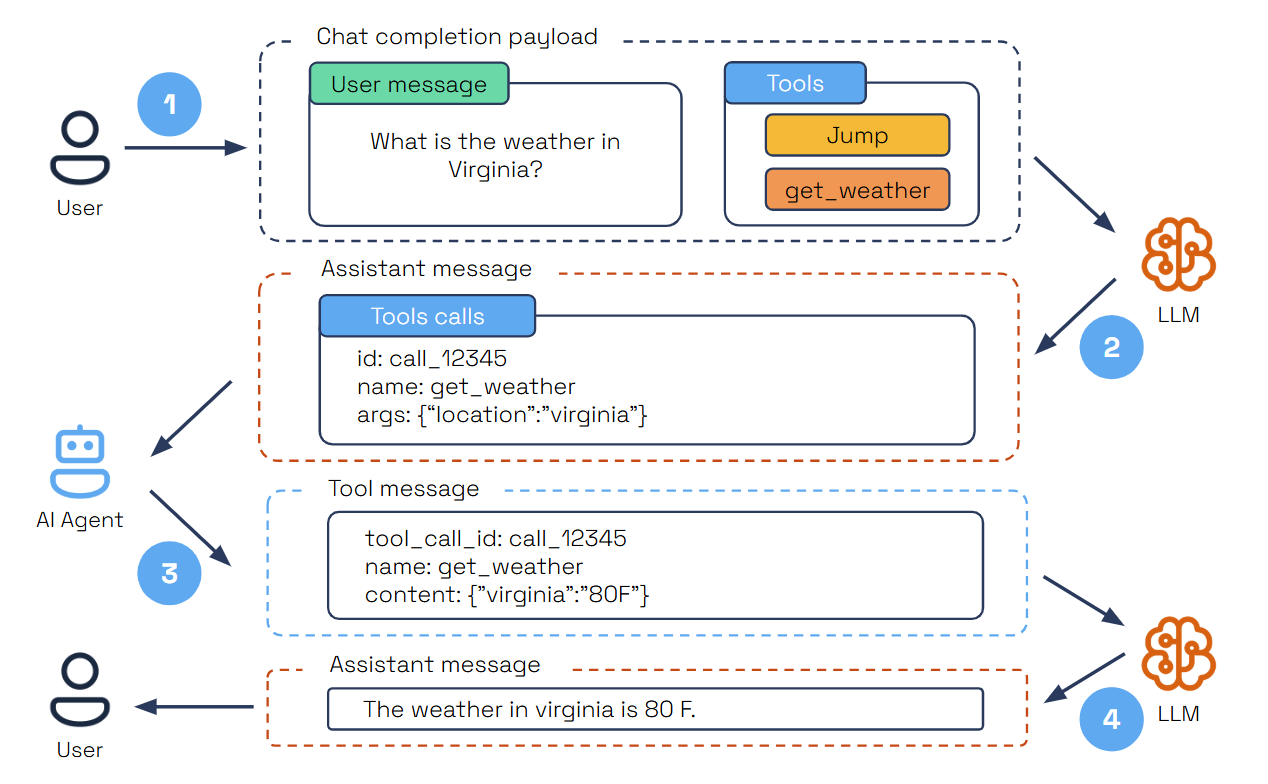
- The user submits a query specifying a task and the available tools.
- The LLM analyzes the query and selects the right tool for the task.
- The LLM provides a structured JSON output containing the tool’s unique ID, name, and arguments.
- The AI agent parses the JSON, executes the tool with the provided arguments, and sends the results back as a tool message.
- The LLM then summarizes the tool’s execution results within the user’s context to deliver a comprehensive final response.
This is supported directly through LLM parametric knowledge and enhanced by Function Calling, ensuring tools are invoked efficiently and accurately.
MCP Support
Dapr Agents includes built-in support for the Model Context Protocol (MCP), enabling agents to dynamically discover and invoke external tools through a standardized interface. Using the provided MCPClient, agents can connect to MCP servers via three transport options: stdio for local development, sse for remote or distributed environments, and via streamable HTTP transport.
client = MCPClient()
await client.connect_sse("local", url="http://localhost:8000/sse")

# Convert MCP tools to AgentTool list
tools = client.get_all_tools()
Once connected, the MCP client fetches all available tools from the server and prepares them for immediate use within the agent’s toolset. This allows agents to incorporate capabilities exposed by external processes—such as local Python scripts or remote services without hardcoding or preloading them. Agents can invoke these tools at runtime, expanding their behavior based on what’s offered by the active MCP server.
Memory
Agents retain context across interactions, enhancing their ability to provide coherent and adaptive responses. Memory options range from simple in-memory lists for managing chat history to vector databases for semantic search, and also integrates with Dapr state stores, for scalable and persistent memory for advanced use cases from 28 different state store providers.
from dapr_agents import Agent, DurableAgent
from dapr_agents.agents.configs import AgentMemoryConfig
from dapr_agents.memory import (
    ConversationDaprStateMemory,
    ConversationListMemory,
    ConversationVectorMemory,
)

# 1. ConversationListMemory (Simple In-Memory) - Default
memory_list = ConversationListMemory()

# 2. ConversationVectorMemory (Vector Store)
memory_vector = ConversationVectorMemory(
    vector_store=your_vector_store_instance,
    distance_metric="cosine",
)

# 3. ConversationDaprStateMemory (Dapr State Store) via AgentMemoryConfig
durable_memory = AgentMemoryConfig(
    store=ConversationDaprStateMemory(
        store_name="historystore",  # Dapr component name
        session_id="my-session",
    )
)

# Using with a regular Agent (pass the memory instance directly)
agent = Agent(
    name="MyAgent",
    role="Assistant",
    memory=memory_list,
)

# Using with a DurableAgent (pass the AgentMemoryConfig)
travel_planner = DurableAgent(
    name="TravelBuddy",
    memory=durable_memory,
    # ... other configs ...
)
ConversationListMemory is the default memory implementation when none is specified. It provides fast, temporary storage in Python lists for development and testing. The Dapr’s memory implementations (all found in dapr_agents.memory) are interchangeable, allowing you to switch between them without modifying your agent logic or deployment model.
| Memory Implementation | Type | Persistence | Search | Use Case |
|---|
ConversationListMemory (Default) | In-Memory | ❌ | Linear | Development |
ConversationVectorMemory | Vector Store | ✅ | Semantic | RAG/AI Apps |
ConversationDaprStateMemory | Dapr State Store | ✅ | Query | Production |
Agent Services
AgentRunner wires DurableAgents into three complementary hosting modes:
run – trigger a durable workflow directly from Python (CLIs, tests, notebooks) and optionally wait for completion.subscribe – automatically register every @message_router decorated handler on the agent (including DurableAgent.agent_workflow) so CloudEvents on the configured topics are validated against their message_model and scheduled as workflow runs.serve – host the agent as a web service by combining subscribe with FastAPI route registration and an auto-started Uvicorn server. By default it exposes POST /run (schedules the @workflow_entry) and GET /run/{instance_id} (fetches workflow status), but you can supply your own FastAPI app or customize host/port/paths.
travel_planner = DurableAgent(
    name="TravelBuddy",
    role="Travel Planner",
    goal="Help humans find flights and remember preferences",
    instructions=[
        "Find flights to destinations",
        "Remember user preferences",
        "Provide clear flight info.",
    ],
    tools=[search_flights],
)
travel_planner.start()
runner = AgentRunner()
The snippets below reuse this travel_planner instance to illustrate each mode.
1. Ad-hoc execution with runner.run(...)
Use run when you want to trigger a durable workflow directly from Python code (tests, CLIs, notebooks, etc.). The runner locates the agent’s @workflow_entry, schedules it, and optionally waits for completion. Call travel_planner.start() first so the workflow runtime is registered.
result = await runner.run(
    travel_planner,
    payload={"task": "Plan a 3-day trip to Paris"},
)
print(result)
This mode is ideal for synchronous automation or when you need to capture the final response programmatically. Pass wait=False for fire-and-forget instances.
2. Pub/Sub subscriptions with runner.subscribe(...)
subscribe scans the agent for every method tagged with @message_router—including the built-in agent_workflow—and automatically registers the necessary Dapr subscriptions using the topics and schemas defined in AgentPubSubConfig. Each incoming CloudEvent is validated against the declared message_model (for example, TriggerAction) before the runner schedules the workflow entry.
runner.subscribe(travel_planner)
await wait_for_shutdown()
Add your own @message_router methods to support extra topics or broadcast channels—the runner will discover them automatically and route messages to the appropriate handler. Use helpers such as wait_for_shutdown() (from dapr_agents.workflow.utils.core) to keep the process alive until you stop it.
3. FastAPI services with runner.serve(...)
serve is the one-line way to run a DurableAgent as a web service. It first calls subscribe(...), then spins up a FastAPI app (unless you pass your own) with two default endpoints:
POST /run: Validates the JSON body against the agent’s @workflow_entry signature and schedules a new workflow instance.GET /run/{instance_id}: Proxies workflow status queries (including payloads, if requested).
runner.serve(
    travel_planner,
    port=8001,
)
Because workflows are durable, the /run endpoint responds immediately with an instance ID even though the agent keeps working in the background. You can mount the generated FastAPI routes into a larger application or let serve run its own Uvicorn loop for standalone deployments.
Multi-agent Systems (MAS)
While it’s tempting to build a fully autonomous agent capable of handling many tasks, in practice, it’s more effective to break this down into specialized agents equipped with appropriate tools and instructions, then coordinate interactions between multiple agents.
Multi-agent systems (MAS) distribute workflow execution across multiple coordinated agents to efficiently achieve shared objectives. This approach, called agent orchestration, enables better specialization, scalability, and maintainability compared to monolithic agent designs.
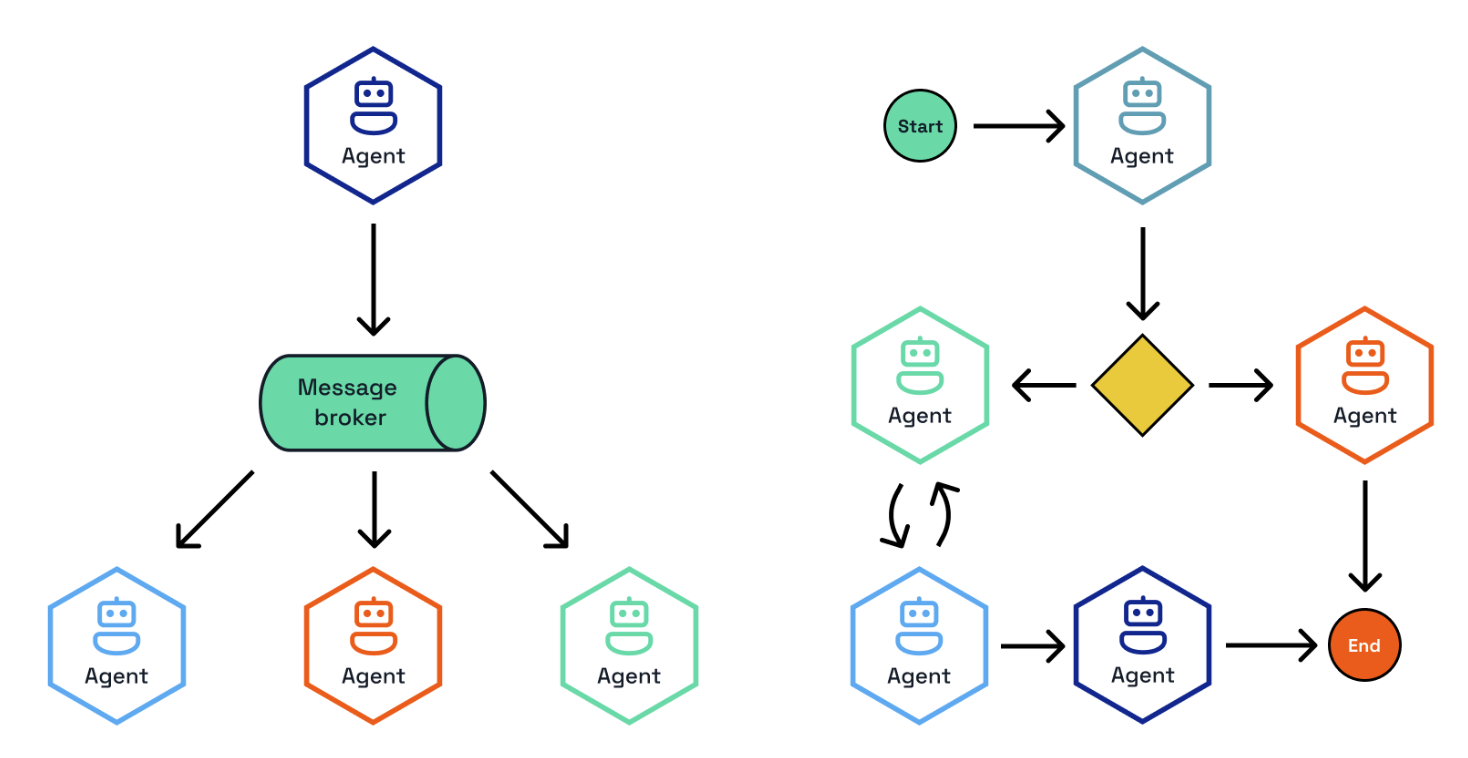
Dapr Agents supports two primary orchestration approaches via Dapr Workflows and Dapr PubSub:
- Deterministic Workflow-based Orchestration - Provides clear, repeatable processes with predefined sequences and decision points
- Event-driven Orchestration - Enables dynamic, adaptive collaboration through message-based coordination among agents
Both approaches utilize a central orchestrator that coordinates multiple specialized agents, each handling specific tasks or domains, ensuring efficient task distribution and seamless collaboration across the system.
Deterministic Workflows
Workflows are structured processes where LLM agents and tools collaborate in predefined sequences to accomplish complex tasks. Unlike fully autonomous agents that make all decisions independently, workflows provide a balance of structure and predictability from the workflow definition, intelligence and flexibility from LLM agents, and reliability and durability from Dapr’s workflow engine.
This approach is particularly suitable for business-critical applications where you need both the intelligence of LLMs and the reliability of traditional software systems.
import dapr.ext.workflow as wf
from dapr.ext.workflow import DaprWorkflowContext

from dapr_agents.llm.dapr import DaprChatClient
from dapr_agents.workflow.decorators import llm_activity

runtime = wf.WorkflowRuntime()
llm = DaprChatClient(component_name="openai")


@runtime.workflow(name="task_chain_workflow")
def task_chain_workflow(ctx: DaprWorkflowContext):
    character = yield ctx.call_activity(get_character)
    line = yield ctx.call_activity(get_line, input={"character": character})
    return line


@runtime.activity(name="get_character")
@llm_activity(
    prompt="Pick a random character from The Lord of the Rings. Respond with the name only.",
    llm=llm,
)
def get_character(ctx) -> str:
    pass


@runtime.activity(name="get_line")
@llm_activity(
    prompt="What is a famous line by {character}?",
    llm=llm,
)
def get_line(ctx, character: str) -> str:
    pass


runtime.start()
client = wf.DaprWorkflowClient()
instance_id = client.schedule_new_workflow(task_chain_workflow)
state = client.wait_for_workflow_completion(instance_id)
print(state.serialized_output)
runtime.shutdown()
This workflow demonstrates sequential task execution where the output of one LLM-backed activity becomes the input for the next. The @llm_activity decorator wires prompts, formatting, and response handling so activities stay deterministic while still using model reasoning.
Dapr Agents supports coordination of LLM interactions at different levels of granularity:
LLM Activities
@llm_activity binds a workflow activity to a prompt, LLM client, and optional structured output. The decorated function body can stay empty because the decorator handles prompting, retries, and response parsing.
llm = DaprChatClient(component_name="openai")

@runtime.activity(name="generate_outline")
@llm_activity(
    prompt="Create a short outline about {topic}.",
    llm=llm,
)
def generate_outline(ctx, topic: str) -> str:
    pass
LLM activities are perfect for lightweight reasoning steps, extraction tasks, or summarization stages that need deterministic workflow control with LLM flexibility.
Agent Activities
@agent_activity lets workflows call fully-configured Agent instances (tools, memory, instructions) as activities. The workflow provides the inputs, and the decorator routes execution through the agent’s reasoning loop.
planner = Agent(
    name="PlannerAgent",
    role="Trip planner",
    instructions=["Create a concise 3-day plan for any city."],
    llm=DaprChatClient(component_name="openai"),
)

@runtime.activity(name="plan_outline")
@agent_activity(agent=planner)
def plan_outline(ctx, destination: str) -> dict:
    pass
Agent activities enable workflows to leverage specialized agents with their own tools, memory, and reasoning capabilities while maintaining the structured coordination benefits of workflow orchestration.
Note: Agent activities must use regular Agent instances, not DurableAgent instances, because workflows manage the execution context and durability through the Dapr workflow engine.
Workflow Patterns
Workflows enable the implementation of various agentic patterns through structured orchestration, including Prompt Chaining, Routing, Parallelization, Orchestrator-Workers, Evaluator-Optimizer, Human-in-the-loop, and others. For detailed implementations and examples of these patterns, see the Patterns documentation.
Message Router Workflows
The @message_router decorator binds a workflow directly to a Dapr Pub/Sub topic so every validated message automatically schedules a workflow instance. This pattern—used in the message-router quickstart—lets you push CloudEvent payloads onto a topic and have LLM-backed activities take over immediately.
from pydantic import BaseModel
from dapr_agents.workflow.decorators.routers import message_router

class StartBlogMessage(BaseModel):
    topic: str

@message_router(
    pubsub="messagepubsub",
    topic="blog.requests",
    message_model=StartBlogMessage,
)
def blog_workflow(ctx: DaprWorkflowContext, wf_input: dict) -> str:
    outline = yield ctx.call_activity(
        create_outline, input={"topic": wf_input["topic"]}
    )
    post = yield ctx.call_activity(write_post, input={"outline": outline})
    return post
During startup, call register_message_routes(targets=[blog_workflow], dapr_client=client) to automatically configure subscriptions, schema validation, and workflow scheduling. This keeps the workflow definition as the single source of truth for both orchestration and event ingress.
Workflows vs. Durable Agents
Both DurableAgent and workflow-based agent orchestration use Dapr workflows behind the scenes for durability and reliability, but they differ in how control flow is determined.
| Aspect | Workflows | Durable Agents |
|---|
| Control | Developer-defined process flow | Agent determines next steps |
| Predictability | Higher | Lower |
| Flexibility | Fixed overall structure, flexible within steps | Completely flexible |
| Reliability | Very high (workflow engine guarantees) | Very high (underlying agent implementation guarantees) |
| Complexity | Structured workflow patterns | Dynamic, flexible execution paths |
| Use Cases | Business processes, regulated domains | Open-ended research, creative tasks |
The key difference lies in control flow determination: with DurableAgent, the underlying workflow is created dynamically by the LLM’s planning decisions, executing entirely within a single agent context. In contrast, with deterministic workflows, the developer explicitly defines the coordination between one or more LLM interactions, providing structured orchestration across multiple tasks or agents.
Event-Driven Orchestration
Event-driven agent orchestration enables multiple specialized agents to collaborate through asynchronous Pub/Sub messaging. This approach provides powerful collaborative problem-solving, parallel processing, and division of responsibilities among specialized agents through independent scaling, resilience via service isolation, and clear separation of responsibilities.
Core Participants
The core participants in this multi-agent coordination systems are the following.
Durable Agents
Each agent runs as an independent service with its own lifecycle, configured as a standard DurableAgent with pub/sub enabled:
import asyncio

from dapr_agents.agents.configs import (
    AgentMemoryConfig,
    AgentProfileConfig,
    AgentPubSubConfig,
    AgentRegistryConfig,
    AgentStateConfig,
)
from dapr_agents.memory import ConversationDaprStateMemory
from dapr_agents.storage.daprstores.stateservice import StateStoreService
from dapr_agents.workflow.runners import AgentRunner
from dapr_agents.workflow.utils.core import wait_for_shutdown

registry = AgentRegistryConfig(
    store=StateStoreService(store_name="agentregistrystore"),
    team_name="fellowship",
)

frodo = DurableAgent(
    profile=AgentProfileConfig(
        name="Frodo",
        role="Ring Bearer",
        instructions=["Speak like Frodo, with humility and determination."],
    ),
    pubsub=AgentPubSubConfig(
        pubsub_name="messagepubsub",
        agent_topic="fellowship.frodo.requests",
        broadcast_topic="fellowship.broadcast",
    ),
    state=AgentStateConfig(
        store=StateStoreService(store_name="workflowstatestore", key_prefix="frodo:")
    ),
    registry=registry,
    memory=AgentMemoryConfig(
        store=ConversationDaprStateMemory(
            store_name="memorystore",
            session_id="frodo-session",
        )
    ),
)
frodo.start()

async def main():
    runner = AgentRunner()
    try:
        runner.subscribe(frodo)
        await wait_for_shutdown()
    finally:
        runner.shutdown()
        frodo.stop()

asyncio.run(main())
Orchestrator
The orchestrator coordinates interactions between agents and manages conversation flow by selecting appropriate agents, managing interaction sequences, and tracking progress. Dapr Agents offers three orchestration strategies: Random, RoundRobin, and LLM-based orchestration.
from dapr_agents.agents.configs import (
    AgentExecutionConfig,
    AgentPubSubConfig,
    AgentRegistryConfig,
    AgentStateConfig,
)
from dapr_agents.llm.openai import OpenAIChatClient
from dapr_agents.storage.daprstores.stateservice import StateStoreService
from dapr_agents.workflow.runners import AgentRunner
import dapr.ext.workflow as wf

llm_orchestrator = LLMOrchestrator(
    name="LLMOrchestrator",
    llm=OpenAIChatClient(),
    pubsub=AgentPubSubConfig(
        pubsub_name="messagepubsub",
        agent_topic="llm.orchestrator.requests",
        broadcast_topic="fellowship.broadcast",
    ),
    state=AgentStateConfig(
        store=StateStoreService(
            store_name="workflowstatestore", key_prefix="llm.orchestrator:"
        )
    ),
    registry=AgentRegistryConfig(
        store=StateStoreService(store_name="agentregistrystore"),
        team_name="fellowship",
    ),
    execution=AgentExecutionConfig(max_iterations=3),
    runtime=wf.WorkflowRuntime(),
)
llm_orchestrator.start()

runner = AgentRunner()
runner.serve(llm_orchestrator, port=8004)
The LLM-based orchestrator uses intelligent agent selection for context-aware decision making, while Random and RoundRobin provide alternative coordination strategies for simpler use cases. The runner keeps the orchestrator online as a Dapr app or HTTP service so clients can publish tasks over topics or REST calls.
Because both DurableAgent.agent_workflow and the orchestrators above are decorated with @message_router(message_model=TriggerAction), runner.subscribe(...) automatically wires the topics declared in AgentPubSubConfig and validates every incoming CloudEvent against the expected schema before scheduling the @workflow_entry. You can add additional message routers (each with its own message_model) to the same agent; the runner will discover them the next time it starts and extend the subscription list automatically.
Communication Flow
Agents communicate through an event-driven pub/sub system that enables asynchronous communication, decoupled architecture, scalable interactions, and reliable message delivery. The typical collaboration flow involves client query submission, orchestrator-driven agent selection, agent response processing, and iterative coordination until task completion.
This approach is particularly effective for complex problem solving requiring multiple expertise areas, creative collaboration from diverse perspectives, role-playing scenarios, and distributed processing of large tasks.
How Messaging Works
Messaging connects agents in workflows, enabling real-time communication and coordination. It acts as the backbone of event-driven interactions, ensuring that agents work together effectively without requiring direct connections.
Through messaging, agents can:
- Collaborate Across Tasks: Agents exchange messages to share updates, broadcast events, or deliver task results.
- Orchestrate Workflows: Tasks are triggered and coordinated through published messages, enabling workflows to adjust dynamically.
- Respond to Events: Agents adapt to real-time changes by subscribing to relevant topics and processing events as they occur.
By using messaging, workflows remain modular and scalable, with agents focusing on their specific roles while seamlessly participating in the broader system.
Message Bus and Topics
The message bus serves as the central system that manages topics and message delivery. Agents interact with the message bus to send and receive messages:
- Publishing Messages: Agents publish messages to a specific topic, making the information available to all subscribed agents.
- Subscribing to Topics: Agents subscribe to topics relevant to their roles, ensuring they only receive the messages they need.
- Broadcasting Updates: Multiple agents can subscribe to the same topic, allowing them to act on shared events or updates.
Why Pub/Sub Messaging for Agentic Workflows?
Pub/Sub messaging is essential for event-driven agentic workflows because it:
- Decouples Components: Agents publish messages without needing to know which agents will receive them, promoting modular and scalable designs.
- Enables Real-Time Communication: Messages are delivered as events occur, allowing agents to react instantly.
- Fosters Collaboration: Multiple agents can subscribe to the same topic, making it easy to share updates or divide responsibilities.
- Enables Scalability:The message bus ensures that communication scales effortlessly, whether you are adding new agents, expanding workflows, or adapting to changing requirements. Agents remain loosely coupled, allowing workflows to evolve without disruptions.
This messaging framework ensures that agents operate efficiently, workflows remain flexible, and systems can scale dynamically.
5 - Agentic Patterns
Common design patterns and use cases for building agentic systems
Dapr Agents simplify the implementation of agentic systems, from simple augmented LLMs to fully autonomous agents in enterprise environments. The following sections describe several application patterns that can benefit from Dapr Agents.
Overview
Agentic systems use design patterns such as reflection, tool use, planning, and multi-agent collaboration to achieve better results than simple single-prompt interactions. Rather than thinking of “agent” as a binary classification, it’s more useful to think of systems as being agentic to different degrees.
This ranges from simple workflows that prompt a model once, to sophisticated systems that can carry out multiple iterative steps with greater autonomy.
There are two fundamental architectural approaches:
- Workflows: Systems where LLMs and tools are orchestrated through predefined code paths (more prescriptive)
- Agents: Systems where LLMs dynamically direct their own processes and tool usage (more autonomous)
On one end, we have predictable workflows with well-defined decision paths and deterministic outcomes. On the other end, we have AI agents that can dynamically direct their own strategies. While fully autonomous agents might seem appealing, workflows often provide better predictability and consistency for well-defined tasks. This aligns with enterprise requirements where reliability and maintainability are crucial.
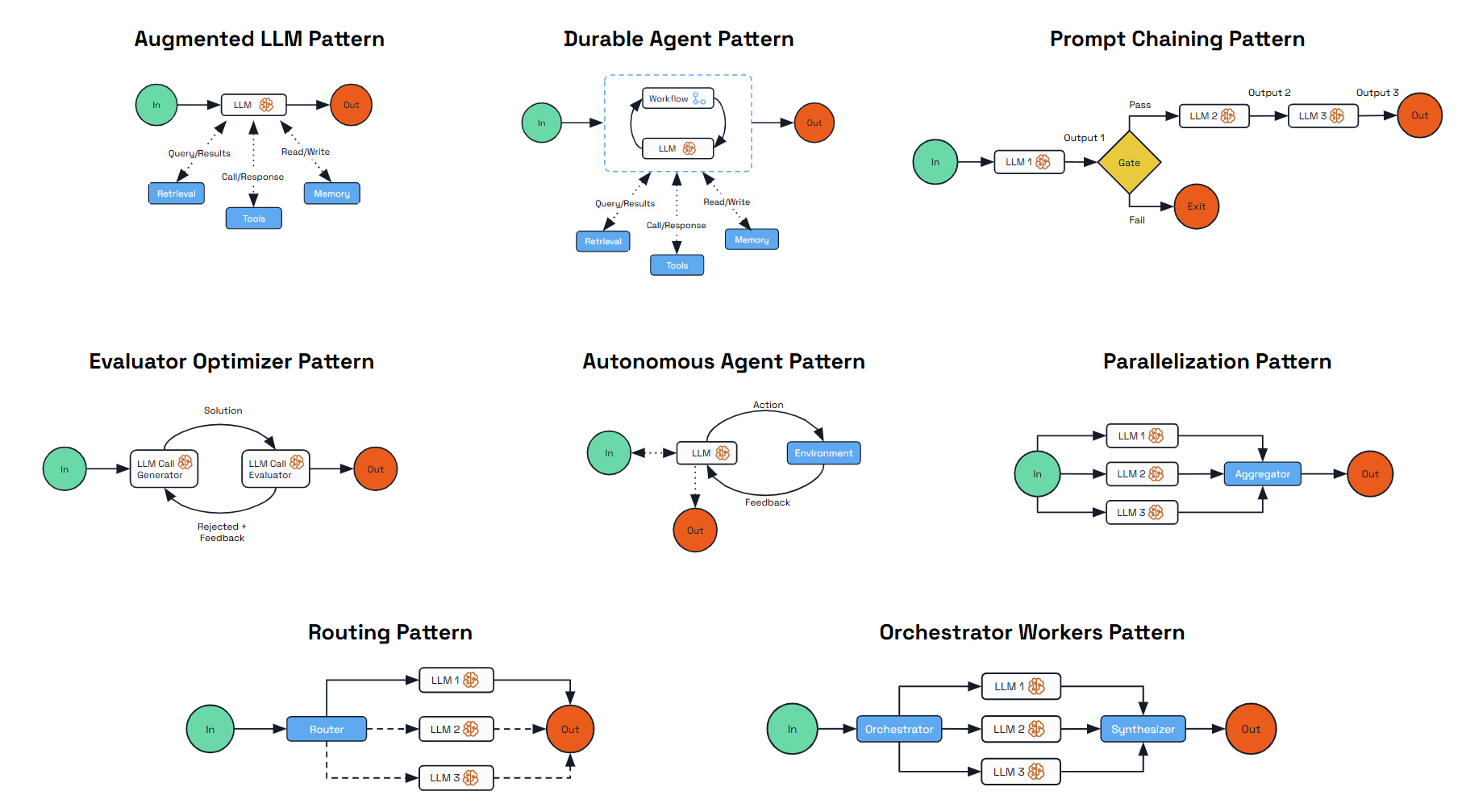
The patterns in this documentation start with the Augmented LLM, then progress through workflow-based approaches that offer predictability and control, before moving toward more autonomous patterns. Each addresses specific use cases and offers different trade-offs between deterministic outcomes and autonomy.
Augmented LLM
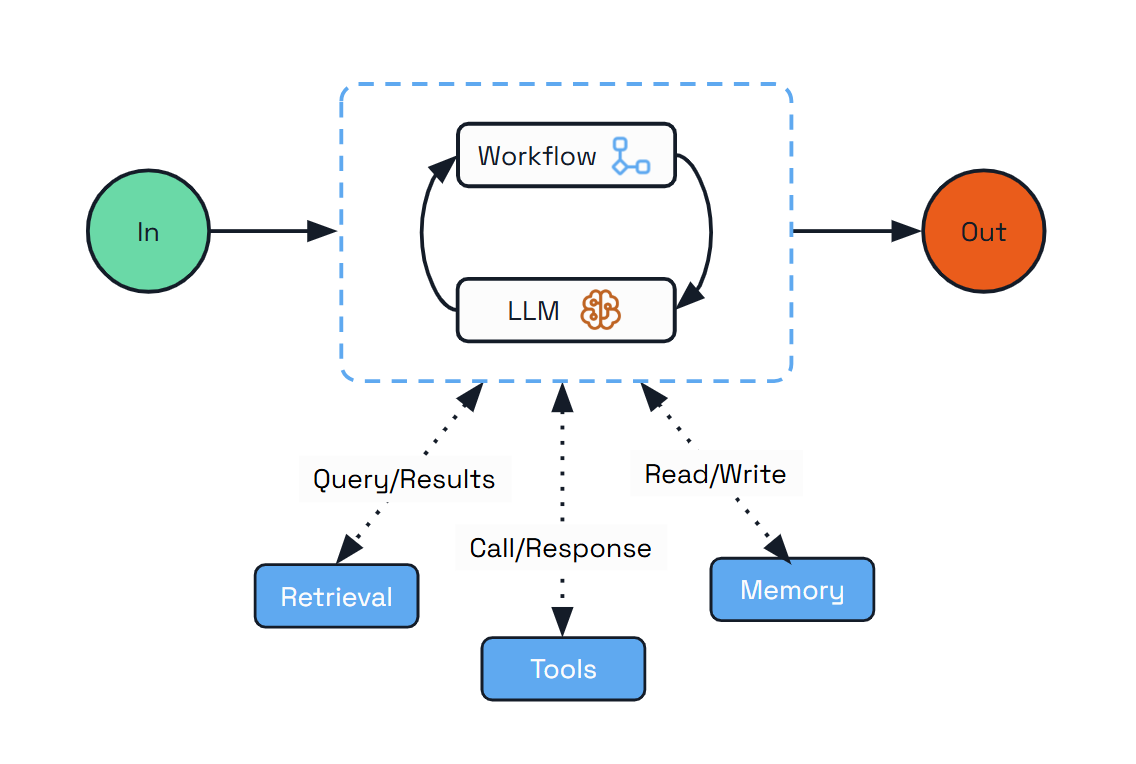
The Augmented LLM pattern is the foundational building block for any kind of agentic system. It enhances a language model with external capabilities like memory and tools, providing a basic but powerful foundation for AI-driven applications.
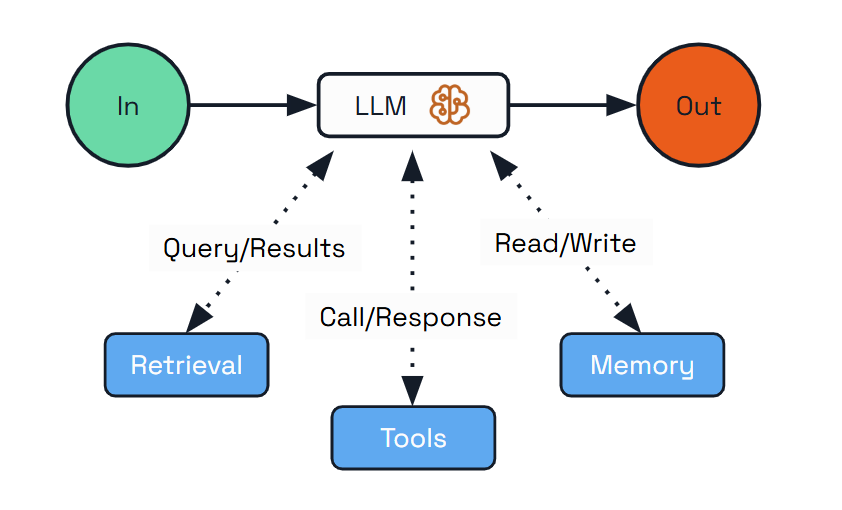
This pattern is ideal for scenarios where you need an LLM with enhanced capabilities but don’t require complex orchestration or autonomous decision-making. The augmented LLM can access external tools, maintain conversation history, and provide consistent responses across interactions.
Use Cases:
- Personal assistants that remember user preferences
- Customer support agents that access product information
- Research tools that retrieve and analyze information
Implementation with Dapr Agents:
from dapr_agents import Agent, tool

@tool
def search_flights(destination: str) -> List[FlightOption]:
    """Search for flights to the specified destination."""
    # Mock flight data (would be an external API call in a real app)
    return [
        FlightOption(airline="SkyHighAir", price=450.00),
        FlightOption(airline="GlobalWings", price=375.50)
    ]

# Create agent with memory and tools
travel_planner = Agent(
    name="TravelBuddy",
    role="Travel Planner Assistant",
    instructions=["Remember destinations and help find flights"],
    tools=[search_flights],
)
Dapr Agents automatically handles:
- Agent configuration - Simple configuration with role and instructions guides the LLM behavior
- Memory persistence - The agent manages conversation memory
- Tool integration - The
@tool decorator handles input validation, type conversion, and output formatting
The foundational building block of any agentic system is the Augmented LLM - a language model enhanced with external capabilities like memory, tools, and retrieval. In Dapr Agents, this is represented by the Agent class. However, while this provides essential capabilities, it alone is often not sufficient for complex enterprise scenarios. This is why it’s typically combined with workflow orchestration that provides structure, reliability, and coordination for multi-step processes.
Prompt Chaining
The Prompt Chaining pattern addresses complex requirements by decomposing tasks into a sequence of steps, where each LLM call processes the output of the previous one. This pattern allows for better control of the overall process, validation between steps, and specialization of each step.
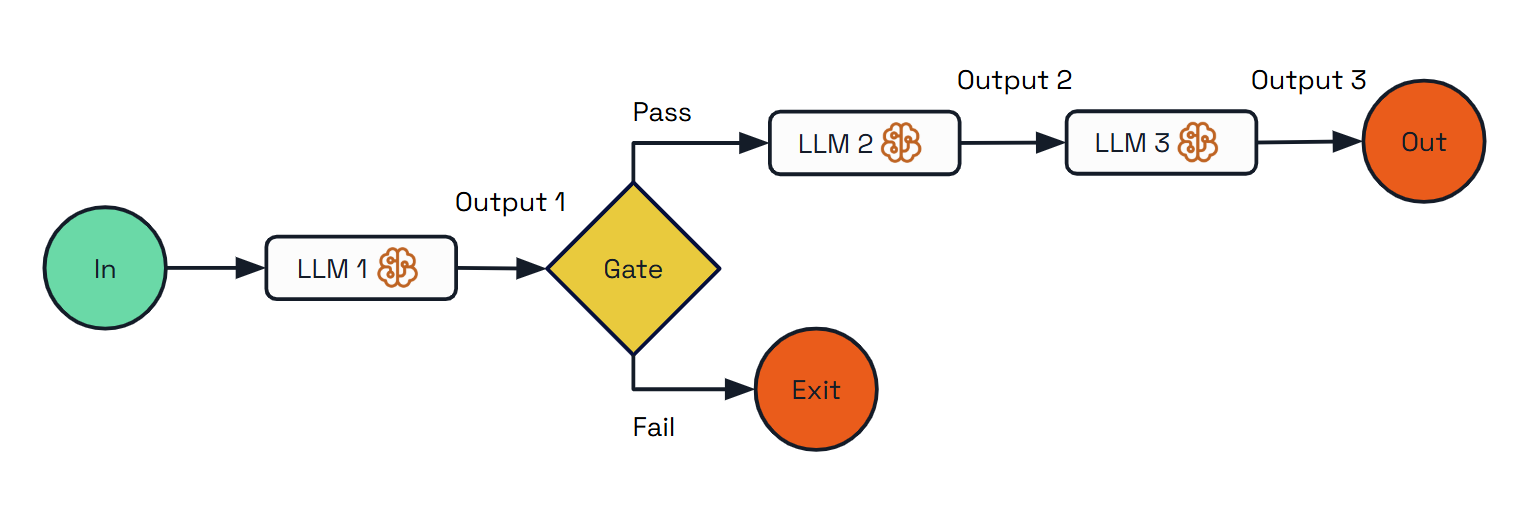
Use Cases:
- Content generation (creating outlines first, then expanding, then reviewing)
- Multi-stage analysis (performing complex analysis into sequential steps)
- Quality assurance workflows (adding validation between processing steps)
Implementation with Dapr Agents:
from dapr_agents import DaprWorkflowContext, workflow

@workflow(name='travel_planning_workflow')
def travel_planning_workflow(ctx: DaprWorkflowContext, user_input: str):
    # Step 1: Extract destination using a simple prompt (no agent)
    destination_text = yield ctx.call_activity(extract_destination, input=user_input)

    # Gate: Check if destination is valid
    if "paris" not in destination_text.lower():
        return "Unable to create itinerary: Destination not recognized or supported."

    # Step 2: Generate outline with planning agent (has tools)
    travel_outline = yield ctx.call_activity(create_travel_outline, input=destination_text)

    # Step 3: Expand into detailed plan with itinerary agent (no tools)
    detailed_itinerary = yield ctx.call_activity(expand_itinerary, input=travel_outline)

    return detailed_itinerary
The implementation showcases three different approaches:
- Basic prompt-based task (no agent)
- Agent-based task without tools
- Agent-based task with tools
Dapr Agents’ workflow orchestration provides:
- Workflow as Code - Tasks are defined in developer-friendly ways
- Workflow Persistence - Long-running chained tasks survive process restarts
- Hybrid Execution - Easily mix prompts, agent calls, and tool-equipped agents
Routing
The Routing pattern addresses diverse request types by classifying inputs and directing them to specialized follow-up tasks. This allows for separation of concerns and creates specialized experts for different types of queries.
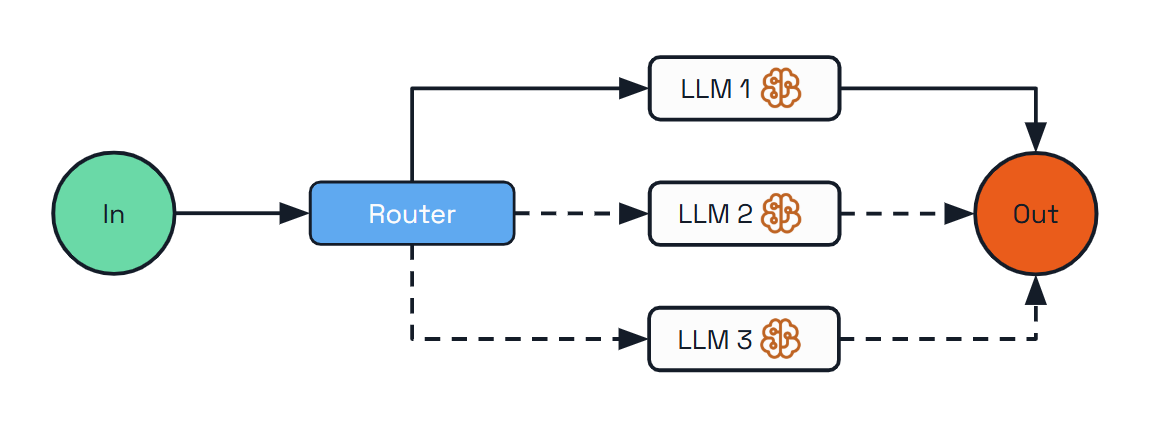
Use Cases:
- Resource optimization (sending simple queries to smaller models)
- Multi-lingual support (routing queries to language-specific handlers)
- Customer support (directing different query types to specialized handlers)
- Content creation (routing writing tasks to topic specialists)
- Hybrid LLM systems (using different models for different tasks)
Implementation with Dapr Agents:
@workflow(name="travel_assistant_workflow")
def travel_assistant_workflow(ctx: DaprWorkflowContext, input_params: dict):
    user_query = input_params.get("query")

    # Classify the query type using an LLM
    query_type = yield ctx.call_activity(classify_query, input={"query": user_query})

    # Route to the appropriate specialized handler
    if query_type == QueryType.ATTRACTIONS:
        response = yield ctx.call_activity(
            handle_attractions_query,
            input={"query": user_query}
        )
    elif query_type == QueryType.ACCOMMODATIONS:
        response = yield ctx.call_activity(
            handle_accommodations_query,
            input={"query": user_query}
        )
    elif query_type == QueryType.TRANSPORTATION:
        response = yield ctx.call_activity(
            handle_transportation_query,
            input={"query": user_query}
        )
    else:
        response = "I'm not sure how to help with that specific travel question."

    return response
The advantages of Dapr’s approach include:
- Familiar Control Flow - Uses standard programming if-else constructs for routing
- Extensibility - The control flow can be extended for future requirements easily
- LLM-Powered Classification - Uses an LLM to categorize queries dynamically
Parallelization
The Parallelization pattern enables processing multiple dimensions of a problem simultaneously, with outputs aggregated programmatically. This pattern improves efficiency for complex tasks with independent subtasks that can be processed concurrently.
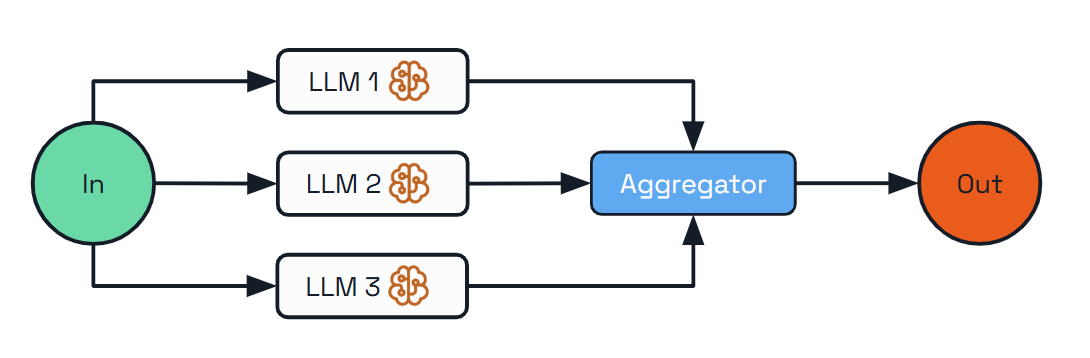
Use Cases:
- Complex research (processing different aspects of a topic in parallel)
- Multi-faceted planning (creating various elements of a plan concurrently)
- Product analysis (analyzing different aspects of a product in parallel)
- Content creation (generating multiple sections of a document simultaneously)
Implementation with Dapr Agents:
@workflow(name="travel_planning_workflow")
def travel_planning_workflow(ctx: DaprWorkflowContext, input_params: dict):
    destination = input_params.get("destination")
    preferences = input_params.get("preferences")
    days = input_params.get("days")

    # Process three aspects of the travel plan in parallel
    parallel_tasks = [
        ctx.call_activity(research_attractions, input={
            "destination": destination,
            "preferences": preferences,
            "days": days
        }),
        ctx.call_activity(recommend_accommodations, input={
            "destination": destination,
            "preferences": preferences,
            "days": days
        }),
        ctx.call_activity(suggest_transportation, input={
            "destination": destination,
            "preferences": preferences,
            "days": days
        })
    ]

    # Wait for all parallel tasks to complete
    results = yield wfapp.when_all(parallel_tasks)

    # Aggregate results into final plan
    final_plan = yield ctx.call_activity(create_final_plan, input={"results": results})

    return final_plan
The benefits of using Dapr for parallelization include:
- Simplified Concurrency - Handles the complex orchestration of parallel tasks
- Automatic Synchronization - Waits for all parallel tasks to complete
- Workflow Durability - The entire parallel process is durable and recoverable
Orchestrator-Workers
For highly complex tasks where the number and nature of subtasks can’t be known in advance, the Orchestrator-Workers pattern offers a powerful solution. This pattern features a central orchestrator LLM that dynamically breaks down tasks, delegates them to worker LLMs, and synthesizes their results.
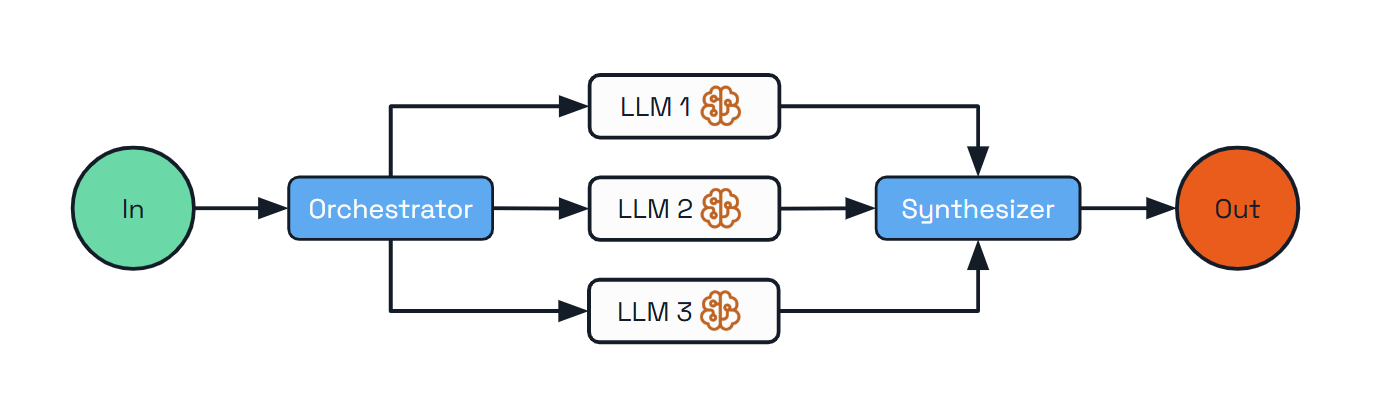
Unlike previous patterns where workflows are predefined, the orchestrator determines the workflow dynamically based on the specific input.
Use Cases:
- Software development tasks spanning multiple files
- Research gathering information from multiple sources
- Business analysis evaluating different facets of a complex problem
- Content creation combining specialized content from various domains
Implementation with Dapr Agents:
@workflow(name="orchestrator_travel_planner")
def orchestrator_travel_planner(ctx: DaprWorkflowContext, input_params: dict):
    travel_request = input_params.get("request")

    # Step 1: Orchestrator analyzes request and determines required tasks
    plan_result = yield ctx.call_activity(
        create_travel_plan,
        input={"request": travel_request}
    )

    tasks = plan_result.get("tasks", [])

    # Step 2: Execute each task with a worker LLM
    worker_results = []
    for task in tasks:
        task_result = yield ctx.call_activity(
            execute_travel_task,
            input={"task": task}
        )
        worker_results.append({
            "task_id": task["task_id"],
            "result": task_result
        })

    # Step 3: Synthesize the results into a cohesive travel plan
    final_plan = yield ctx.call_activity(
        synthesize_travel_plan,
        input={
            "request": travel_request,
            "results": worker_results
        }
    )

    return final_plan
The advantages of Dapr for the Orchestrator-Workers pattern include:
- Dynamic Planning - The orchestrator can dynamically create subtasks based on input
- Worker Isolation - Each worker focuses on solving one specific aspect of the problem
- Simplified Synthesis - The final synthesis step combines results into a coherent output
Evaluator-Optimizer
Quality is often achieved through iteration and refinement. The Evaluator-Optimizer pattern implements a dual-LLM process where one model generates responses while another provides evaluation and feedback in an iterative loop.
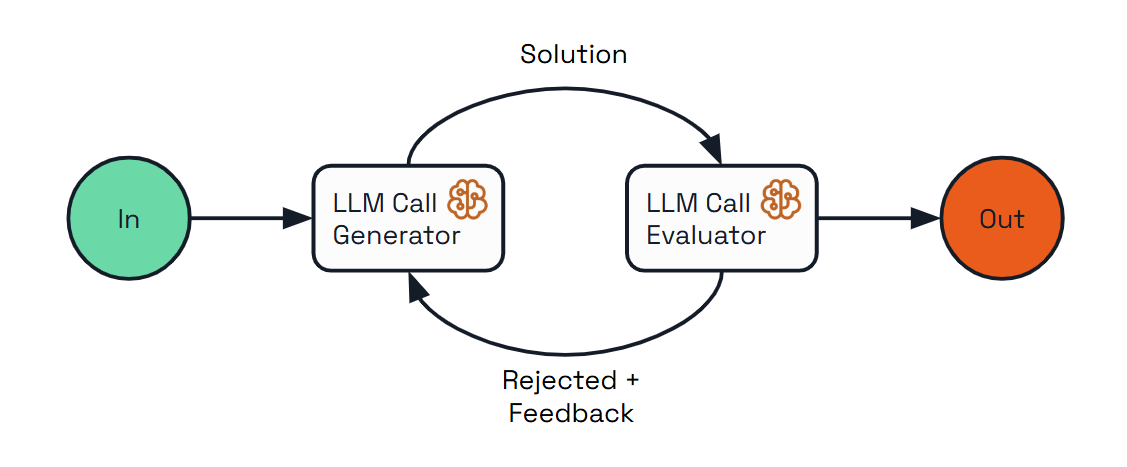
Use Cases:
- Content creation requiring adherence to specific style guidelines
- Translation needing nuanced understanding and expression
- Code generation meeting specific requirements and handling edge cases
- Complex search requiring multiple rounds of information gathering and refinement
Implementation with Dapr Agents:
@workflow(name="evaluator_optimizer_travel_planner")
def evaluator_optimizer_travel_planner(ctx: DaprWorkflowContext, input_params: dict):
    travel_request = input_params.get("request")
    max_iterations = input_params.get("max_iterations", 3)

    # Generate initial travel plan
    current_plan = yield ctx.call_activity(
        generate_travel_plan,
        input={"request": travel_request, "feedback": None}
    )

    # Evaluation loop
    iteration = 1
    meets_criteria = False

    while iteration <= max_iterations and not meets_criteria:
        # Evaluate the current plan
        evaluation = yield ctx.call_activity(
            evaluate_travel_plan,
            input={"request": travel_request, "plan": current_plan}
        )

        score = evaluation.get("score", 0)
        feedback = evaluation.get("feedback", [])
        meets_criteria = evaluation.get("meets_criteria", False)

        # Stop if we meet criteria or reached max iterations
        if meets_criteria or iteration >= max_iterations:
            break

        # Optimize the plan based on feedback
        current_plan = yield ctx.call_activity(
            generate_travel_plan,
            input={"request": travel_request, "feedback": feedback}
        )

        iteration += 1

    return {
        "final_plan": current_plan,
        "iterations": iteration,
        "final_score": score
    }
The benefits of using Dapr for this pattern include:
- Iterative Improvement Loop - Manages the feedback cycle between generation and evaluation
- Quality Criteria - Enables clear definition of what constitutes acceptable output
- Maximum Iteration Control - Prevents infinite loops by enforcing iteration limits
Durable Agent
Moving to the far end of the agentic spectrum, the Durable Agent pattern represents a shift from workflow-based approaches. Instead of predefined steps, we have an autonomous agent that can plan its own steps and execute them based on its understanding of the goal.
Enterprise applications often need durable execution and reliability that go beyond in-memory capabilities. Dapr’s DurableAgent class helps you implement autonomous agents with the reliability of workflows, as these agents are backed by Dapr workflows behind the scenes. The DurableAgent extends the basic Agent class by adding durability to agent execution.
This pattern doesn’t just persist message history – it dynamically creates workflows with durable activities for each interaction, where LLM calls and tool executions are stored reliably in Dapr’s state stores. This makes it ideal for environments where reliability and durability is critical.
The Durable Agent also enables the “headless agents” approach where autonomous systems that operate without direct user interaction. Dapr’s Durable Agent exposes REST and Pub/Sub APIs, making it ideal for long-running operations that are triggered by other applications or external events.
Use Cases:
- Long-running tasks that may take minutes or days to complete
- Distributed systems running across multiple services
- Customer support handling complex multi-session tickets
- Business processes with LLM intelligence at each step
- Personal assistants handling scheduling and information lookup
- Autonomous background processes triggered by external systems
Implementation with Dapr Agents:
import asyncio

from dapr_agents import DurableAgent
from dapr_agents.agents.configs import (
    AgentExecutionConfig,
    AgentMemoryConfig,
    AgentPubSubConfig,
    AgentRegistryConfig,
    AgentStateConfig,
)
from dapr_agents.memory import ConversationDaprStateMemory
from dapr_agents.storage.daprstores.stateservice import StateStoreService
from dapr_agents.workflow.runners import AgentRunner

travel_planner = DurableAgent(
    name="TravelBuddy",
    role="Travel Planner",
    goal="Help users find flights and remember preferences",
    instructions=[
        "Find flights to destinations",
        "Remember user preferences",
        "Provide clear flight info",
    ],
    tools=[search_flights],
    pubsub=AgentPubSubConfig(
        pubsub_name="messagepubsub",
        agent_topic="travel.requests",
        broadcast_topic="travel.broadcast",
    ),
    state=AgentStateConfig(
        store=StateStoreService(store_name="workflowstatestore"),
    ),
    registry=AgentRegistryConfig(
        store=StateStoreService(store_name="registrystatestore"),
        team_name="travel-team",
    ),
    execution=AgentExecutionConfig(max_iterations=3),
    memory=AgentMemoryConfig(
        store=ConversationDaprStateMemory(
            store_name="conversationstore",
            session_id="travel-session",
        )
    ),
)

async def main():
    travel_planner.start()
    runner = AgentRunner()
    try:
        result = await runner.run(
            travel_planner,
            payload={"task": "Find weekend flights to Paris"},
        )
        print(result)
    finally:
        runner.shutdown()
        travel_planner.stop()

asyncio.run(main())
The implementation follows Dapr’s sidecar architecture model, where all infrastructure concerns are handled by the Dapr runtime:
- Persistent Memory - Agent state is stored in Dapr’s state store, surviving process crashes
- Workflow Orchestration - All agent interactions managed through Dapr’s workflow system
- Service Exposure -
AgentRunner.serve() exposes REST endpoints (e.g., POST /run) that schedule the agent’s @workflow_entry - Pub/Sub Input/Output -
AgentRunner.subscribe() scans the agent for @message_router methods and wires the configured topics with schema validation
The Durable Agent enables the concept of “headless agents” - autonomous systems that operate without direct user interaction. Depending on the scenario you can:
- Run durable workflows programmatically (
runner.run as shown above) - Subscribe the agent to topics so other services can trigger it via pub/sub (
runner.subscribe) - Serve the agent behind a FastAPI app with built-in
/run and status endpoints (runner.serve)
These options make it easy to process requests asynchronously and integrate seamlessly into larger distributed systems.
Choosing the Right Pattern
The journey from simple agentic workflows to fully autonomous agents represents a spectrum of approaches for integrating LLMs into your applications. Different use cases call for different levels of agency and control:
- Start with simpler patterns like Augmented LLM and Prompt Chaining for well-defined tasks where predictability is crucial
- Progress to more dynamic patterns like Parallelization and Orchestrator-Workers as your needs grow more complex
- Consider fully autonomous agents only for open-ended tasks where the benefits of flexibility outweigh the need for strict control
6 - Integrations
Various integrations and tools available in Dapr Agents
Text Splitter
The Text Splitter module is a foundational integration in Dapr Agents designed to preprocess documents for use in Retrieval-Augmented Generation (RAG) workflows and other in-context learning applications. Its primary purpose is to break large documents into smaller, meaningful chunks that can be embedded, indexed, and efficiently retrieved based on user queries.
By focusing on manageable chunk sizes and preserving contextual integrity through overlaps, the Text Splitter ensures documents are processed in a way that supports downstream tasks like question answering, summarization, and document retrieval.
Why Use a Text Splitter?
When building RAG pipelines, splitting text into smaller chunks serves these key purposes:
- Enabling Effective Indexing: Chunks are embedded and stored in a vector database, making them retrievable based on similarity to user queries.
- Maintaining Semantic Coherence: Overlapping chunks help retain context across splits, ensuring the system can connect related pieces of information.
- Handling Model Limitations: Many models have input size limits. Splitting ensures text fits within these constraints while remaining meaningful.
This step is crucial for preparing knowledge to be embedded into a searchable format, forming the backbone of retrieval-based workflows.
Strategies for Text Splitting
The Text Splitter supports multiple strategies to handle different types of documents effectively. These strategies balance the size of each chunk with the need to maintain context.
1. Character-Based Length
- How It Works: Counts the number of characters in each chunk.
- Use Case: Simple and effective for text splitting without dependency on external tokenization tools.
Example:
from dapr_agents.document.splitter.text import TextSplitter

# Character-based splitter (default)
splitter = TextSplitter(chunk_size=1024, chunk_overlap=200)
2. Token-Based Length
- How It Works: Counts tokens, which are the semantic units used by language models (e.g., words or subwords).
- Use Case: Ensures compatibility with models like GPT, where token limits are critical.
Example:
import tiktoken
from dapr_agents.document.splitter.text import TextSplitter

enc = tiktoken.get_encoding("cl100k_base")

def length_function(text: str) -> int:
    return len(enc.encode(text))

splitter = TextSplitter(
    chunk_size=1024,
    chunk_overlap=200,
    chunk_size_function=length_function
)
The flexibility to define the chunk size function makes the Text Splitter adaptable to various scenarios.
Chunk Overlap
To preserve context, the Text Splitter includes a chunk overlap feature. This ensures that parts of one chunk carry over into the next, helping maintain continuity when chunks are processed sequentially.
Example:
- With
chunk_size=1024 and chunk_overlap=200, the last 200 tokens or characters of one chunk appear at the start of the next. - This design helps in tasks like text generation, where maintaining context across chunks is essential.
How to Use the Text Splitter
Here’s a practical example of using the Text Splitter to process a PDF document:
Step 1: Load a PDF
import requests
from pathlib import Path

# Download PDF
pdf_url = "https://arxiv.org/pdf/2412.05265.pdf"
local_pdf_path = Path("arxiv_paper.pdf")

if not local_pdf_path.exists():
    response = requests.get(pdf_url)
    response.raise_for_status()
    with open(local_pdf_path, "wb") as pdf_file:
        pdf_file.write(response.content)
Step 2: Read the Document
For this example, we use Dapr Agents’ PyPDFReader.
Note
The PyPDF Reader relies on the
pypdf python library, which is not included in the Dapr Agents core module. This design choice helps maintain modularity and avoids adding unnecessary dependencies for users who may not require this functionality. To use the PyPDF Reader, ensure that you install the library separately.
Then, initialize the reader to load the PDF file.
from dapr_agents.document.reader.pdf.pypdf import PyPDFReader

reader = PyPDFReader()
documents = reader.load(local_pdf_path)
Step 3: Split the Document
splitter = TextSplitter(
    chunk_size=1024,
    chunk_overlap=200,
    chunk_size_function=length_function
)
chunked_documents = splitter.split_documents(documents)
Step 4: Analyze Results
print(f"Original document pages: {len(documents)}")
print(f"Total chunks: {len(chunked_documents)}")
print(f"First chunk: {chunked_documents[0]}")
Key Features
- Hierarchical Splitting: Splits text by separators (e.g., paragraphs), then refines chunks further if needed.
- Customizable Chunk Size: Supports character-based and token-based length functions.
- Overlap for Context: Retains portions of one chunk in the next to maintain continuity.
- Metadata Preservation: Each chunk retains metadata like page numbers and start/end indices for easier mapping.
By understanding and leveraging the Text Splitter, you can preprocess large documents effectively, ensuring they are ready for embedding, indexing, and retrieval in advanced workflows like RAG pipelines.
Arxiv Fetcher
The Arxiv Fetcher module in Dapr Agents provides a powerful interface to interact with the arXiv API. It is designed to help users programmatically search for, retrieve, and download scientific papers from arXiv. With advanced querying capabilities, metadata extraction, and support for downloading PDF files, the Arxiv Fetcher is ideal for researchers, developers, and teams working with academic literature.
Why Use the Arxiv Fetcher?
The Arxiv Fetcher simplifies the process of accessing research papers, offering features like:
- Automated Literature Search: Query arXiv for specific topics, keywords, or authors.
- Metadata Retrieval: Extract structured metadata, such as titles, abstracts, authors, categories, and submission dates.
- Precise Filtering: Limit search results by date ranges (e.g., retrieve the latest research in a field).
- PDF Downloading: Fetch full-text PDFs of papers for offline use.
How to Use the Arxiv Fetcher
Step 1: Install Required Modules
Note
The Arxiv Fetcher relies on a
lightweight Python wrapper for the arXiv API, which is not included in the Dapr Agents core module. This design choice helps maintain modularity and avoids adding unnecessary dependencies for users who may not require this functionality. To use the Arxiv Fetcher, ensure you install the
library separately.
Step 2: Initialize the Fetcher
Set up the ArxivFetcher to begin interacting with the arXiv API.
from dapr_agents.document import ArxivFetcher

# Initialize the fetcher
fetcher = ArxivFetcher()
Basic Search by Query String
Search for papers using simple keywords. The results are returned as Document objects, each containing:
text: The abstract of the paper.metadata: Structured metadata such as title, authors, categories, and submission dates.
# Search for papers related to "machine learning"
results = fetcher.search(query="machine learning", max_results=5)

# Display metadata and summaries
for doc in results:
    print(f"Title: {doc.metadata['title']}")
    print(f"Authors: {', '.join(doc.metadata['authors'])}")
    print(f"Summary: {doc.text}\n")
Advanced Querying
Refine searches using logical operators like AND, OR, and NOT or perform field-specific searches, such as by author.
Examples:
Search for papers on “agents” and “cybersecurity”:
results = fetcher.search(query="all:(agents AND cybersecurity)", max_results=10)
Exclude specific terms (e.g., “quantum” but not “computing”):
results = fetcher.search(query="all:(quantum NOT computing)", max_results=10)
Search for papers by a specific author:
results = fetcher.search(query='au:"John Doe"', max_results=10)
Filter Papers by Date
Limit search results to a specific time range, such as papers submitted in the last 24 hours.
from datetime import datetime, timedelta

# Calculate the date range
last_24_hours = (datetime.now() - timedelta(days=1)).strftime("%Y%m%d")
today = datetime.now().strftime("%Y%m%d")

# Search for recent papers
recent_results = fetcher.search(
    query="all:(agents AND cybersecurity)",
    from_date=last_24_hours,
    to_date=today,
    max_results=5
)

# Display metadata
for doc in recent_results:
    print(f"Title: {doc.metadata['title']}")
    print(f"Authors: {', '.join(doc.metadata['authors'])}")
    print(f"Published: {doc.metadata['published']}")
    print(f"Summary: {doc.text}\n")
Step 4: Download PDFs
Fetch the full-text PDFs of papers for offline use. Metadata is preserved alongside the downloaded files.
import os
from pathlib import Path

# Create a directory for downloads
os.makedirs("arxiv_papers", exist_ok=True)

# Download PDFs
download_results = fetcher.search(
    query="all:(agents AND cybersecurity)",
    max_results=5,
    download=True,
    dirpath=Path("arxiv_papers")
)

for paper in download_results:
    print(f"Downloaded Paper: {paper['title']}")
    print(f"File Path: {paper['file_path']}\n")
Step 5: Extract and Process PDF Content
Use PyPDFReader from Dapr Agents to extract content from downloaded PDFs. Each page is treated as a separate Document object with metadata.
from pathlib import Path
from dapr_agents.document import PyPDFReader

reader = PyPDFReader()
docs_read = []

for paper in download_results:
    local_pdf_path = Path(paper["file_path"])
    documents = reader.load(local_pdf_path, additional_metadata=paper)
    docs_read.extend(documents)

# Verify results
print(f"Extracted {len(docs_read)} documents.")
print(f"First document text: {docs_read[0].text}")
print(f"Metadata: {docs_read[0].metadata}")
Practical Applications
The Arxiv Fetcher enables various use cases for researchers and developers:
- Literature Reviews: Quickly retrieve and organize relevant papers on a given topic or by a specific author.
- Trend Analysis: Identify the latest research in a domain by filtering for recent submissions.
- Offline Research Workflows: Download and process PDFs for local analysis and archiving.
Next Steps
While the Arxiv Fetcher provides robust functionality for retrieving and processing research papers, its output can be integrated into advanced workflows:
- Building a Searchable Knowledge Base: Combine fetched papers with integrations like text splitting and vector embeddings for advanced search capabilities.
- Retrieval-Augmented Generation (RAG): Use processed papers as inputs for RAG pipelines to power question-answering systems.
- Automated Literature Surveys: Generate summaries or insights based on the fetched and processed research.