Workflow architecture
Dapr Workflows allow developers to define workflows using ordinary code in a variety of programming languages. The workflow engine runs inside of the Dapr sidecar and orchestrates workflow code deployed as part of your application. Dapr Workflows are built on top of Dapr Actors providing durability and scalability for workflow execution.
This article describes:
- The architecture of the Dapr Workflow engine
- How the workflow engine interacts with application code
- How the workflow engine fits into the overall Dapr architecture
- How different workflow backends can work with workflow engine
For more information on how to author Dapr Workflows in your application, see How to: Author a workflow.
The Dapr Workflow engine is internally powered by Dapr’s actor runtime. The following diagram illustrates the Dapr Workflow architecture in Kubernetes mode:
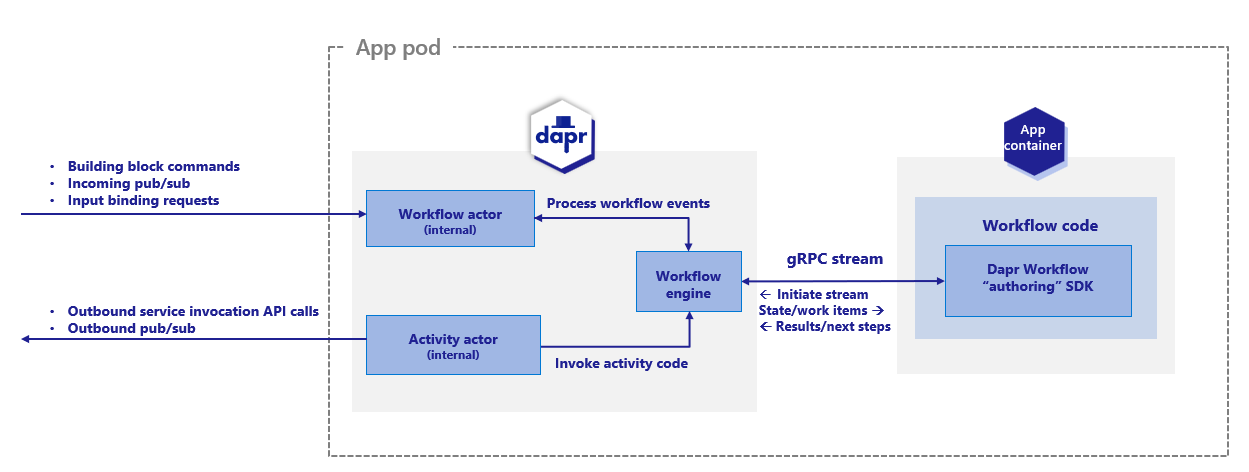
To use the Dapr Workflow building block, you write workflow code in your application using the Dapr Workflow SDK, which internally connects to the sidecar using a gRPC stream. This registers the workflow and any workflow activities, or tasks that workflows can schedule.
The engine is embedded directly into the sidecar and implemented using the durabletask-go framework library. This framework allows you to swap out different storage providers, including a storage provider created for Dapr that leverages internal actors behind the scenes. Since Dapr Workflows use actors, you can store workflow state in state stores.
Sidecar interactions
When a workflow application starts up, it uses a workflow authoring SDK to send a gRPC request to the Dapr sidecar and get back a stream of workflow work items, following the server streaming RPC pattern. These work items can be anything from “start a new X workflow” (where X is the type of a workflow) to “schedule activity Y with input Z to run on behalf of workflow X”.
The workflow app executes the appropriate workflow code and then sends a gRPC request back to the sidecar with the execution results.
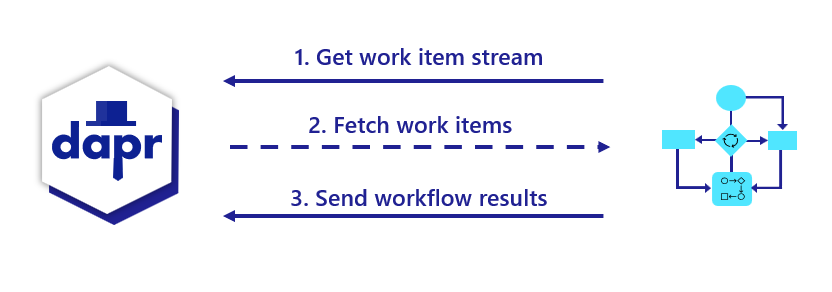
All interactions happen over a single gRPC channel and are initiated by the application, which means the application doesn’t need to open any inbound ports. The details of these interactions are internally handled by the language-specific Dapr Workflow authoring SDK.
Differences between workflow and application actor interactions
If you’re familiar with Dapr actors, you may notice a few differences in terms of how sidecar interactions works for workflows compared to application defined actors.
| Actors | Workflows |
|---|---|
| Actors created by the application can interact with the sidecar using either HTTP or gRPC. | Workflows only use gRPC. Due to the workflow gRPC protocol’s complexity, an SDK is required when implementing workflows. |
| Actor operations are pushed to application code from the sidecar. This requires the application to listen on a particular app port. | For workflows, operations are pulled from the sidecar by the application using a streaming protocol. The application doesn’t need to listen on any ports to run workflows. |
| Actors explicitly register themselves with the sidecar. | Workflows do not register themselves with the sidecar. The embedded engine doesn’t keep track of workflow types. This responsibility is instead delegated to the workflow application and its SDK. |
Workflow distributed tracing
The durabletask-go core used by the workflow engine writes distributed traces using Open Telemetry SDKs.
These traces are captured automatically by the Dapr sidecar and exported to the configured Open Telemetry provider, such as Zipkin.
Each workflow instance managed by the engine is represented as one or more spans. There is a single parent span representing the full workflow execution and child spans for the various tasks, including spans for activity task execution and durable timers.
Workflow activity code currently does not have access to the trace context.
Workflow actors
Upon the workflow client connecting to the sidecar, there are two types of actors that are registered in support of the workflow engine:
dapr.internal.{namespace}.{appID}.workflowdapr.internal.{namespace}.{appID}.activity
The {namespace} value is the Dapr namespace and defaults to default if no namespace is configured.
The {appID} value is the app’s ID.
For example, if you have a workflow app named “wfapp”, then the type of the workflow actor would be dapr.internal.default.wfapp.workflow and the type of the activity actor would be dapr.internal.default.wfapp.activity.
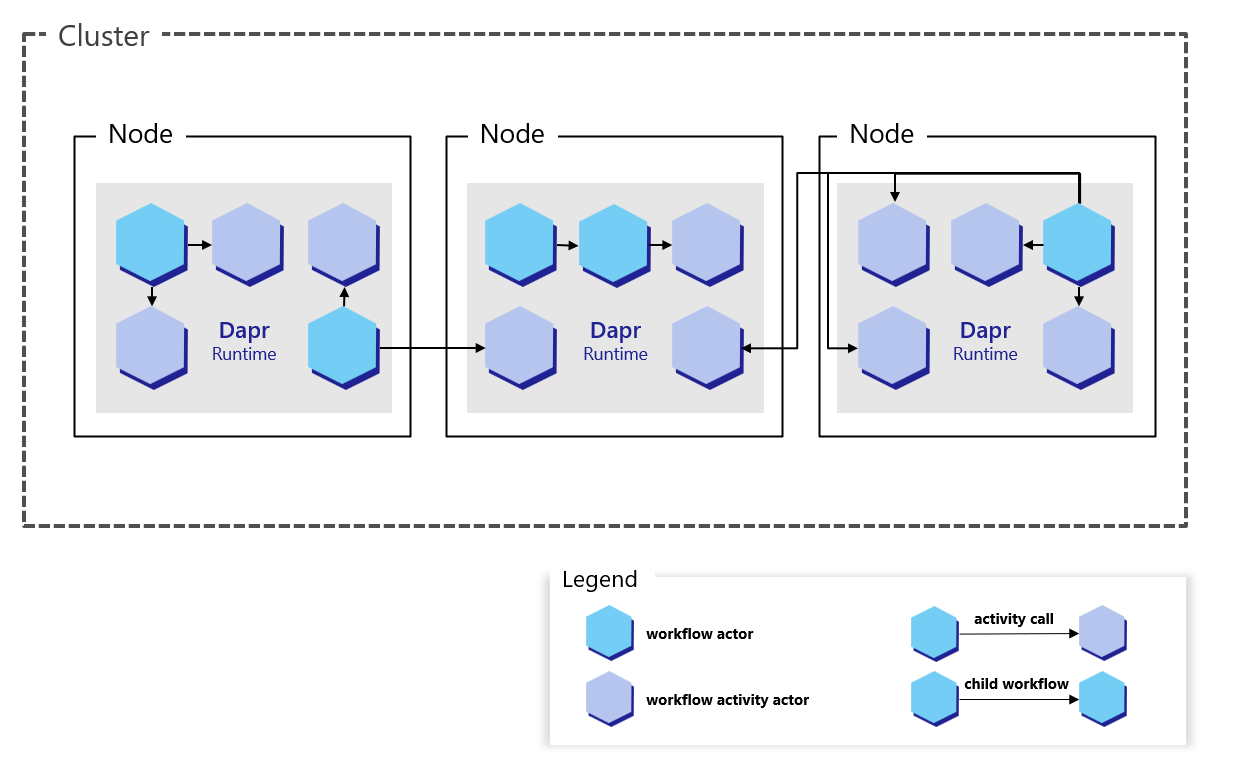
The following diagram demonstrates how workflow actors operate in a Kubernetes scenario:
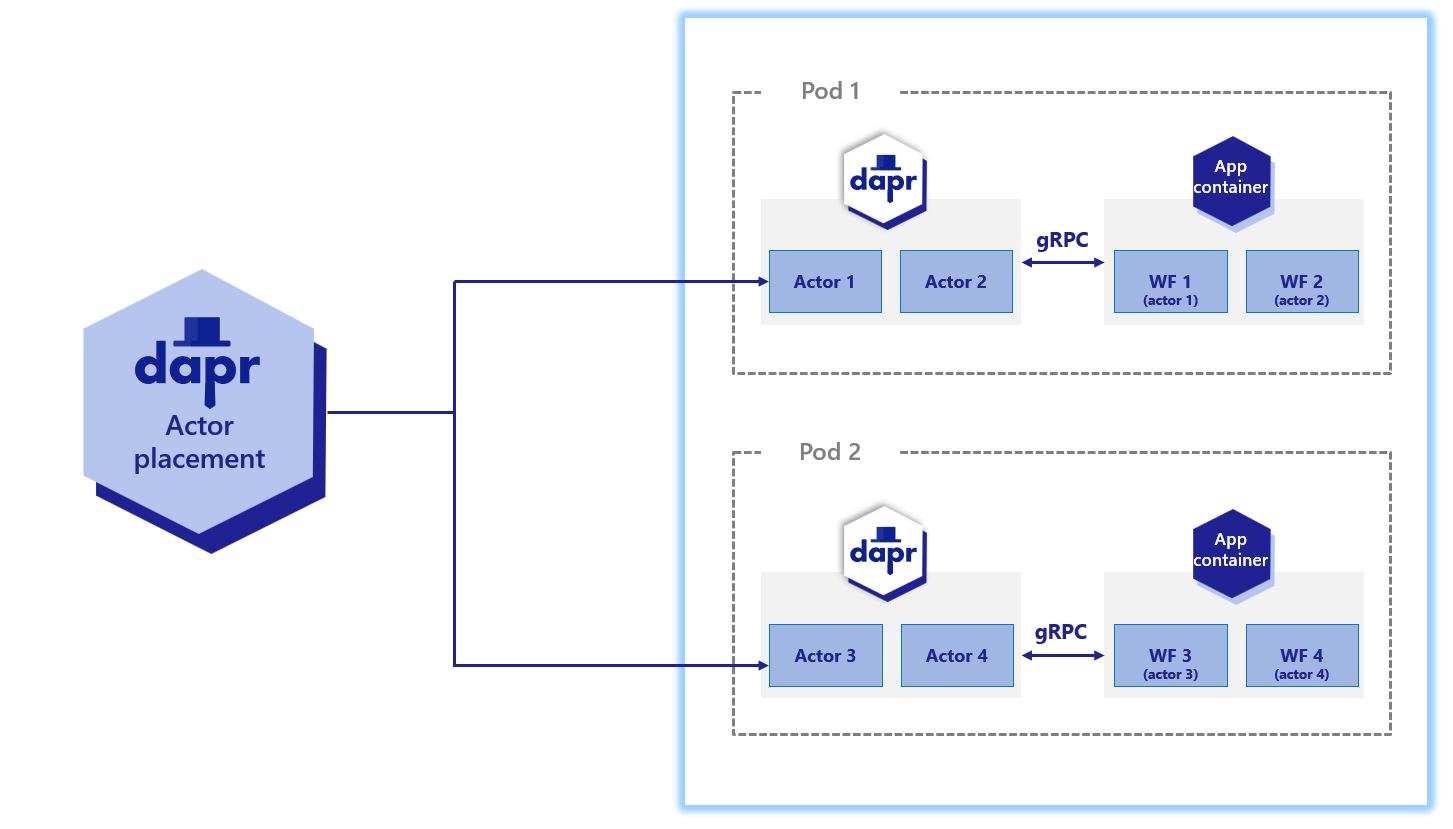
Just like user-defined actors, workflow actors are distributed across the cluster by the hashing lookup table provided by the actor placement service. They also maintain their own state and make use of reminders. However, unlike actors that live in application code, these workflow actors are embedded into the Dapr sidecar. Application code is completely unaware that these actors exist.
Note
The workflow actor types are only registered after an app has registered a workflow using a Dapr Workflow SDK. If an app never registers a workflow, then the internal workflow actors are never registered.
Workflow actors
There are 2 different types of actors used with workflows: workflow actors and activity actors. Workflow actors are responsible for managing the state and placement of all workflows running in the app. A new instance of the workflow actor is activated for every workflow instance that gets scheduled. The ID of the workflow actor is the ID of the workflow. This workflow actor stores the state of the workflow as it progresses, and determines the node on which the workflow code executes via the actor lookup table.
As workflows are based on actors, all workflow and activity work is randomly distributed across all replicas of the application implementing workflows. There is no locality or relationship between where a workflow is started and where each work item is executed.
Each workflow actor saves its state using the following keys in the configured actor state store:
| Key | Description |
|---|---|
inbox-NNNNNN | A workflow’s inbox is effectively a FIFO queue of messages that drive a workflow’s execution. Example messages include workflow creation messages, activity task completion messages, etc. Each message is stored in its own key in the state store with the name inbox-NNNNNN where NNNNNN is a 6-digit number indicating the ordering of the messages. These state keys are removed once the corresponding messages are consumed by the workflow. |
history-NNNNNN | A workflow’s history is an ordered list of events that represent a workflow’s execution history. Each key in the history holds the data for a single history event. Like an append-only log, workflow history events are only added and never removed (except when a workflow performs a “continue as new” operation, which purges all history and restarts a workflow with a new input). |
customStatus | Contains a user-defined workflow status value. There is exactly one customStatus key for each workflow actor instance. |
metadata | Contains meta information about the workflow as a JSON blob and includes details such as the length of the inbox, the length of the history, and a 64-bit integer representing the workflow generation (for cases where the instance ID gets reused). The length information is used to determine which keys need to be read or written to when loading or saving workflow state updates. |
Warning
Workflow actor state remains in the state store even after a workflow has completed.
Creating a large number of workflows could result in unbounded storage usage. To address this either purge workflows using their ID or directly delete entries in the workflow DB store.
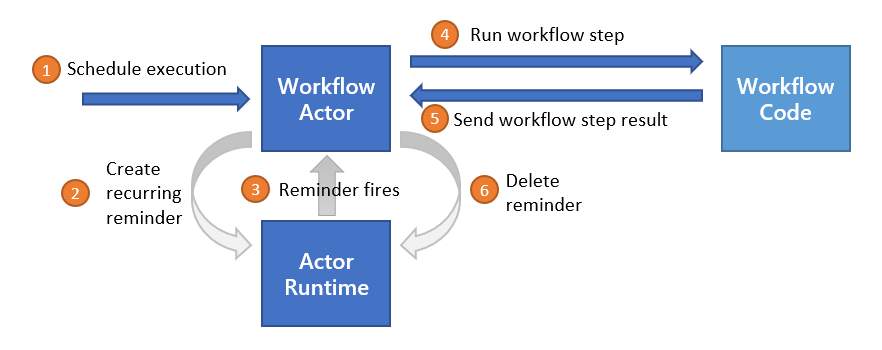
The following diagram illustrates the typical lifecycle of a workflow actor.
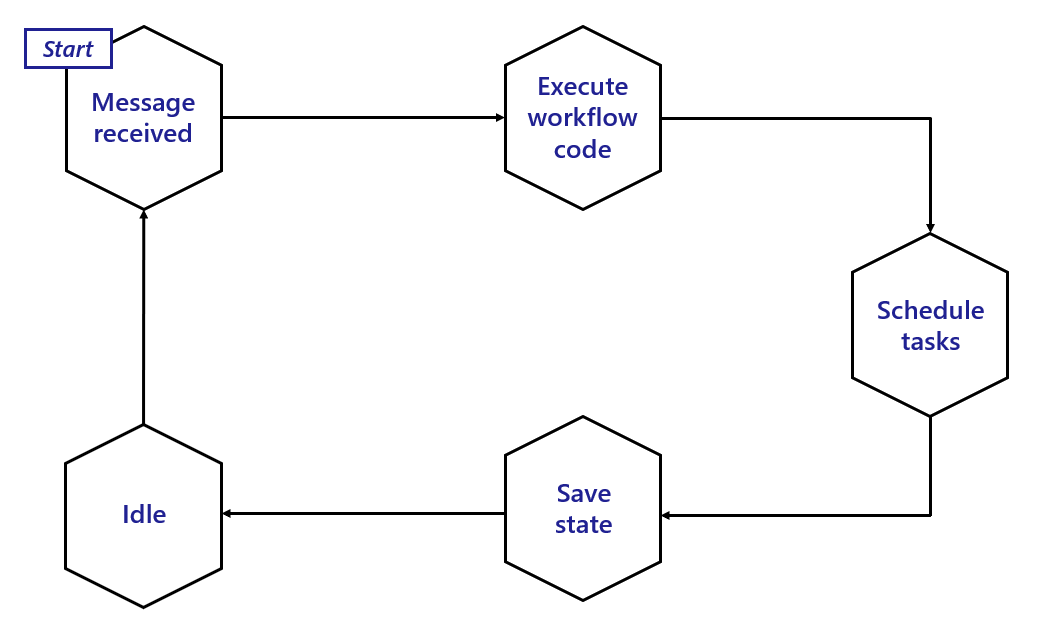
To summarize:
- A workflow actor is activated when it receives a new message.
- New messages then trigger the associated workflow code (in your application) to run and return an execution result back to the workflow actor.
- Once the result is received, the actor schedules any tasks as necessary.
- After scheduling, the actor updates its state in the state store.
- Finally, the actor goes idle until it receives another message. During this idle time, the sidecar may decide to unload the workflow actor from memory.
Activity actors
Activity actors are responsible for managing the state and placement of all workflow activity invocations.
A new instance of the activity actor is activated for every activity task that gets scheduled by a workflow.
The ID of the activity actor is the ID of the workflow combined with a sequence number (sequence numbers start with 0), as well as the “generation” (incremented during instances of rerunning from using continue as new).
For example, if a workflow has an ID of 876bf371 and is the third activity to be scheduled by the workflow, it’s ID will be 876bf371::2::1 where 2 is the sequence number, and 1 is the generation.
If the activity is scheduled again after a continue as new, the ID will be 876bf371::2::2.
No state is stored by activity actors, and instead all resulting data is sent back to the parent workflow actor.
The following diagram illustrates the typical lifecycle of an activity actor.
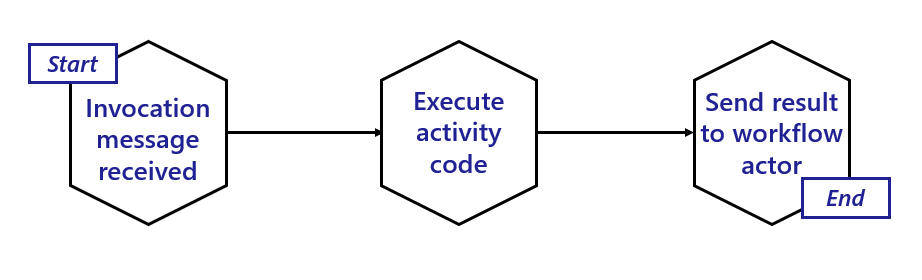
Activity actors are short-lived:
- Activity actors are activated when a workflow actor schedules an activity task.
- Activity actors then immediately call into the workflow application to invoke the associated activity code.
- Once the activity code has finished running and has returned its result, the activity actor sends a message to the parent workflow actor with the execution results.
- The activity actor then deactivates itself.
- Once the results are sent, the workflow is triggered to move forward to its next step.
Reminder usage and execution guarantees
The Dapr Workflow ensures workflow fault-tolerance by using actor reminders to recover from transient system failures. Prior to invoking application workflow code, the workflow or activity actor will create a new reminder. These reminders are made “one shot”, meaning that they will expire after successful triggering. If the application code executes without interruption, the reminder is triggered and expired. However, if the node or the sidecar hosting the associated workflow or activity crashes, the reminder will reactivate the corresponding actor and the execution will be retried, forever.
State store usage
Dapr Workflows use actors internally to drive the execution of workflows.
Like any actors, these workflow actors store their state in the configured actor state store.
This is done by specifying a state store component in your Dapr configuration and then referencing that state store in the actorStateStore property of the configuration’s actors section.
Read the state API reference and the actors API reference to learn more about state stores for actors.
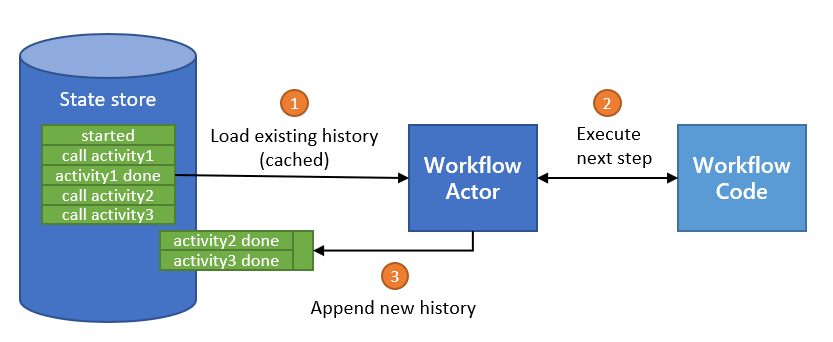
As discussed in the workflow actors section, workflows save their state incrementally by appending to a history log. The history log for a workflow is distributed across multiple state store keys so that each “checkpoint” only needs to append the newest entries.
The size of each checkpoint is determined by the number of concurrent actions scheduled by the workflow before it goes into an idle state. Sequential workflows will therefore make smaller batch updates to the state store, while fan-out/fan-in workflows will require larger batches. The size of the batch is also impacted by the size of inputs and outputs when workflows invoke activities or child workflows.
Different state store implementations may implicitly put restrictions on the types of workflows you can author. For example, the Azure Cosmos DB state store limits item sizes to 2 MB of UTF-8 encoded JSON (source). The input or output payload of an activity or child workflow is stored as a single record in the state store, so a item limit of 2 MB means that workflow and activity inputs and outputs can’t exceed 2 MB of JSON-serialized data.
Similarly, if a state store imposes restrictions on the size of a batch transaction, that may limit the number of parallel actions that can be scheduled by a workflow.
Workflow state can be purged from a state store, including all its history. Each Dapr SDK exposes APIs for purging all metadata related to specific workflow instances.
State store record count
The number of records which are saved as history in the state store per workflow run is determined by its complexity or “shape”. In other words, the number of activities, timers, sub-workflows etc. The following table shows a general guide to the number of records that are saved by different workflow tasks. This number may be larger or smaller depending on retries or concurrency.
| Task type | Number of records saved |
|---|---|
| Start workflow | 5 records |
| Call activity | 3 records |
| Timer | 3 records |
| Raise event | 3 records |
| Start child workflow | 8 records |
Query Workflow History
dapr workflow --app-id myapp list
dapr workflow --app-id myapp history <instance-id>
Supported State Stores
The workflow engine supports these state stores:
- PostgreSQL
- MySQL
- SQL Server
- SQLite
- Oracle Database
- CockroachDB
- MongoDB
- Redis
Workflow scalability
Because Dapr Workflows are internally implemented using actors, Dapr Workflows have the same scalability characteristics as actors. The placement service:
- Doesn’t distinguish between workflow actors and actors you define in your application
- Will load balance workflows using the same algorithms that it uses for actors
The expected scalability of a workflow is determined by the following factors:
- The number of machines used to host your workflow application
- The CPU and memory resources available on the machines running workflows
- The scalability of the state store configured for actors
- The scalability of the actor placement service and the reminder subsystem
The implementation details of the workflow code in the target application also plays a role in the scalability of individual workflow instances. Each workflow instance executes on a single node at a time, but a workflow can schedule activities and child workflows which run on other nodes.
Workflows can also schedule these activities and child workflows to run in parallel, allowing a single workflow to potentially distribute compute tasks across all available nodes in the cluster.
You can configure the maximum concurrency of workflows and activities using the Dapr configuration as described in the next section.
Important
By default, there are no global limits imposed on workflow and activity concurrency. A runaway workflow could therefore potentially consume all resources in a cluster if it attempts to schedule too many tasks in parallel. Use care when authoring Dapr Workflows that schedule large batches of work in parallel.Important
The Dapr Workflow engine requires that all instances of a workflow app register the exact same set of workflows and activities. In other words, it’s not possible to scale certain workflows or activities independently. All workflows and activities within an app must be scaled together.Workflows don’t control the specifics of how load is distributed across the cluster. For example, if a workflow schedules 10 activity tasks to run in parallel, all 10 tasks may run on as many as 10 different compute nodes or as few as a single compute node. The actual scale behavior is determined by the actor placement service, which manages the distribution of the actors that represent each of the workflow’s tasks.
Workflow latency
In order to provide guarantees around durability and resiliency, Dapr Workflows frequently write to the state store and rely on reminders to drive execution. Dapr Workflows therefore may not be appropriate for latency-sensitive workloads. Expected sources of high latency include:
- Latency from the state store when persisting workflow state.
- Latency from the state store when rehydrating workflows with large histories.
- Latency caused by too many active reminders in the cluster.
- Latency caused by high CPU usage in the cluster.
See the Reminder usage and execution guarantees section for more details on how the design of workflow actors may impact execution latency.
Increasing scheduling throughput
By default, when a client schedules a workflow, the workflow engine waits for the workflow to be fully started before returning a response to the client. Waiting for the workflow to start before returning can decrease the scheduling throughput of workflows. When scheduling a workflow with a start time, the workflow engine does not wait for the workflow to start before returning a response to the client. To increase scheduling throughput, consider adding a start time of “now” when scheduling a workflow. An example of scheduling a workflow with a start time of “now” in the Go SDK is shown below:
client.ScheduleNewWorkflow(ctx, "MyCoolWorkflow", workflow.WithStartTime(time.Now()))
Workflows cluster deployment when using Dapr Shared with workflow
Note
The following feature is only available when the Workflows Clustered Deployment preview feature is enabled.When using Dapr Shared, it can be the case that there are multiple daprd sidecars running behind a single load balancer or service.
As such, the instance to which a worker receiving work, may not be the same instance that receives the work result.
Dapr creates a third actor type to handle this scenario: dapr.internal.{namespace}.{appID}.executor to handle routing of the worker results back to the correct workflow actor to ensure correct operation.
Next steps
Author workflows >>Related links
- Workflow overview
- Workflow API reference
- Try out the Workflow quickstart
- Try out the following examples: