This is the multi-page printable view of this section. Click here to print.

Return to the regular view of this page.

Distributed lock

Distributed locks provide mutually exclusive access to shared resources from an application.

1 - Distributed lock overview

Overview of the distributed lock API building block

Introduction

Locks are used to provide mutually exclusive access to a resource. For example, you can use a lock to:

  • Provide exclusive access to a database row, table, or an entire database
  • Lock reading messages from a queue in a sequential manner

Any resource that is shared where updates occur can be the target for a lock. Locks are usually used on operations that mutate state, not on reads.

Each lock has a name. The application determines the resources that the named lock accesses. Typically, multiple instances of the same application use this named lock to exclusively access the resource and perform updates.

For example, in the competing consumer pattern, multiple instances of an application access a queue. You can decide that you want to lock the queue while the application is running its business logic.

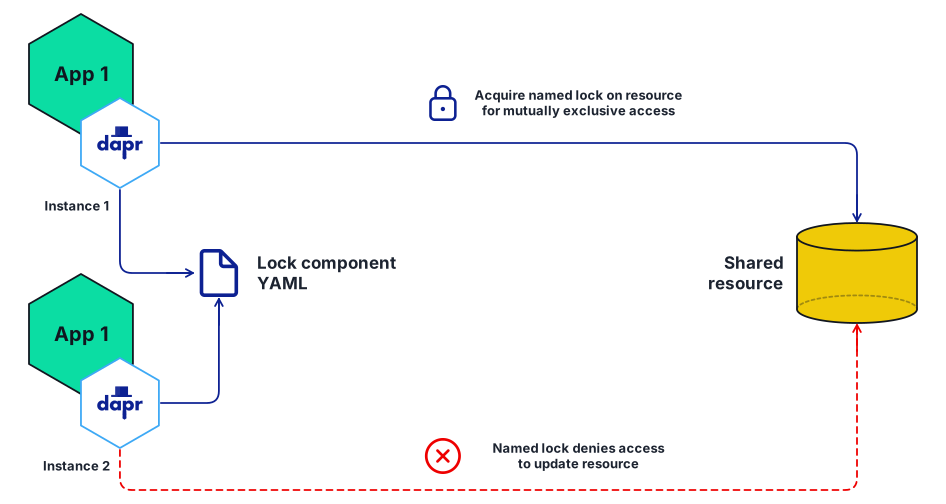
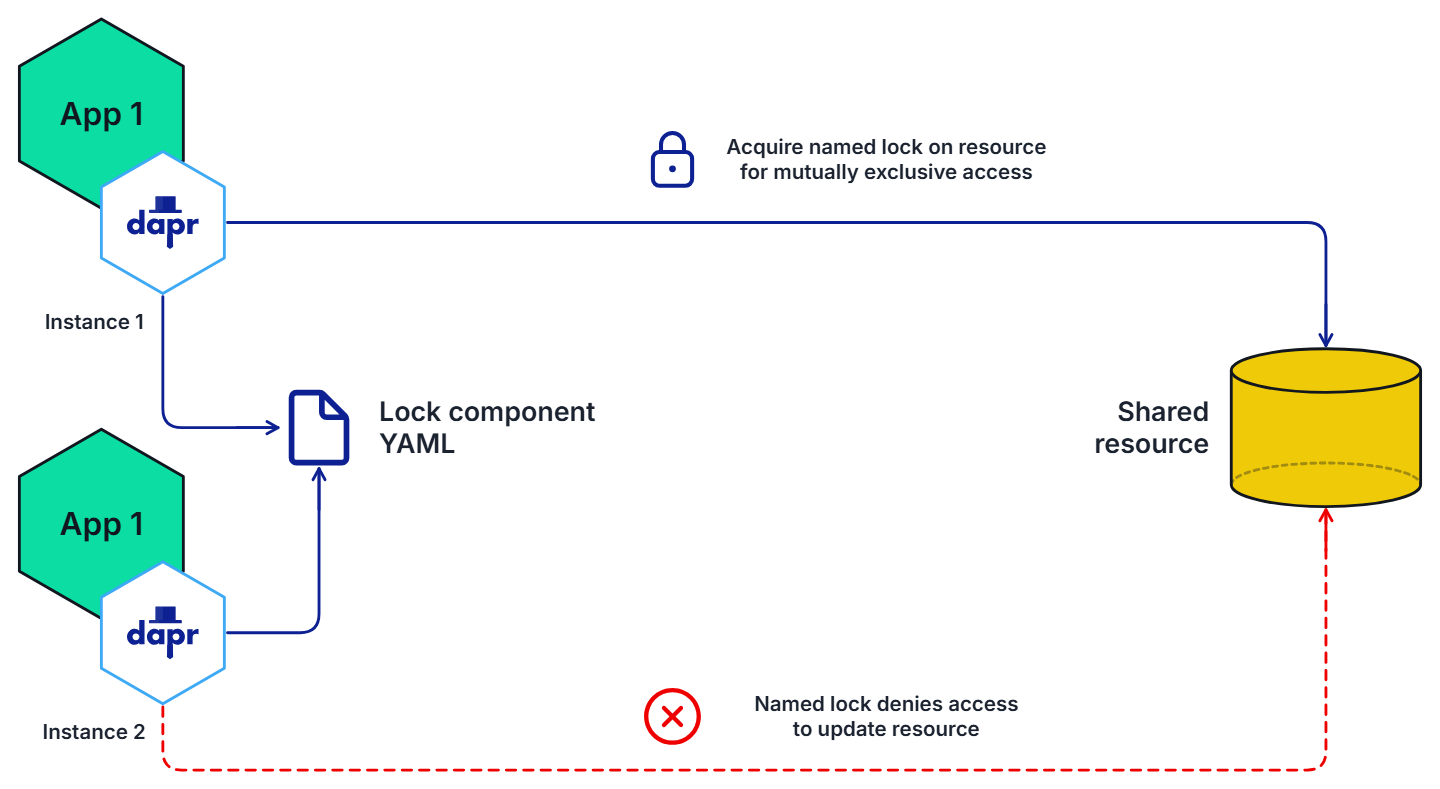
In the diagram below, two instances of the same application, App1, use the Redis lock component to take a lock on a shared resource.

  • The first app instance acquires the named lock and gets exclusive access.
  • The second app instance is unable to acquire the lock and therefore is not allowed to access the resource until the lock is released, either:
    • Explicitly by the application through the unlock API, or
    • After a period of time, due to a lease timeout.
Two instances of one app competing for a named lock on a shared resourceTwo green hexagons, one above the other, both named App 1 - they are two instances of one application - each with a hexagon carrying the Dapr logo overlapping its lower right corner, and each captioned underneath, Instance 1 and Instance 2. Between the two Dapr hexagons is a file glyph named Lock component YAML, joined to each of them by a line with a head at each end. From the upper Dapr hexagon a line runs right and turns down into the top of a gold data-store cylinder named Shared resource; a padlock and the words "Acquire named lock on resource for mutually exclusive access" stand just above that line. From the lower Dapr hexagon a dashed red line runs right and turns up into the foot of the same store; a cross in a circle and the words "Named lock denies access to update resource" stand just below it.Lock componentYAMLAcquire named lock on resourcefor mutually exclusive accessNamed lock denies accessto update resourceApp 1Instance 1App 1Instance 2Sharedresource

*This API is currently in Alpha state.

Features

Mutually exclusive access to a resource

At any given moment, only one instance of an application can hold a named lock. Locks are scoped to a Dapr app-id.

Deadlock free using leases

Dapr distributed locks use a lease-based locking mechanism. If an application acquires a lock, encounters an exception, and cannot free the lock, the lock is automatically released after a period of time using a lease. This prevents resource deadlocks in the event of application failures.

Demo

Watch this video for an overview of the distributed lock API:

Next steps

Follow these guides on:

2 - How-To: Use a lock

Learn how to use distributed locks to provide exclusive access to a resource

Now that you’ve learned what the Dapr distributed lock API building block provides, learn how it can work in your service. In this guide, an example application acquires a lock using the Redis lock component to demonstrate how to lock resources. For a list of supported lock stores, see this reference page.

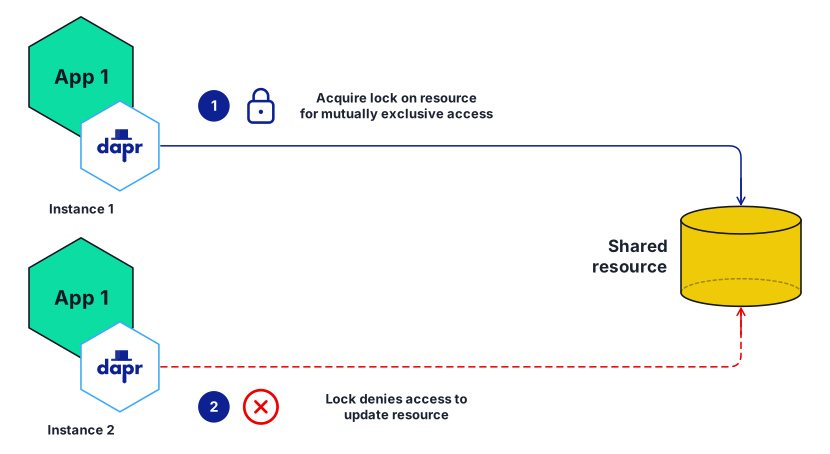
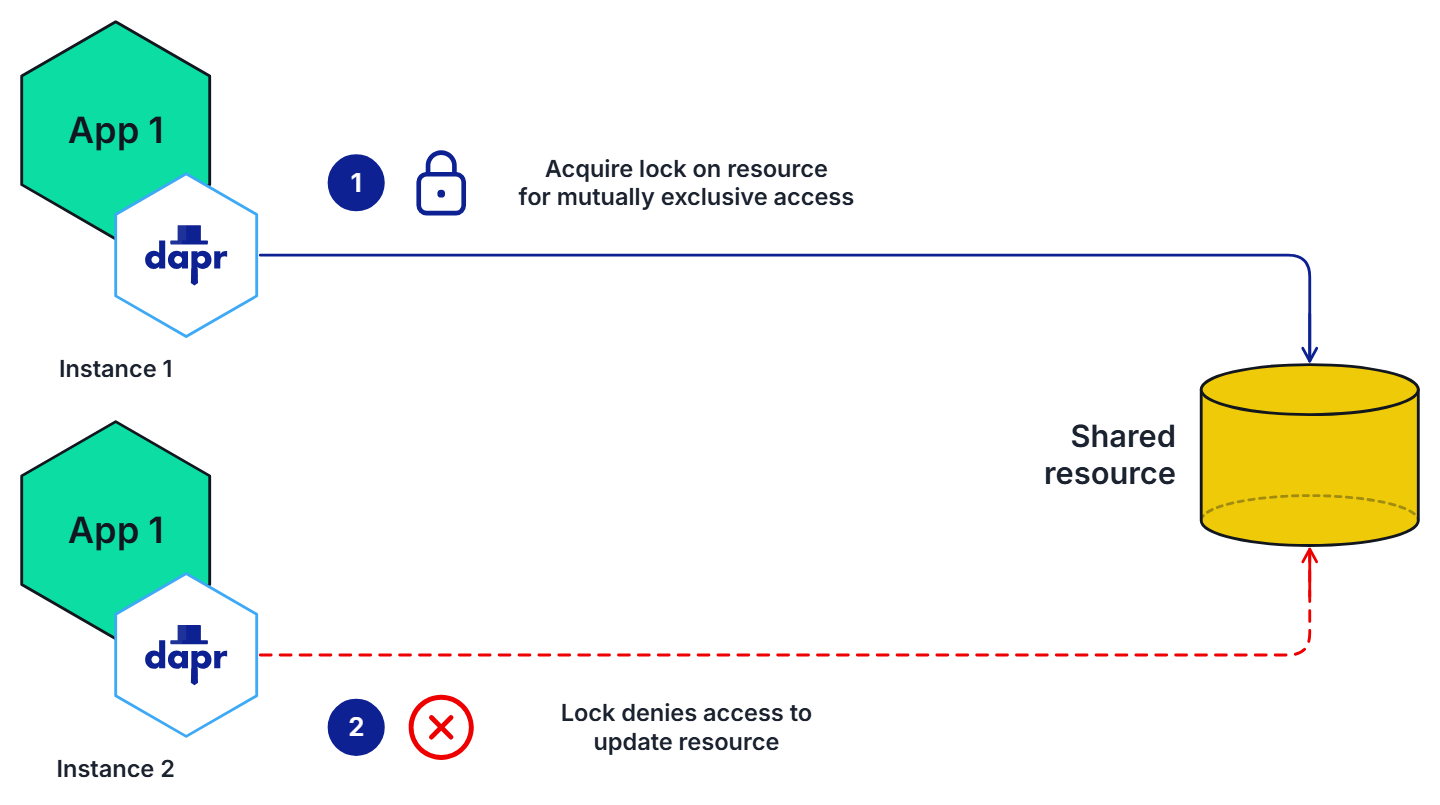
In the diagram below, two instances of the same application acquire a lock, where one instance is successful and the other is denied.

One instance of an app holding a lock while the other is refused itTwo green hexagons, one above the other, both named App 1 and captioned Instance 1 and Instance 2, each with a hexagon carrying the Dapr logo overlapping its lower right corner. From the upper Dapr hexagon a line runs right and turns down into the top of a gold data-store cylinder named Shared resource; beside it a numbered step 1, a closed padlock, and the words "Acquire lock on resource for mutually exclusive access". From the lower Dapr hexagon a dashed red line runs right and turns up into the foot of the same store; beside it a numbered step 2, a cross in a circle, and the words "Lock denies access to update resource".1Acquire lock on resourcefor mutually exclusive access2Lock denies access toupdate resourceApp 1Instance 1App 1Instance 2Sharedresource

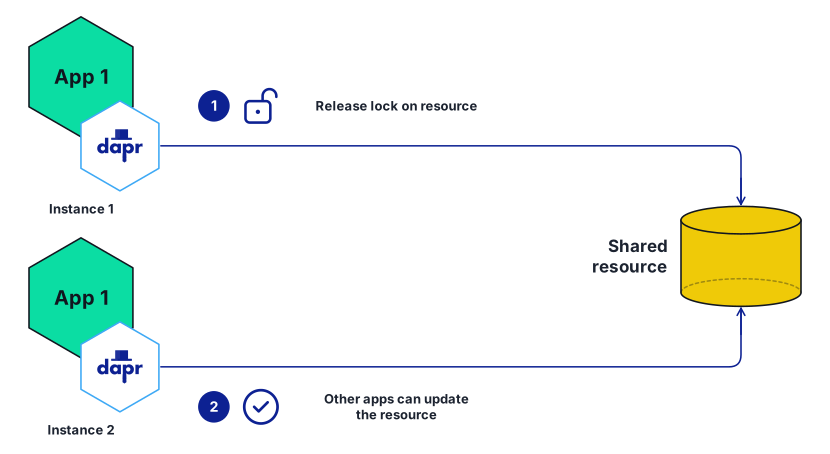
The diagram below shows two instances of the same application, where one instance releases the lock and the other instance is then able to acquire the lock.

One instance releasing its lock so the other can update the resourceTwo green hexagons, one above the other, both named App 1 and captioned Instance 1 and Instance 2, each with a hexagon carrying the Dapr logo overlapping its lower right corner. From the upper Dapr hexagon a line runs right and turns down into the top of a gold data-store cylinder named Shared resource; beside it a numbered step 1, an open padlock, and the words "Release lock on resource". From the lower Dapr hexagon a line runs right and turns up into the foot of the same store; beside it a numbered step 2, a tick in a circle, and the words "Other apps can update the resource".1Release lock on resource2Other apps can updatethe resourceApp 1Instance 1App 1Instance 2Sharedresource

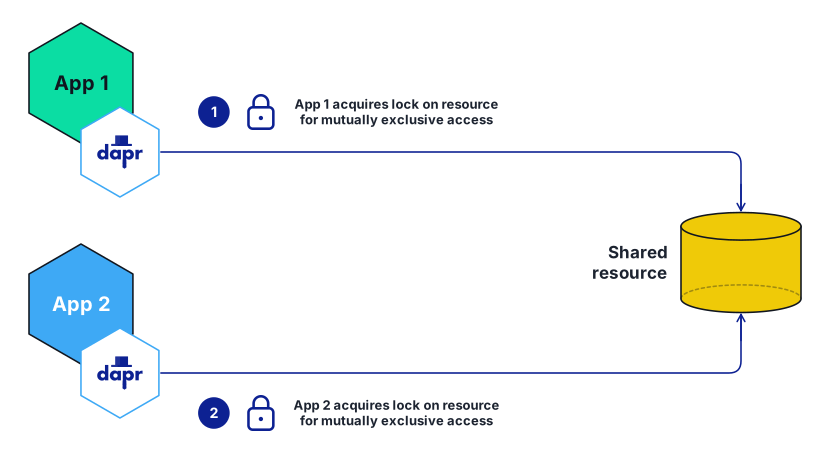
The diagram below shows two instances of different applications, acquiring different locks on the same resource.

Two different applications each taking their own lock on one resourceTwo hexagons, one above the other: a green one named App 1 and a blue one named App 2, each with a hexagon carrying the Dapr logo overlapping its lower right corner. From each Dapr hexagon a line runs right to a gold data-store cylinder named Shared resource, the upper one turning down into its top and the lower one up into its foot. Beside the upper run, a numbered step 1, a closed padlock, and the words "App 1 acquires lock on resource for mutually exclusive access"; beside the lower run, a numbered step 2, a second closed padlock, and the same words for App 2.1App 1 acquires lock on resourcefor mutually exclusive access2App 2 acquires lock on resourcefor mutually exclusive accessApp 1App 2Sharedresource

Locks are scoped to a Dapr app-id, so these two locks are independent of each other: each one excludes other instances of its own application, not the other application. Two applications cannot use the lock API to exclude one another from the same resource.

Configure a lock component

Save the following component file to the default components folder on your machine.

apiVersion: dapr.io/v1alpha1
kind: Component
metadata:
  name: lockstore
spec:
  type: lock.redis
  version: v1
  metadata:
  - name: redisHost
    value: localhost:6379
  - name: redisPassword
    value: <PASSWORD>

Acquire lock

curl -X POST http://localhost:3500/v1.0-alpha1/lock/lockstore
   -H 'Content-Type: application/json'
   -d '{"resourceId":"my_file_name", "lockOwner":"random_id_abc123", "expiryInSeconds": 60}'
using System;
using Dapr.Client;

namespace LockService
{
    class Program
    {
        [Obsolete("Distributed Lock API is in Alpha, this can be removed once it is stable.")]
        static async Task Main(string[] args)
        {
            string DAPR_LOCK_NAME = "lockstore";
            string fileName = "my_file_name";
            var client = new DaprClientBuilder().Build();
    
            await using (var fileLock = await client.Lock(DAPR_LOCK_NAME, fileName, "random_id_abc123", 60))
            {
                if (fileLock.Success)
                {
                    Console.WriteLine("Success");
                }
                else
                {
                    Console.WriteLine($"Failed to lock {fileName}.");
                }
            }
        }
    }
}
package main

import (
    "fmt"

    dapr "github.com/dapr/go-sdk/client"
)

func main() {
    client, err := dapr.NewClient()
    if err != nil {
        panic(err)
    }
    defer client.Close()
    
    resp, err := client.TryLockAlpha1(ctx, "lockstore", &dapr.LockRequest{
			LockOwner:         "random_id_abc123",
			ResourceID:      "my_file_name",
			ExpiryInSeconds: 60,
		})

    fmt.Println(resp.Success)
}

Unlock existing lock

curl -X POST http://localhost:3500/v1.0-alpha1/unlock/lockstore
   -H 'Content-Type: application/json'
   -d '{"resourceId":"my_file_name", "lockOwner":"random_id_abc123"}'
using System;
using Dapr.Client;

namespace LockService
{
    class Program
    {
        static async Task Main(string[] args)
        {
            string DAPR_LOCK_NAME = "lockstore";
            var client = new DaprClientBuilder().Build();

            var response = await client.Unlock(DAPR_LOCK_NAME, "my_file_name", "random_id_abc123"));
            Console.WriteLine(response.status);
        }
    }
}
package main

import (
    "fmt"

    dapr "github.com/dapr/go-sdk/client"
)

func main() {
    client, err := dapr.NewClient()
    if err != nil {
        panic(err)
    }
    defer client.Close()
    
    resp, err := client.UnlockAlpha1(ctx, "lockstore", &UnlockRequest{
			LockOwner:    "random_id_abc123",
			ResourceID: "my_file_name",
		})

    fmt.Println(resp.Status)
}

Next steps

Read the distributed lock API overview to learn more.