This is the multi-page printable view of this section. Click here to print.
Conversation
1 - Conversation overview
Alpha
The conversation API is currently in alpha.Dapr’s conversation API reduces the complexity of securely and reliably interacting with Large Language Models (LLM) at scale. Whether you’re a developer who doesn’t have the necessary native SDKs or a polyglot shop who just wants to focus on the prompt aspects of LLM interactions, the conversation API provides one consistent API entry point to talk to underlying LLM providers.
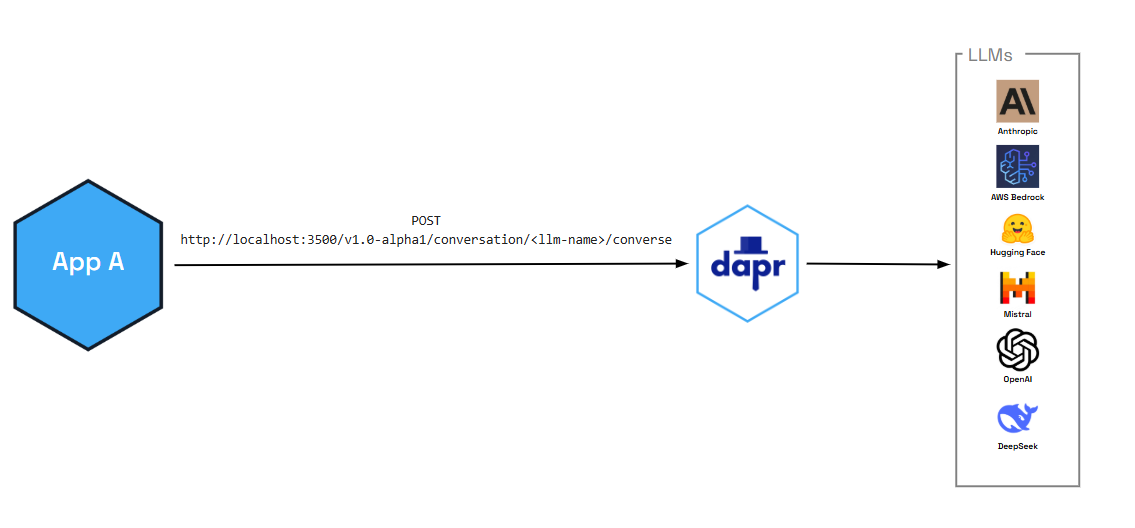
In addition to enabling critical performance and security functionality (like caching and PII scrubbing), the conversation API also provides:
- Tool calling capabilities that allow LLMs to interact with external functions and APIs, enabling more sophisticated AI applications
- OpenAI-compatible interface for seamless integration with existing AI workflows and tools
You can also pair the conversation API with Dapr functionalities, like:
- Resiliency policies including circuit breakers to handle repeated errors, timeouts to safeguards from slow responses, and retries for temporary network failures
- Observability with metrics and distributed tracing using OpenTelemetry and Zipkin
- Middleware to authenticate requests to and from the LLM
Features
The following features are out-of-the-box for all the supported conversation components.
Caching
The Conversation API supports two kinds of caching:
- Prompt caching: Some LLM providers cache prompt prefixes on their side to speed up and reduce cost of repeated prompts. You enable this per request via the API using the
promptCacheRetentionparameter (for example,24hfor OpenAI). See the Conversation API reference for request-level options. Support depends on the provider. - Response caching: Conversation components can cache full LLM responses in the sidecar. When you set the component metadata field
responseCacheTTL(for example,10m), Dapr caches responses keyed by the request (prompt and options). Repeated identical requests are served from the cache without calling the LLM, reducing latency and cost. This cache is in-memory and per sidecar. Configure this in your conversation component spec.
Response formatting
You can request structured output from the model by passing a responseFormat (JSON Schema) in the request. Supported by Deepseek, Google AI, Hugging Face, OpenAI, and Anthropic. See the Conversation API reference.
Usage metrics
Responses can include token usage (promptTokens, completionTokens, totalTokens) for the conversation. See Response content in the API reference.
Personally identifiable information (PII) obfuscation
The PII obfuscation feature identifies and removes any form of sensitive user information from a conversation response. Simply enable PII obfuscation on input and output data to protect your privacy and scrub sensitive details that could be used to identify an individual.
The PII scrubber obfuscates the following user information:
- Phone number
- Email address
- IP address
- Street address
- Credit cards
- Social Security number
- ISBN
- Media Access Control (MAC) address
- Secure Hash Algorithm 1 (SHA-1) hex
- SHA-256 hex
- MD5 hex
Tool calling support
The conversation API supports advanced tool calling capabilities that allow LLMs to interact with external functions and APIs. This enables you to build sophisticated AI applications that can:
- Execute custom functions based on user requests
- Integrate with external services and databases
- Provide dynamic, context-aware responses
- Create multi-step workflows and automation
Tool calling follows OpenAI’s function calling format, making it easy to integrate with existing AI development workflows and tools.
Demo
Watch the demo presented during Diagrid’s Dapr v1.15 celebration to see how the conversation API works using the .NET SDK.
Try out conversation API
Quickstarts and tutorials
Want to put the Dapr conversation API to the test? Walk through the following quickstart and tutorials to see it in action:
| Quickstart/tutorial | Description |
|---|---|
| Conversation quickstart | Learn how to interact with Large Language Models (LLMs) using the conversation API. |
Start using the conversation API directly in your app
Want to skip the quickstarts? Not a problem. You can try out the conversation building block directly in your application. After Dapr is installed, you can begin using the conversation API starting with the how-to guide.
Next steps
2 - How-To: Converse with an LLM using the conversation API
Alpha
The conversation API is currently in alpha.Let’s get started using the conversation API. In this guide, you’ll learn how to:
- Set up one of the available Dapr components (echo) that work with the conversation API.
- Add the conversation client to your application.
- Run the connection using
dapr run.
Set up the conversation component
Create a new configuration file called conversation.yaml and save to a components or config sub-folder in your application directory.
Select your preferred conversation component spec for your conversation.yaml file.
For this scenario, we use a simple echo component.
apiVersion: dapr.io/v1alpha1
kind: Component
metadata:
  name: echo
spec:
  type: conversation.echo
  version: v1
Use the OpenAI component
To interface with a real LLM, use one of the other supported conversation components, including OpenAI, Hugging Face, Anthropic, DeepSeek, and more.
For example, to swap out the echo mock component with an OpenAI component, replace the conversation.yaml file with the following. You’ll need to copy your API key into the component file.
apiVersion: dapr.io/v1alpha1
kind: Component
metadata:
  name: openai
spec:
  type: conversation.openai
  metadata:
  - name: key
    value: <REPLACE_WITH_YOUR_KEY>
  - name: model
    value: gpt-4-turbo
Connect the conversation client
The following examples use the Dapr SDK client to interact with LLMs.
using Dapr.AI.Conversation;
using Dapr.AI.Conversation.Extensions;

var builder = WebApplication.CreateBuilder(args);

builder.Services.AddDaprConversationClient();

var app = builder.Build();

var conversationClient = app.Services.GetRequiredService<DaprConversationClient>();
var response = await conversationClient.ConverseAsync("conversation",
    new List<DaprConversationInput>
    {
        new DaprConversationInput(
            "Please write a witty haiku about the Dapr distributed programming framework at dapr.io",
            DaprConversationRole.Generic)
    });

Console.WriteLine("conversation output: ");
foreach (var resp in response.Outputs)
{
    Console.WriteLine($"\t{resp.Result}");
}
//dependencies
import io.dapr.client.DaprClientBuilder;
import io.dapr.client.DaprPreviewClient;
import io.dapr.client.domain.ConversationInput;
import io.dapr.client.domain.ConversationRequest;
import io.dapr.client.domain.ConversationResponse;
import reactor.core.publisher.Mono;

import java.util.List;

public class Conversation {

    public static void main(String[] args) {
        String prompt = "Please write a witty haiku about the Dapr distributed programming framework at dapr.io";

        try (DaprPreviewClient client = new DaprClientBuilder().buildPreviewClient()) {
            System.out.println("Input: " + prompt);

            ConversationInput daprConversationInput = new ConversationInput(prompt);

            // Component name is the name provided in the metadata block of the conversation.yaml file.
            Mono<ConversationResponse> responseMono = client.converse(new ConversationRequest("echo",
                    List.of(daprConversationInput))
                    .setContextId("contextId")
                    .setScrubPii(true).setTemperature(1.1d));
            ConversationResponse response = responseMono.block();
            System.out.printf("conversation output: %s", response.getConversationOutputs().get(0).getResult());
        } catch (Exception e) {
            throw new RuntimeException(e);
        }
    }
}
#dependencies
from dapr.clients import DaprClient
from dapr.clients.grpc._request import ConversationInput

#code
with DaprClient() as d:
    inputs = [
        ConversationInput(content="Please write a witty haiku about the Dapr distributed programming framework at dapr.io", role='user', scrub_pii=True),
    ]

    metadata = {
        'model': 'modelname',
        'key': 'authKey',
        'responseCacheTTL': '10m',
    }

    response = d.converse_alpha1(
        name='echo', inputs=inputs, temperature=0.7, context_id='chat-123', metadata=metadata
    )

    for output in response.outputs:
        print(f'conversation output: {output.result}')
package main

import (
	"context"
	"fmt"
	dapr "github.com/dapr/go-sdk/client"
	"log"
)

func main() {
	client, err := dapr.NewClient()
	if err != nil {
		panic(err)
	}

	input := dapr.ConversationInput{
		Content: "Please write a witty haiku about the Dapr distributed programming framework at dapr.io",
		// Role:     "", // Optional
		// ScrubPII: false, // Optional
	}

	fmt.Printf("conversation input: %s\n", input.Content)

	var conversationComponent = "echo"

	request := dapr.NewConversationRequest(conversationComponent, []dapr.ConversationInput{input})

	resp, err := client.ConverseAlpha1(context.Background(), request)
	if err != nil {
		log.Fatalf("err: %v", err)
	}

	fmt.Printf("conversation output: %s\n", resp.Outputs[0].Result)
}
use dapr::client::{ConversationInputBuilder, ConversationRequestBuilder};
use std::thread;
use std::time::Duration;

type DaprClient = dapr::Client<dapr::client::TonicClient>;

#[tokio::main]
async fn main() -> Result<(), Box<dyn std::error::Error>> {
    // Sleep to allow for the server to become available
    thread::sleep(Duration::from_secs(5));

    // Set the Dapr address
    let address = "https://127.0.0.1".to_string();

    let mut client = DaprClient::connect(address).await?;

    let input = ConversationInputBuilder::new("Please write a witty haiku about the Dapr distributed programming framework at dapr.io").build();

    let conversation_component = "echo";

    let request =
        ConversationRequestBuilder::new(conversation_component, vec![input.clone()]).build();

    println!("conversation input: {:?}", input.content);

    let response = client.converse_alpha1(request).await?;

    println!("conversation output: {:?}", response.outputs[0].result);
    Ok(())
}
Run the conversation connection
Start the connection using the dapr run command. For example, for this scenario, we’re running dapr run on an application with the app ID conversation and pointing to our conversation YAML file in the ./config directory.
dapr run --app-id conversation --dapr-grpc-port 50001 --log-level debug --resources-path ./config -- dotnet run
dapr run --app-id conversation --dapr-grpc-port 50001 --log-level debug --resources-path ./config -- mvn spring-boot:run
dapr run --app-id conversation --dapr-grpc-port 50001 --log-level debug --resources-path ./config -- python3 app.py
dapr run --app-id conversation --dapr-grpc-port 50001 --log-level debug --resources-path ./config -- go run ./main.go
dapr run --app-id=conversation --resources-path ./config --dapr-grpc-port 3500 -- cargo run --example conversation
Expected output
- '== APP == conversation output: Please write a witty haiku about the Dapr distributed programming framework at dapr.io'
Advanced features
The conversation API supports the following features:
Prompt caching: Allows developers to cache prompts in Dapr, leading to much faster response times and reducing costs on egress and on inserting the prompt into the LLM provider’s cache.
PII scrubbing: Allows for the obfuscation of data going in and out of the LLM.
Tool calling: Allows LLMs to interact with external functions and APIs.
To learn how to enable these features, see the conversation API reference guide.
Conversation API examples in Dapr SDK repositories
Try out the conversation API using the full examples provided in the supported SDK repos.