Getting Started
Dapr Agents Concepts
If you are looking for an introductory overview of Dapr Agents and want to learn more about basic Dapr Agents terminology, we recommend starting with the introduction and concepts sections.Install Dapr CLI
While simple examples in Dapr Agents can be used without the sidecar, the recommended mode is with the Dapr sidecar. To benefit from the full power of Dapr Agents, install the Dapr CLI for running Dapr locally or on Kubernetes for development purposes. For a complete step-by-step guide, follow the Dapr CLI installation page.
Verify the CLI is installed by restarting your terminal/command prompt and running the following:
dapr -h
Initialize Dapr in Local Mode
Note
Make sure you have Docker already installed.Initialize Dapr locally to set up a self-hosted environment for development. This process fetches and installs the Dapr sidecar binaries, runs essential services as Docker containers, and prepares a default components folder for your application. For detailed steps, see the official guide on initializing Dapr locally.
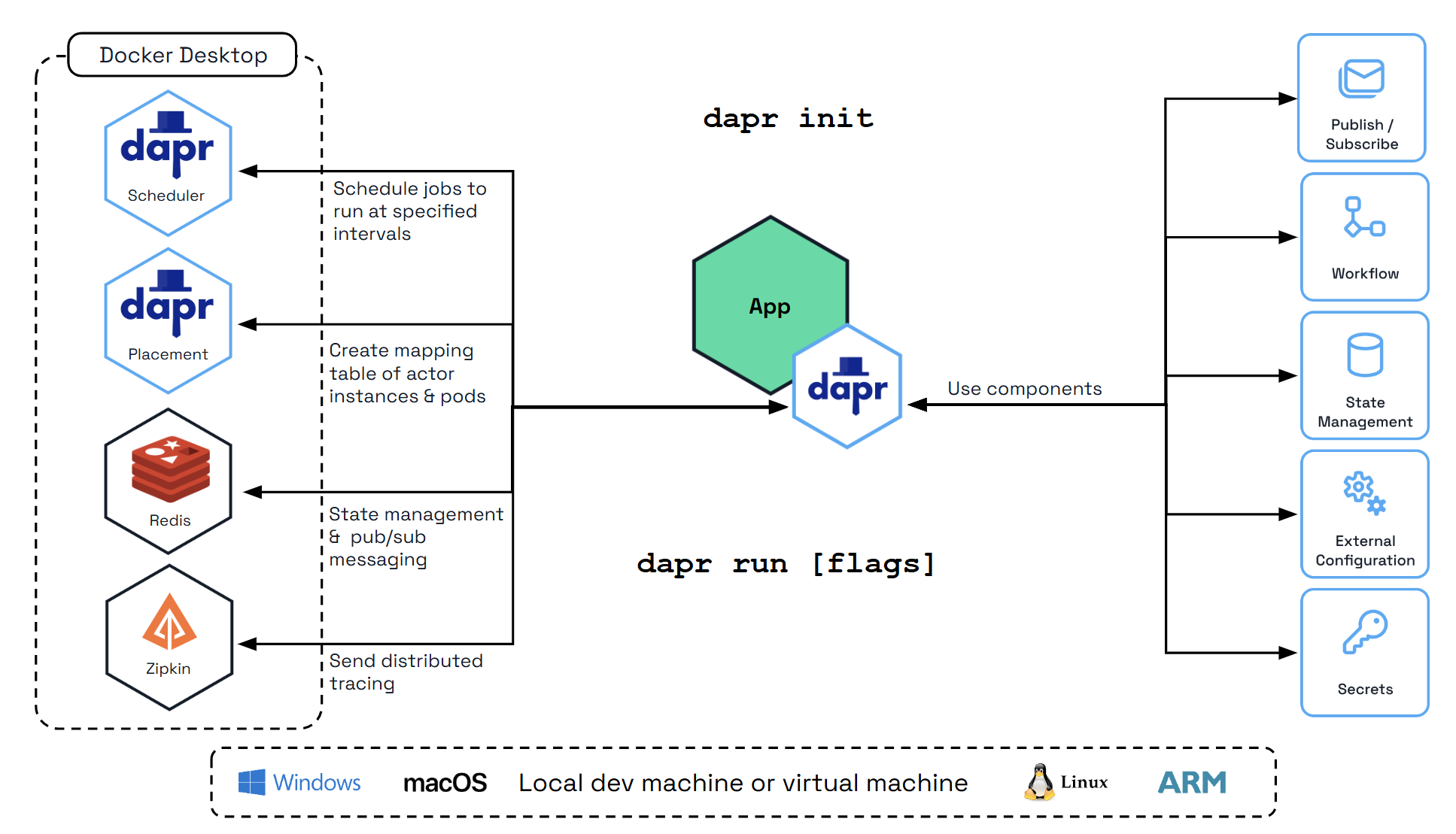
To initialize the Dapr control plane containers and create a default configuration file, run:
dapr init
Verify you have container instances with daprio/dapr, openzipkin/zipkin, and redis images running:
docker ps
Install Python
Note
Make sure you have Python already installed.Python >=3.11. For installation instructions, visit the official Python installation guide.Install uv
The Dapr Agents quickstarts use uv as the Python package manager. Install it by following the uv installation guide.
Configure an LLM
The quickstarts use Ollama by default so you can run everything locally without an API key.
Default: Ollama (Local)
- Install and start Ollama:
curl -fsSL https://ollama.com/install.sh | sh
brew install ollama
Download and run the installer from ollama.com/download.
- Pull a model with tool-calling support:
ollama serve    # Start the server (skip if already running)
ollama pull qwen3:0.6b
- Export the required environment variables before running any quickstart:
export OLLAMA_ENDPOINT=http://localhost:11434/v1
export OLLAMA_MODEL=qwen3:0.6b
$env:OLLAMA_ENDPOINT = "http://localhost:11434/v1"
$env:OLLAMA_MODEL = "qwen3:0.6b"
The resources/llm-provider.yaml component resolves {{OLLAMA_ENDPOINT}} and {{OLLAMA_MODEL}} from your environment automatically.
Alternative: OpenAI
To use OpenAI instead, replace resources/llm-provider.yaml with:
apiVersion: dapr.io/v1alpha1
kind: Component
metadata:
  name: llm-provider
spec:
  type: conversation.openai
  version: v1
  metadata:
  - name: key
    value: "{{OPENAI_API_KEY}}"
  - name: model
    value: "gpt-4o-mini"
Dapr also supports Anthropic, Mistral, and other providers through the Conversation API. Replace the component type and metadata while keeping name: llm-provider.
Prepare your environment
In this getting started guide, you’ll work directly from the Dapr Agents quickstarts. You’ll focus on 02_durable_agent_http.py—a reliable durable agent backed by Dapr’s workflow engine and exposed over HTTP.
1. Clone the repository
git clone https://github.com/dapr/dapr-agents.git
cd dapr-agents/quickstarts
2. Create a virtual environment and install dependencies
From the quickstarts folder:
uv venv

# Activate the virtual environment
# On Windows:
.venv\Scripts\activate
# On macOS/Linux:
source .venv/bin/activate

# Install dependencies
uv sync --active
This installs dapr-agents and any additional libraries needed by the examples.
Understand the application
This example creates an agent that assists with weather information and uses Dapr to handle LLM interactions, persist conversation history, and provide reliable, durable execution of the agent’s steps.
For this quickstart you’ll primarily work with:
02_durable_agent_http.py– the main durable weather agent application exposed over HTTPfunction_tools.py– containsslow_weather_func, the tool used by the agentresources/llm-provider.yaml– Conversation API and LLM configurationresources/agent-memory.yaml– conversation memory state storeresources/agent-workflow.yaml– workflow and durable execution state store
Open 02_durable_agent_http.py:
from dapr_agents.llm import DaprChatClient

from dapr_agents import DurableAgent
from dapr_agents.agents.configs import AgentMemoryConfig, AgentStateConfig
from dapr_agents.memory import ConversationDaprStateMemory
from dapr_agents.storage.daprstores.stateservice import StateStoreService
from dapr_agents.workflow.runners import AgentRunner
from function_tools import slow_weather_func


def main() -> None:
    weather_agent = DurableAgent(
        name="WeatherAgent",
        role="Weather Assistant",
        instructions=["Help users with weather information"],
        tools=[slow_weather_func],
        # Configure this agent to use Dapr Conversation API.
        llm=DaprChatClient(component_name="llm-provider"),
        # Configure the agent to use Dapr State Store for conversation history.
        memory=AgentMemoryConfig(
            store=ConversationDaprStateMemory(
                store_name="agent-memory",
            )
        ),
        # This is where the execution state is stored
        state=AgentStateConfig(
            store=StateStoreService(store_name="agent-workflow"),
        ),
    )

    runner = AgentRunner()
    try:
        runner.serve(weather_agent, port=8001)
    finally:
        runner.shutdown()


if __name__ == "__main__":
    try:
        main()
    except KeyboardInterrupt:
        print("\nInterrupted by user. Exiting gracefully...")
This single file is the full application and shows how to create a production-style durable agent with Dapr:
DurableAgentwraps the LLM and tools in a workflow-backed execution model. Each step of reasoning and tool calls is persisted.slow_weather_func(fromfunction_tools.py) represents a slow external call, allowing you to observe how durable workflows resume after interruptions.AgentRunnerexposes the agent over HTTP on port8001, so other services (orcurl) can start and query durable tasks.
The sections below break down the key configuration areas and show how each Python configuration maps to a Dapr component.
LLM calls via Dapr Conversation API
In the agent definition:
llm=DaprChatClient(component_name="llm-provider"),
This uses Dapr Conversation API via the llm-provider component. The corresponding Dapr component is defined in resources/llm-provider.yaml:
apiVersion: dapr.io/v1alpha1
kind: Component
metadata:
  name: llm-provider
spec:
  type: conversation.openai
  version: v1
  metadata:
  - name: key
    value: "ollama"
  - name: model
    value: "{{OLLAMA_MODEL}}"
  - name: endpoint
    value: "{{OLLAMA_ENDPOINT}}"
- The
conversation.openaicomponent type is used for the Ollama-compatible OpenAI API. keyis set to"ollama"for local Ollama inference; replace with a real API key when using a cloud provider.modelandendpointare resolved from environment variables at runtime.
With this setup, you can swap models or providers by editing the component YAML without changing the agent code.
Conversation memory with a Dapr state store
In the agent definition, conversation memory is configured as:
memory=AgentMemoryConfig(
  store=ConversationDaprStateMemory(
      store_name="agent-memory",
  )
),
This tells the agent to store conversation history in the agent-memory Dapr state store. The matching Dapr component is resources/agent-memory.yaml:
apiVersion: dapr.io/v1alpha1
kind: Component
metadata:
  name: agent-memory
spec:
  type: state.redis
  version: v1
  metadata:
    - name: redisHost
      value: localhost:6379
    - name: redisPassword
      value: ""
- The state store uses Redis to persist conversation turns.
- The agent reads and writes messages here so the LLM can maintain context across multiple HTTP calls.
You can browse this state later (for example, with Redis Insight) to see how conversation history is stored.
Durable execution state with a workflow state store
The agent’s durable execution state is configured as:
state=AgentStateConfig(
  store=StateStoreService(store_name="agent-workflow"),
),
This uses the agent-workflow Dapr state store. The corresponding component is resources/agent-workflow.yaml:
apiVersion: dapr.io/v1alpha1
kind: Component
metadata:
  name: agent-workflow
spec:
  type: state.redis
  version: v1
  metadata:
  - name: redisHost
    value: localhost:6379
  - name: redisPassword
    value: ""
  - name: actorStateStore
    value: "true"
actorStateStore: "true"is a required setting that enables storage suitable for Dapr Workflows.- If the process stops mid-execution, the workflow engine uses this state to resume from the last persisted step instead of starting over. This prevents complex agent workflows from re-executing LLM and tool calls that already completed.
Together, these features make the agent durable, reliable, and provider-agnostic, while keeping the agent code itself focused on behavior and tools.
Run the durable agent with Dapr
From the quickstarts folder, with your virtual environment activated:
uv run dapr run --app-id durable-agent --resources-path resources -- python 02_durable_agent_http.py
This:
- Starts a Dapr sidecar using the components in
resources/. - Runs
02_durable_agent_http.pywith the durableWeatherAgent. - Exposes the agent’s HTTP API on port
8001.
Trigger the agent with a prompt
In a separate terminal, ask the agent about the weather.
curl -i -X POST http://localhost:8001/agent/run \
  -H "Content-Type: application/json" \
  -d '{"task": "What is the weather in London?"}'
The response includes a WORKFLOW_ID that represents the workflow execution.
Query the workflow status or result
Use the WORKFLOW_ID from the POST response to query progress or final result:
curl -i -X GET http://localhost:8001/agent/instances/WORKFLOW_ID
Replace WORKFLOW_ID with the value you received from the POST request.
Expected behavior
The agent exposes a REST endpoint at
/agent/run.A POST to
/agent/runaccepts a prompt, schedules a workflow execution, and returns a workflow ID.You can GET
/agent/instances/{WORKFLOW_ID}at any time (even after stopping and restarting the agent) to check status or retrieve the final answer.The workflow orchestrates:
- An LLM call to interpret the task and decide if a tool is needed.
- A tool call (using
slow_weather_func) to fetch the weather data. - A final LLM step that incorporates the tool result into the response.
Every step is durably persisted, so no LLM or tool call is repeated unless it fails.
Test durability by interrupting the agent
To see durable execution in action:
Start a run Send the POST request to
/agent/runas shown above and note theWORKFLOW_ID.Kill the agent process While the request is being processed (during
slow_weather_func, which is intentionally delayed 5 seconds), stop the agent process:- Go to the terminal running
uv run dapr run .... - Press
Ctrl+Cto stop the app and sidecar.
- Go to the terminal running
Restart the agent Start it again with the same command:
uv run dapr run --app-id durable-agent --resources-path resources -- python 02_durable_agent_http.py
Query the same workflow In the other terminal, query the same workflow ID:
curl -i -X GET http://localhost:8001/agent/instances/WORKFLOW_ID
You’ll see that the workflow continues from its last persisted step instead of starting over. The tool call or LLM calls are not re-executed unless required, and you do not need to send a new prompt. Once the workflow completes, the GET request returns the final result.
In summary, the Dapr Workflow engine preserves the execution state of the agent across restarts, enabling reliable long-running interactions that combine LLM calls, tools, and stateful reasoning.
Inspect workflow executions with Diagrid Dashboard
After starting the durable agent with Dapr, you can use the local Diagrid Dashboard to visualize and inspect your workflow state, including detailed execution history for each run. The dashboard runs as a container and connects to the same state store used by Dapr workflows (by default, the local Redis instance).
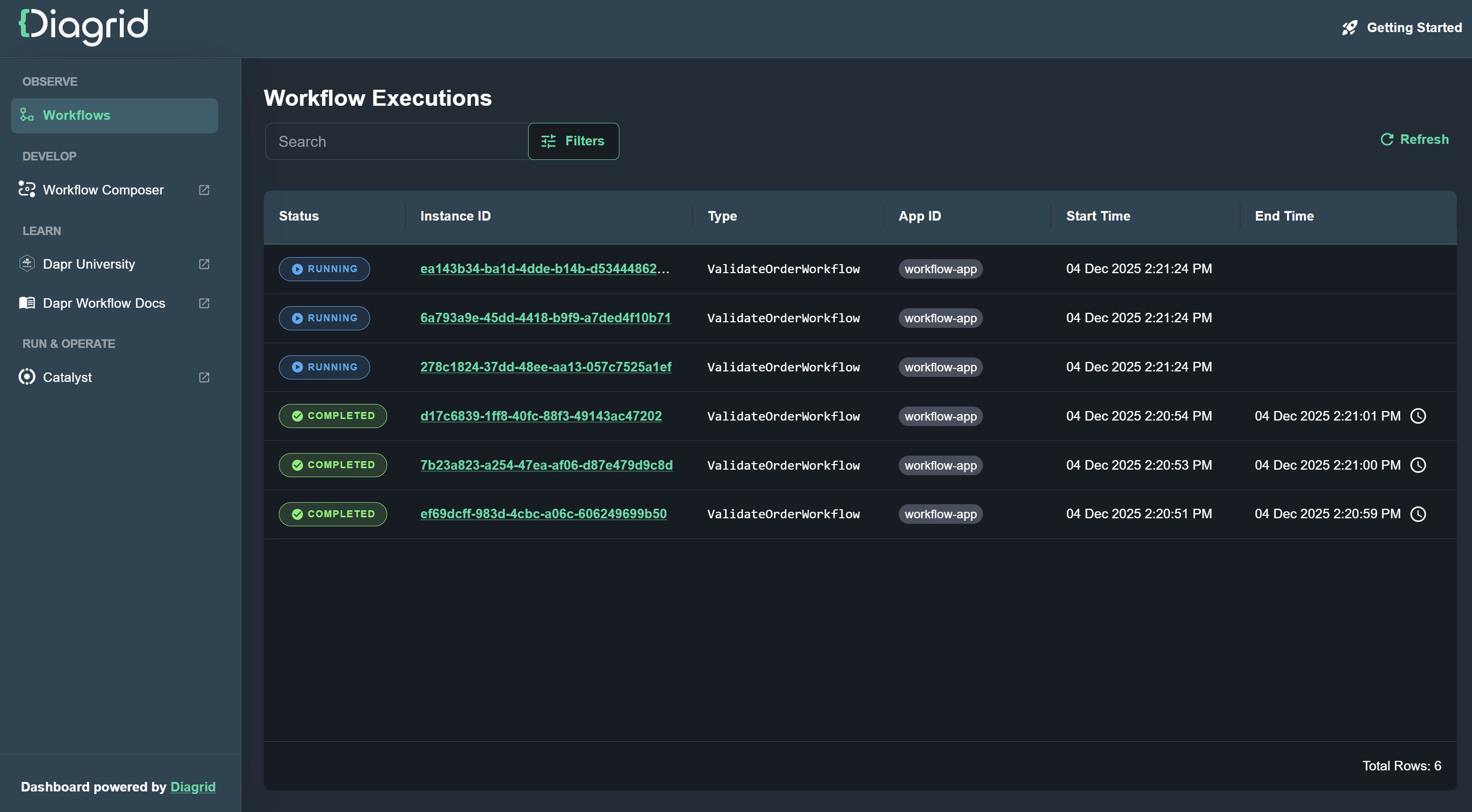
Start the Diagrid Dashboard container using Docker:
docker run -p 8080:8080 ghcr.io/diagridio/diagrid-dashboard:latest
Open the dashboard in a browser at http://localhost:8080 to explore your local workflow executions.
Inspect Conversation History with Redis Insight
Dapr uses Redis by default for state management and pub/sub messaging, which are fundamental to Dapr Agents’ agentic workflows. To inspect the Redis instance and see both conversation state for this durable agent, you can use Redis Insight.
Run Redis Insight:
docker run --rm -d --name redisinsight -p 5540:5540 redis/redisinsight:latest
Once running, access the Redis Insight interface at http://localhost:5540/.
Inside Redis Insight, you can connect to the Redis instance used by Dapr:
- Port: 6379
- Host (Linux):
172.17.0.1 - Host (Windows/Mac):
host.docker.internal(for example,host.docker.internal:6379)
Redis Insight makes it easy to inspect keys and values stored in the state stores (such as agent-memory and agent-workflow), which is useful for debugging and understanding how your durable agents behave.
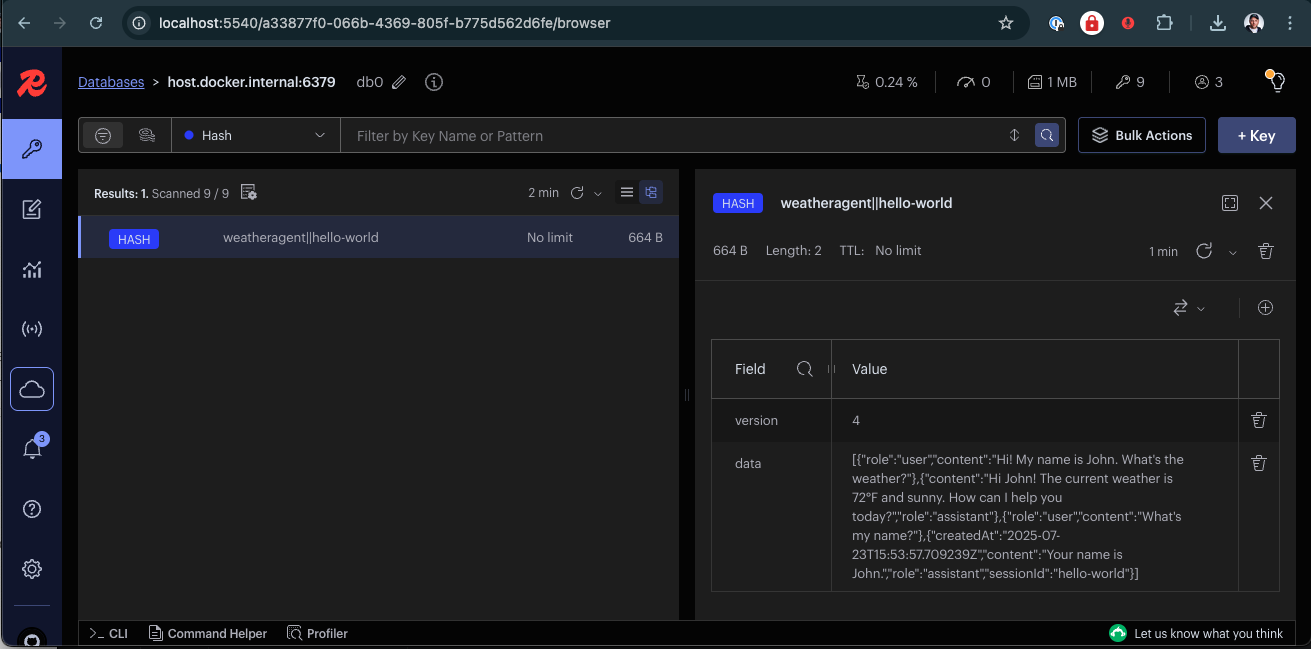
Here you can browse the state stores used by the agent (agent-memory) and explore their data.
Next Steps
Now that you have Dapr Agents installed via the quickstart, and a durable HTTP agent running end-to-end, explore more examples and patterns in the quickstarts section to learn about multi-agent workflows, pub/sub-driven agents, tracing, and deeper integration with Dapr’s building blocks.