Dapr concepts
Learn about Dapr including its main features and capabilities
Welcome to the Dapr concepts guide!
Dapr is built around durable execution: the guarantee that your code runs to completion despite crashes, restarts, and outages. At its core is a durable, verifiable workflow engine that orchestrates long-running business processes and powers durable AI agents, backed by a set of modular building blocks and pluggable components that solve the common challenges of building distributed systems.
This section explains the core ideas behind Dapr, from durable workflows, building blocks, and components to its security model, resiliency, and observability.
1 - Building blocks
Modular best practices accessible over standard HTTP or gRPC APIs
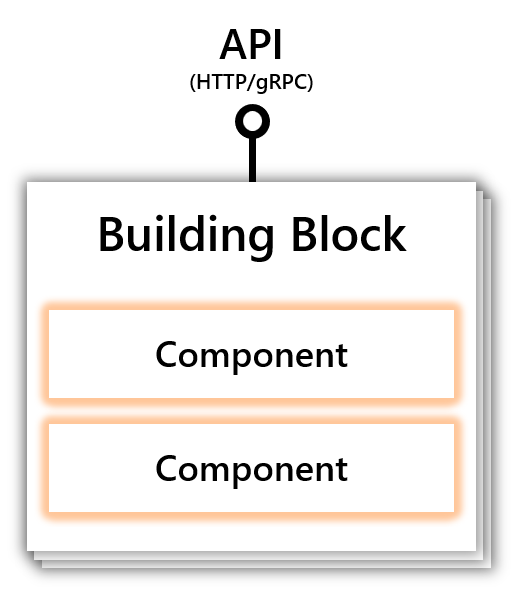
A building block is an HTTP or gRPC API that can be called from your code and uses one or more Dapr components. Dapr consists of a set of API building blocks, with extensibility to add new building blocks. Dapr’s building blocks:
- Address common challenges in building resilient, microservices applications
- Codify best practices and patterns
The diagram below shows how building blocks expose a public API that is called from your code, using components to implement the building blocks’ capability.
Dapr provides the following building blocks:
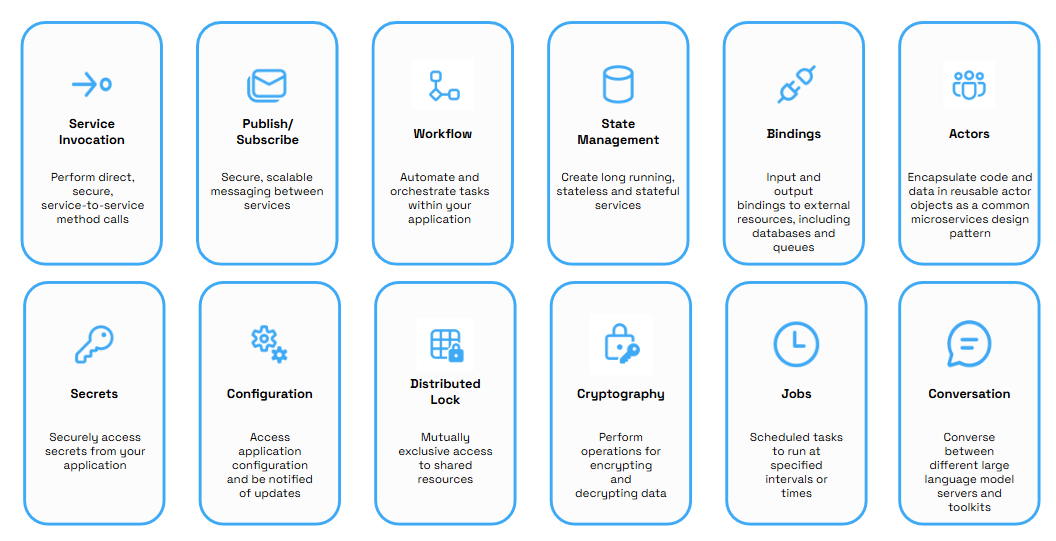
| Building Block | Endpoint | Description |
|---|
| Workflows | /v1.0/workflow | Dapr’s durable execution engine. The Workflow API enables you to define long-running, persistent processes or data flows that span multiple microservices, guaranteeing each step runs to completion despite crashes, restarts, and outages. Workflow histories can be cryptographically signed and verified, making execution tamper-evident and auditable. The Workflow API can be combined with other Dapr API building blocks. For example, a workflow can call another service with service invocation or retrieve secrets, providing flexibility and portability. |
| Service-to-service invocation | /v1.0/invoke | Service invocation enables applications to communicate with each other through well-known endpoints in the form of http or gRPC messages. Dapr provides an endpoint that acts as a combination of a reverse proxy with built-in service discovery, while leveraging built-in distributed tracing and error handling. |
| Publish and subscribe | /v1.0/publish /v1.0/subscribe | Pub/Sub is a loosely coupled messaging pattern where senders (or publishers) publish messages to a topic, to which subscribers subscribe. Dapr supports the pub/sub pattern between applications. |
| State management | /v1.0/state | Application state is anything an application wants to preserve beyond a single session. Dapr provides a key/value-based state and query APIs with pluggable state stores for persistence. |
| Bindings | /v1.0/bindings | A binding provides a bi-directional connection to an external cloud/on-premise service or system. Dapr allows you to invoke the external service through the Dapr binding API, and it allows your application to be triggered by events sent by the connected service. |
| Actors | /v1.0/actors | An actor is an isolated, independent unit of compute and state with single-threaded execution. Dapr provides an actor implementation based on the virtual actor pattern which provides a single-threaded programming model and where actors are garbage collected when not in use. |
| Secrets | /v1.0/secrets | Dapr provides a secrets building block API and integrates with secret stores such as public cloud stores, local stores and Kubernetes to store the secrets. Services can call the secrets API to retrieve secrets, for example to get a connection string to a database. |
| Configuration | /v1.0/configuration | The Configuration API enables you to retrieve and subscribe to application configuration items for supported configuration stores. This enables an application to retrieve specific configuration information, for example, at start up or when configuration changes are made in the store. |
| Distributed lock | /v1.0-alpha1/lock | The distributed lock API enables you to take a lock on a resource so that multiple instances of an application can access the resource without conflicts and provide consistency guarantees. |
| Cryptography | /v1.0-alpha1/crypto | The Cryptography API enables you to perform cryptographic operations, such as encrypting and decrypting messages, without exposing keys to your application. |
| Jobs | /v1.0/jobs | The Jobs API enables you to schedule and orchestrate jobs. Example scenarios include:- Schedule batch processing jobs to run every business day
- Schedule various maintenance scripts to perform clean-ups
- Schedule ETL jobs to run at specific times (hourly, daily) to fetch new data, process it, and update the data warehouse with the latest information.
|
| Conversation | /v1.0-alpha2/conversation | The Conversation API enables you to supply prompts to converse with different large language models (LLMs) and includes features such as prompt caching, response formatting, usage metrics, and personally identifiable information (PII) obfuscation. |
2 - Components
Modular functionality used by building blocks and applications
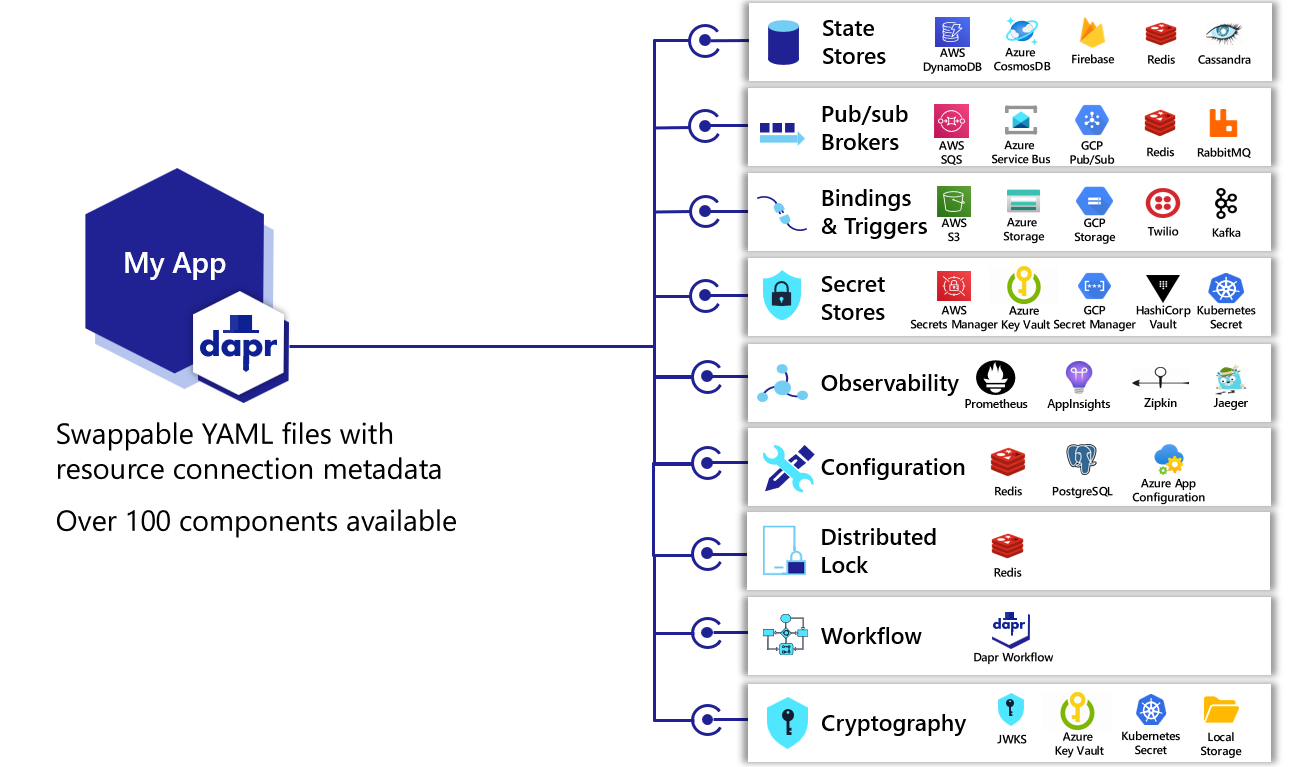
Dapr uses a modular design where functionality is delivered as a component. Each component has an interface definition. All of the components are interchangeable so that you can swap out one component with the same interface for another.
You can contribute implementations and extend Dapr’s component interfaces capabilities via:
A building block can use any combination of components. For example, the actors and the state management building blocks both use state components.
As another example, the pub/sub building block uses pub/sub components.
You can get a list of current components available in the hosting environment using the dapr components CLI command.
Note
For any component that returns data to the app, it is recommended to set the memory capacity of the Dapr sidecar accordingly (process or container) to avoid potential OOM panics. For example in Docker use the --memory option. For Kubernetes, use the dapr.io/sidecar-memory-limit annotation. For processes this depends on the OS and/or process orchestration tools.*Component specification
Each component has a specification (or spec) that it conforms to. Components are configured at design-time with a YAML file which is stored in either:
- A
components/local folder within your solution, or - Globally in the
.dapr folder created when invoking dapr init.
These YAML files adhere to the generic Dapr component schema, but each is specific to the component specification.
It is important to understand that the component spec values, particularly the spec metadata, can change between components of the same component type, for example between different state stores, and that some design-time spec values can be overridden at runtime when making requests to a component’s API. As a result, it is strongly recommended to review a component’s specs, paying particular attention to the sample payloads for requests to set the metadata used to interact with the component.
Tip
For local development, the
Dapr Dev Dashboard has a component builder that guides you through creating a component YAML file for any component type, so you don’t have to write the spec by hand. The dashboard also shows which components each running app has loaded, which helps to confirm that Dapr picked up your component files.
The diagram below shows some examples of the components for each component type
Built-in and pluggable components
Dapr has built-in components that are included as part of the runtime. These are public components that are developed and donated by the community and are available to use in every release.
Dapr also allows for users to create their own private components called pluggable components. These are components that are self-hosted (process or container), do not need to be written in Go, exist outside the Dapr runtime, and are able to “plug” into Dapr to utilize the building block APIs.
Where possible, donating built-in components to the Dapr project and community is encouraged.
However, pluggable components are ideal for scenarios where you want to create your own private components that are not included into the Dapr project.
For example:
- Your component may be specific to your company or pose IP concerns, so it cannot be included in the Dapr component repo.
- You want decouple your component updates from the Dapr release cycle.
For more information read Pluggable components overview
Hot Reloading
Since Dapr v1.18, components are “hot reloaded” at runtime by default. To opt out, disable the HotReload feature in the Dapr application configuration.
This means that you can update component configuration without restarting the Dapr runtime.
Component reloading occurs when a component resource is created, updated, or deleted, either in the Kubernetes API or in self-hosted mode when a file is changed in the resources directory.
When a component is updated, the component is first closed, and then reinitialized using the new configuration.
The component is unavailable for a short period of time during reload and reinitialization.
Hot reloading also extends to Configuration, Resiliency, and HTTPEndpoint resources.
Changes to these resource types trigger a graceful restart of the Dapr sidecar (via SIGHUP) to apply the new configuration. SIGHUP is not supported on Windows.
See Updating resources for more details.
Available component types
The following are the component types provided by Dapr:
Name resolution
Name resolution components are used with the service invocation building block to integrate with the hosting environment and provide service-to-service discovery. For example, the Kubernetes name resolution component integrates with the Kubernetes DNS service, self-hosted uses mDNS and clusters of VMs can use the Consul name resolution component.
Pub/sub brokers
Pub/sub broker components are message brokers that can pass messages to/from services as part of the publish & subscribe building block.
State stores
State store components are data stores (databases, files, memory) that store key-value pairs as part of the state management building block.
Bindings
External resources can connect to Dapr in order to trigger a method on an application or be called from an application as part of the bindings building block.
Secret stores
A secret is any piece of private information that you want to guard against unwanted access. Secrets stores are used to store secrets that can be retrieved and used in applications.
Configuration stores
Configuration stores are used to save application data, which can then be read by application instances on startup or notified of when changes occur. This allows for dynamic configuration.
Locks
Lock components are used as a distributed lock to provide mutually exclusive access to a resource such as a queue or database.
Cryptography
Cryptography components are used to perform cryptographic operations, including encrypting and decrypting messages, without exposing keys to your application.
Conversation
Dapr provides developers a way to abstract interactions with large language models (LLMs) with built-in security and reliability features. Use conversation components to send prompts to different LLMs, along with the conversation context.
Middleware
Dapr allows custom middleware to be plugged into the HTTP request processing pipeline. Middleware can perform additional actions on an HTTP request (such as authentication, encryption, and message transformation) before the request is routed to the user code, or the response is returned to the client. The middleware components are used with the service invocation building block.
Note
Since pluggable components are not required to be written in Go, they follow a different implementation process than built-in Dapr components. For more information on developing built-in components, read
developing new components.
3 - Application and control plane configuration
Change the behavior of Dapr application sidecars or globally on Dapr control plane system services
With Dapr configurations, you use settings and policies to change:
- The behavior of individual Dapr applications
- The global behavior of the Dapr control plane system services
For example, set a sampling rate policy on the application sidecar configuration to indicate which methods can be called from another application. If you set a policy on the Dapr control plane configuration, you can change the certificate renewal period for all certificates that are deployed to application sidecar instances.
Configurations are defined and deployed as a YAML file. In the following application configuration example, a tracing endpoint is set for where to send the metrics information, capturing all the sample traces.
apiVersion: dapr.io/v1alpha1
kind: Configuration
metadata:
  name: daprConfig
  namespace: default
spec:
  tracing:
    samplingRate: "1"
    zipkin:
      endpointAddress: "http://localhost:9411/api/v2/spans"
The above YAML configures tracing for metrics recording. You can load it in local self-hosted mode by either:
- Editing the default configuration file called
config.yaml file in your .dapr directory, or - Applying it to your Kubernetes cluster with
kubectl/helm.
The following example shows the Dapr control plane configuration called daprsystem in the dapr-system namespace.
apiVersion: dapr.io/v1alpha1
kind: Configuration
metadata:
  name: daprsystem
  namespace: dapr-system
spec:
  mtls:
    enabled: true
    workloadCertTTL: "24h"
    allowedClockSkew: "15m"
By default, there is a single configuration file called daprsystem installed with the Dapr control plane system services. This configuration file applies global control plane settings and is set up when Dapr is deployed to Kubernetes.
Learn more about configuration options.
When running Dapr locally, you can use the Dapr Dev Dashboard to view the configuration that each of your apps uses, which is useful to verify settings such as tracing, feature flags, and access control policies.
Important
Dapr application and control plane configurations should not be confused with the
configuration building block API, which enables applications to retrieve key/value data from configuration store components.
Next steps
Learn more about configuration4 - Resiliency
Configure policies and monitor app and sidecar health
Distributed applications are commonly comprised of many microservices, with dozens - sometimes hundreds - of instances scaling across underlying infrastructure. As these distributed solutions grow in size and complexity, the potential for system failures inevitably increases. Service instances can fail or become unresponsive due to any number of issues, including hardware failures, unexpected throughput, or application lifecycle events, such as scaling out and application restarts. Designing and implementing a self-healing solution with the ability to detect, mitigate, and respond to failure is critical.
Resiliency Policies
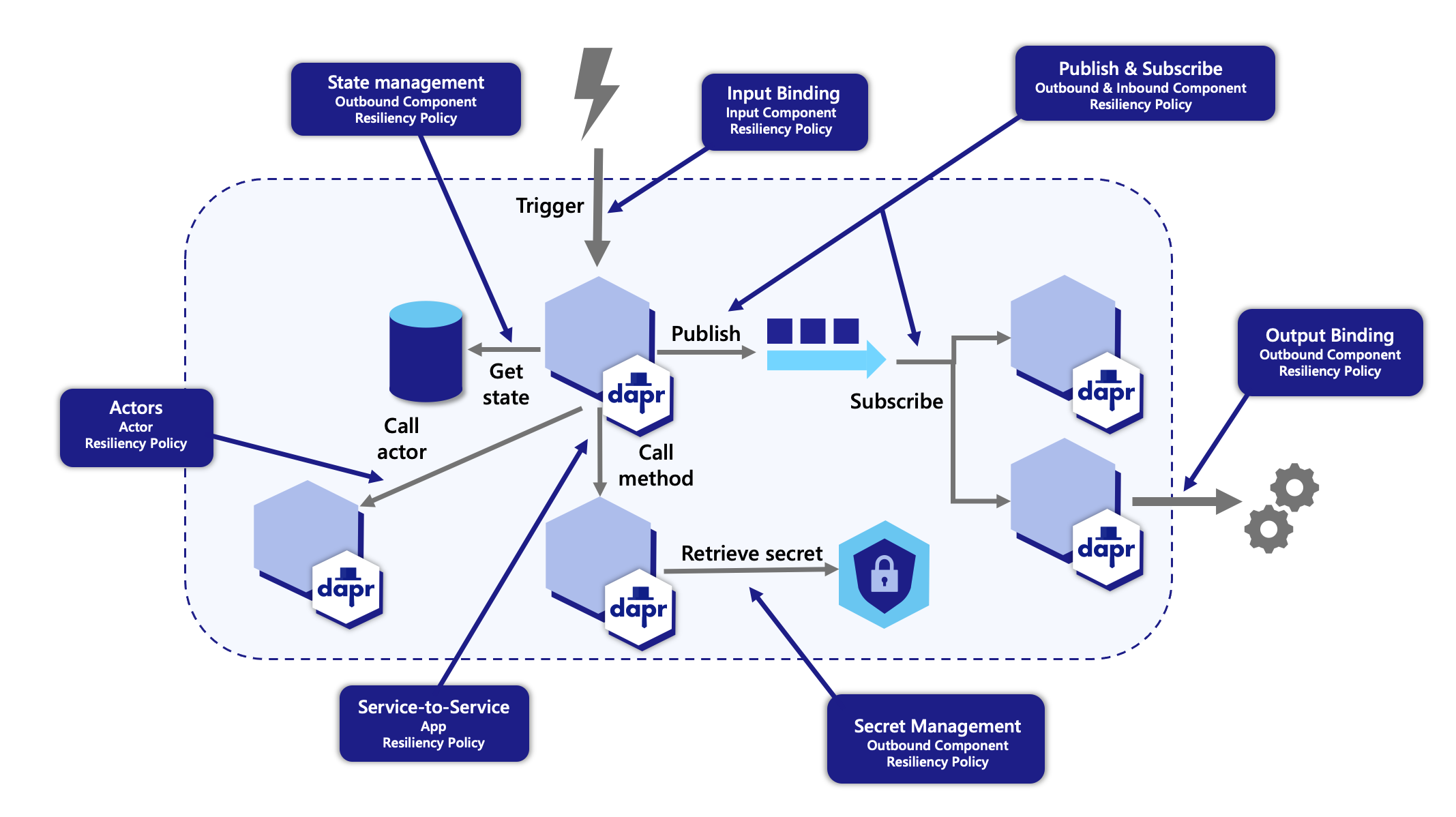
Dapr provides a capability for defining and applying fault tolerance resiliency policies to your application. You can define policies for following resiliency patterns:
- Timeouts
- Retries/back-offs
- Circuit breakers
These policies can be applied to any Dapr API calls when calling components with a resiliency spec.
App Health Checks
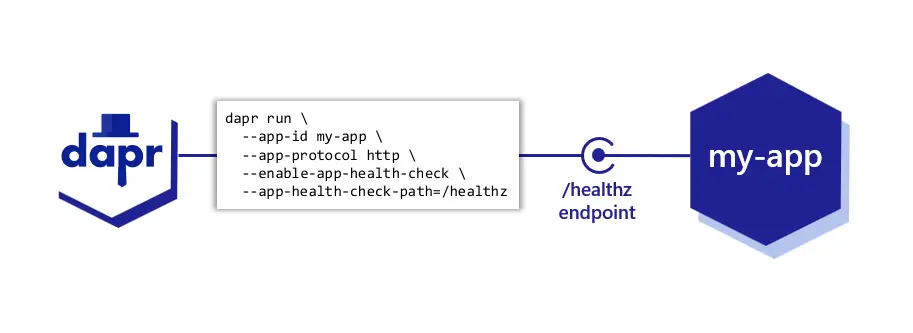
Applications can become unresponsive for a variety of reasons. For example, they are too busy to accept new work, could have crashed, or be in a deadlock state. Sometimes the condition can be transitory or persistent.
Dapr provides a capability for monitoring app health through probes that check the health of your application and react to status changes. When an unhealthy app is detected, Dapr stops accepting new work on behalf of the application.
Read more on how to apply app health checks to your application.
Sidecar Health Checks
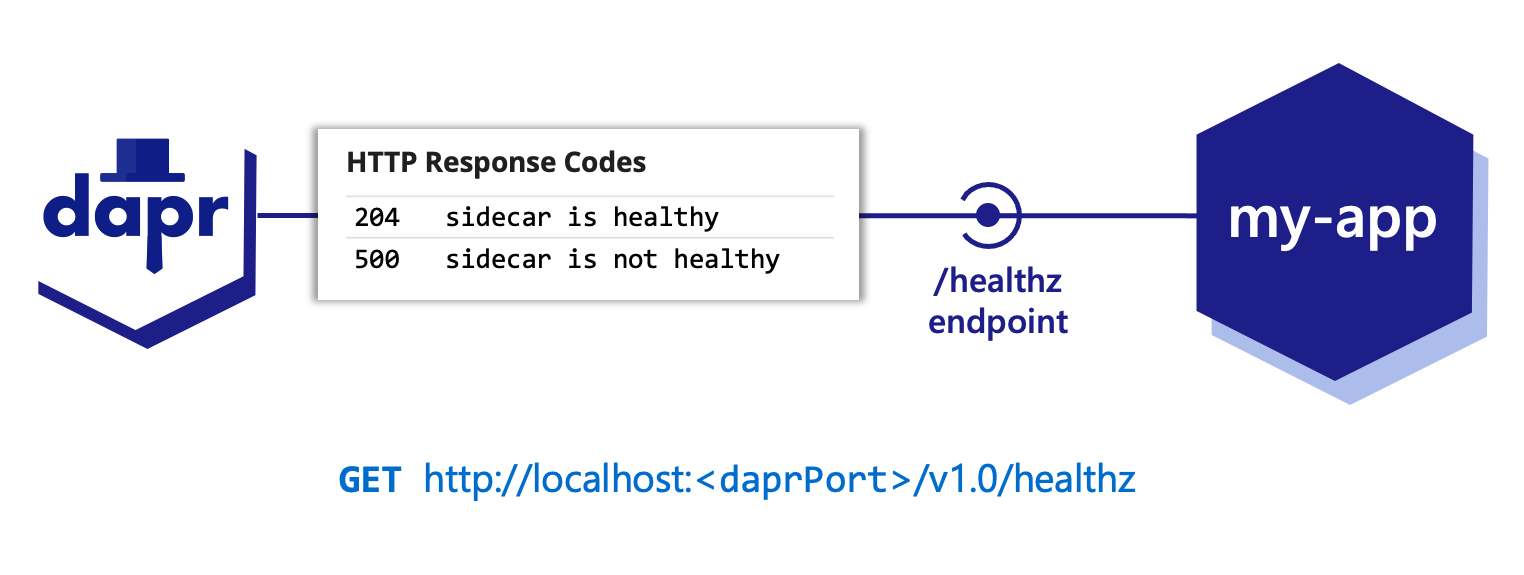
Dapr provides a way to determine its health using an HTTP /healthz endpoint. With this endpoint, the daprd process, or sidecar, can be:
- Probed for its health
- Determined for readiness and liveness
Read more on about how to apply dapr health checks to your application.
Next steps
5 - Observability
Observe applications through tracing, metrics, logs and health
When building an application, understanding the system behavior is an important, yet challenging part of operating it, such as:
- Observing the internal calls of an application
- Gauging its performance
- Becoming aware of problems as soon as they occur
This can be particularly challenging for a distributed system comprised of multiple microservices, where a flow made of several calls may start in one microservice and continue in another.
Observability into your application is critical in production environments, and can be useful during development to:
- Understand bottlenecks
- Improve performance
- Perform basic debugging across the span of microservices
While some data points about an application can be gathered from the underlying infrastructure (memory consumption, CPU usage), other meaningful information must be collected from an “application-aware” layer – one that can show how an important series of calls is executed across microservices. Typically, you’d add some code to instrument an application, which simply sends collected data (such as traces and metrics) to observability tools or services that can help store, visualize, and analyze all this information.
Maintaining this instrumentation code, which is not part of the core logic of the application, requires understanding the observability tools’ APIs, using additional SDKs, etc. This instrumentation may also present portability challenges for your application, requiring different instrumentation depending on where the application is deployed. For example:
- Different cloud providers offer different observability tools
- An on-premises deployment might require a self-hosted solution
Observability for your application with Dapr
When you leverage Dapr API building blocks to perform service-to-service calls, pub/sub messaging, and other APIs, Dapr offers an advantage with respect to distributed tracing. Since this inter-service communication flows through the Dapr runtime (or “sidecar”), Dapr is in a unique position to offload the burden of application-level instrumentation.
Distributed tracing
Dapr can be configured to emit tracing data using the widely adopted protocols of Open Telemetry (OTEL) and Zipkin. This makes it easily integrated with multiple observability tools.
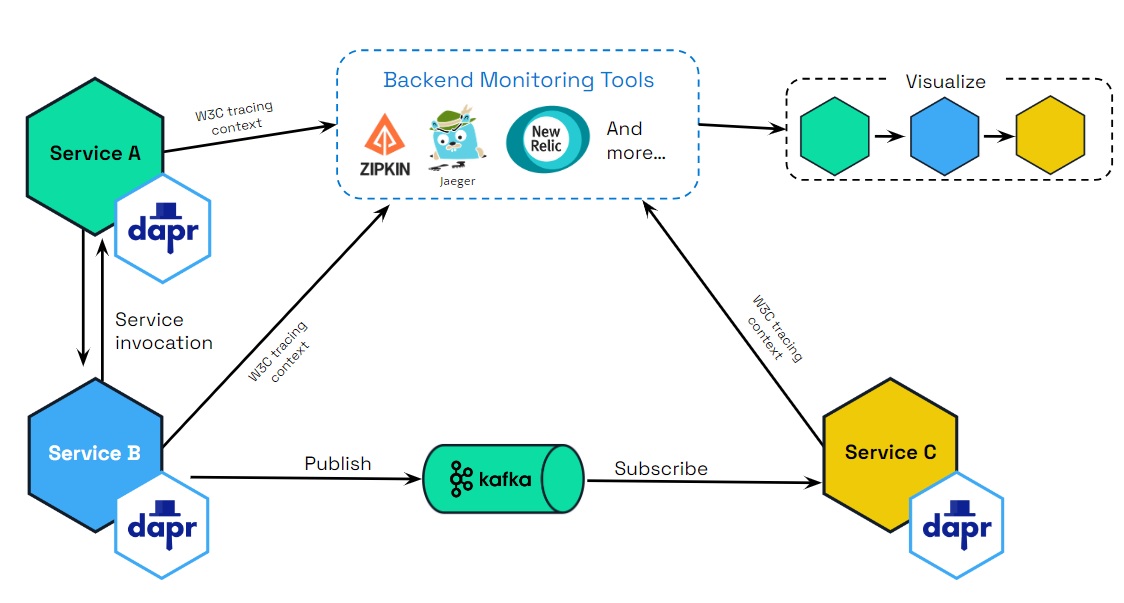
Automatic tracing context generation
Dapr uses the W3C tracing specification for tracing context, included as part Open Telemetry (OTEL), to generate and propagate the context header for the application or propagate user-provided context headers. This means that you get tracing by default with Dapr.
Observability for the Dapr sidecar and control plane
You can also observe Dapr itself, by:
- Generating logs emitted by the Dapr sidecar and the Dapr control plane services
- Collecting metrics on performance, throughput, and latency
- Using health endpoints probes to indicate the Dapr sidecar health status
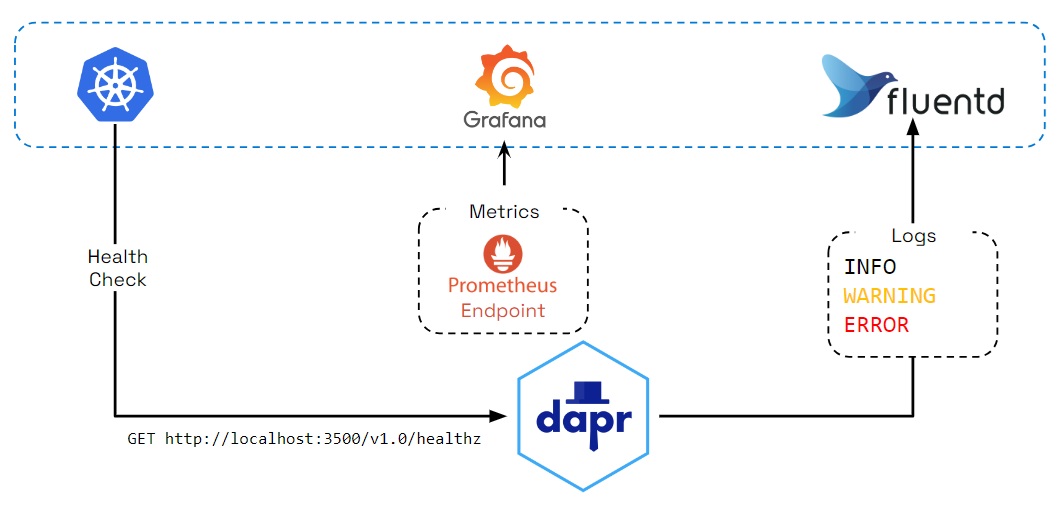
Logging
Dapr generates logs to:
- Provide visibility into sidecar operation
- Help users identify issues and perform debugging
Log events contain warning, error, info, and debug messages produced by Dapr system services. You can also configure Dapr to send logs to collectors, such as Open Telemetry Collector, Fluentd, New Relic, Azure Monitor, and other observability tools, so that logs can be searched and analyzed to provide insights.
Metrics
Metrics are a series of measured values and counts collected and stored over time. Dapr metrics provide monitoring capabilities to understand the behavior of the Dapr sidecar and control plane. For example, the metrics between a Dapr sidecar and the user application show call latency, traffic failures, error rates of requests, etc.
Dapr control plane metrics show sidecar injection failures and the health of control plane services, including CPU usage, number of actor placements made, etc.
Health checks
The Dapr sidecar exposes an HTTP endpoint for health checks. With this API, user code or hosting environments can probe the Dapr sidecar to determine its status and identify issues with sidecar readiness.
Conversely, Dapr can be configured to probe for the health of your application, and react to changes in the app’s health, including stopping pub/sub subscriptions and short-circuiting service invocation calls.
Next steps
6 - Security
How Dapr is designed with security in mind
Security is fundamental to Dapr. This article describes the security features and capabilities when using Dapr in a distributed application. These can be divided into:
- Secure communication with service invocation and pub/sub APIs.
- Security policies on components and applied through configuration.
- Operational security practices.
- State security, focusing on data at rest.
An example application is used to illustrate many of the security features available in Dapr.
Secure communication
Dapr provides end-to-end security with the service invocation API, with the ability to authenticate an application with Dapr and set endpoint access policies. This is shown in the diagram below.
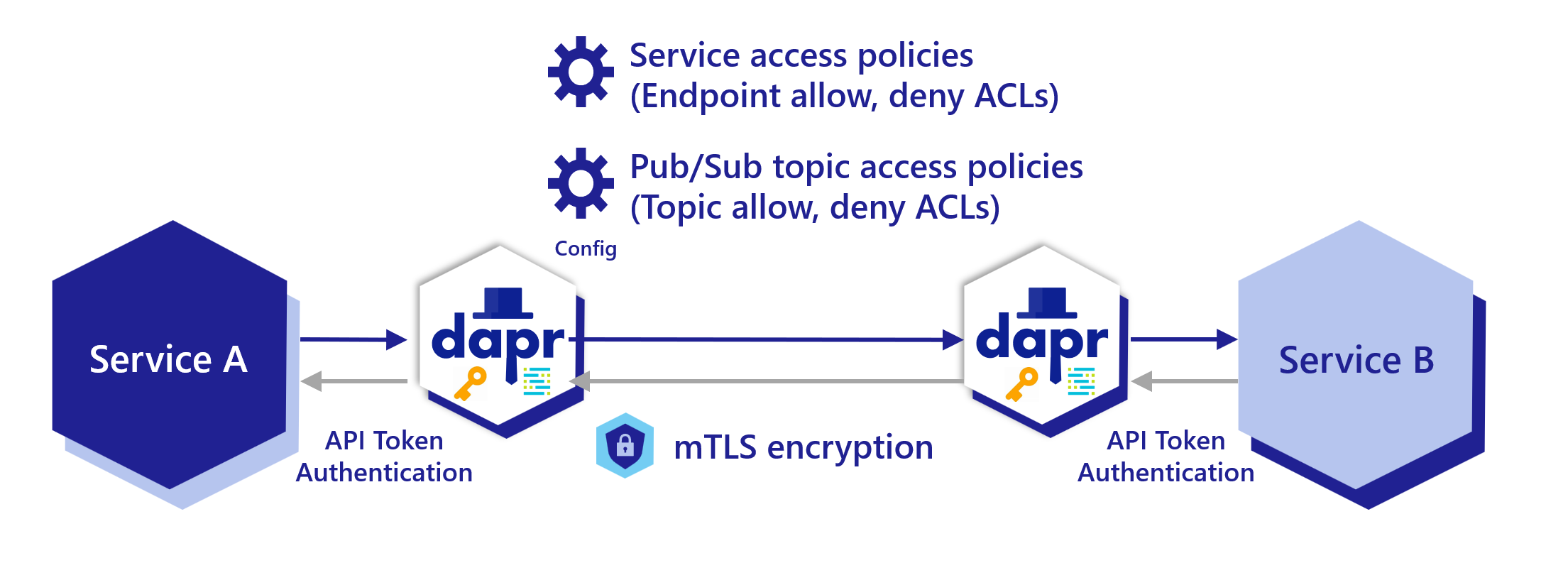
Application Identity
In Dapr, Application Identity is built around the concept of an App ID.
The App ID is the single atomic unit of identity in Dapr:
- Every Dapr-enabled application has an App ID. Multiple replicas of the application share the same App ID.
- All routing, service discovery, security policies, and access control in Dapr are derived from this App ID.
- Service-to-service communication in Dapr uses the App ID instead of relying on IP addresses or hostnames, enabling stable and portable addressing across environments.
For example, when one service calls another using Dapr’s service invocation API, it calls the target by its App ID rather than its network location.
This abstraction ensures that security policies, mutual TLS (mTLS) certificates, and access controls consistently apply at the application identity level.
Namespaces and Scoping
While App IDs uniquely identify applications, namespaces provide an additional layer of scoping and isolation, especially in multi-tenant or large environments.
- Namespaces allow operators to deploy Dapr applications in logically separated groups.
- Two applications can have the same App ID in different namespaces without conflicting because security, routing, and discovery are namespace-aware.
Service invocation scoping access policy
Dapr applications can be scoped to namespaces for deployment and security. You can call between services deployed to different namespaces. Read the Service invocation across namespaces article for more details.
Dapr applications can restrict which operations can be called, including which applications are allowed (or denied) to call it. Read How-To: Apply access control list configuration for service invocation for more details.
Pub/sub topic scoping access policy
For pub/sub components, you can limit which topic types and applications are allowed to publish and subscribe to specific topics. Read Scope Pub/Sub topic access for more details.
Encryption of data using mTLS
One of Dapr’s security mechanisms for encrypting data in transit is mutual authentication TLS or mTLS. mTLS offers a few key features for network traffic inside your application:
- Two way authentication, with the client proving its identity to the server, and vice-versa.
- An encrypted channel for all in-flight communication, after two-way authentication is established.
mTLS is useful in almost all scenarios, but especially for systems subject to regulations such as HIPAA and PCI.
Secure Dapr to Dapr communication
Dapr enables mTLS with no extra code or complex configuration inside your production systems. Equally, Dapr sidecars prevent all IP addresses by default other than localhost from calling it, unless explicitly listed.
Dapr includes an “on by default”, automatic mTLS that provides in-transit encryption for traffic between Dapr sidecars. To achieve this, Dapr leverages a system service named Sentry, which acts as a Certificate Authority (CA)/Identity Provider and signs workload (app) certificate requests originating from the Dapr sidecar.
By default, a workload certificate is valid for 24 hours and the clock skew is set to 15 minutes.
Unless you’ve provided existing root certificates, the Sentry service automatically creates and persists self-signed root certificates valid for one year. Dapr manages workload certificate rotation; if you bring your own certificates, Dapr does so with zero downtime to the application.
When root certificates are replaced (secret in Kubernetes mode and filesystem for self-hosted mode), Sentry picks them up and rebuilds the trust chain, without restart and with zero downtime to Sentry.
When a new Dapr sidecar initializes, it checks if mTLS is enabled. If so, a private key and certificate signing request are generated and sent to Sentry via a gRPC interface. The communication between the Dapr sidecar and Sentry is authenticated using the trust chain certificate, which is injected into each Dapr instance by the Dapr Sidecar Injector system service.
Workload identity key algorithm
Starting with Dapr 1.18, Sentry generates workload identity keys using Ed25519 instead of ECDSA P-256.
| Scope | Algorithm (pre-1.18) | Algorithm (1.18+) |
|---|
| Root CA and issuer CA keys | ECDSA P-256 (ECDSAWithSHA256) | Ed25519 (PureEd25519) |
| Workload (sidecar) X.509 certificates | ECDSA P-256 | Ed25519 |
| Injector / Operator webhook serving certs | ECDSA P-256 | RSA (intentional — see below) |
| JWT / OIDC signing | RSA-2048 | RSA-2048 (unchanged) |
Why Ed25519? Ed25519 keys are smaller than P-256 (32-byte private key; 32-byte public key vs. 65 bytes uncompressed for P-256), signatures are 64 bytes (vs. ~72 bytes for P-256 DER), signing and verification are faster, and the curve design eliminates several known side-channel attack surfaces.
What stays RSA? The Dapr injector and operator use RSA keys for their webhook serving certificates. Some managed Kubernetes distributions (including certain versions of GKE, EKS, and AKS) reject Ed25519 TLS certificates on admission webhook endpoints. RSA is retained there to ensure the sidecar injector and CRD conversion webhook remain reachable on all target environments. See dapr/dapr#9873 for details.
JWT signing remains RSA-2048 for compatibility with cloud provider OIDC implementations, which have broad RSA support but inconsistent Ed25519 support.
Mixed-version rolling upgrades are fully supported. Sentry signs workload CSRs from any algorithm client — the signature algorithm on the issued cert is determined by Sentry’s issuer key, not the CSR. A 1.17.x sidecar submitting an ECDSA CSR receives an Ed25519-signed workload cert from a 1.18 Sentry during a rolling upgrade.
FIPS / regulated environments
Ed25519 (Curve25519) may not satisfy FIPS 140 requirements; consult your compliance scope. FIPS 140-2 does not include Ed25519. FIPS 140-3 has provisional EdDSA support but approval status varies by module and jurisdiction. If your environment requires FIPS 140 compliance, supply your own root and issuer certificates generated with an approved algorithm (RSA or ECDSA P-256/P-384) using the
bring-your-own-certificates path. When you bring your own CA, Sentry signs workload CSRs using the algorithm of the issuer key you provide, not Ed25519.
Downgrade floor: 1.17.7
Sentry writes the Ed25519-keyed CA bundle to the
dapr-trust-bundle Kubernetes secret. Sentry versions
before 1.17.7 cannot parse this bundle and crash on startup. Do not roll back from 1.18 to a version earlier than 1.17.7 without first rotating the CA. See the
1.18 release notes for the safe rollback path.
Configuring mTLS
mTLS can be turned on/off by editing the default configuration deployed with Dapr via the spec.mtls.enabled field.
You can do this for both Kubernetes and self-hosted modes.
mTLS in self hosted mode
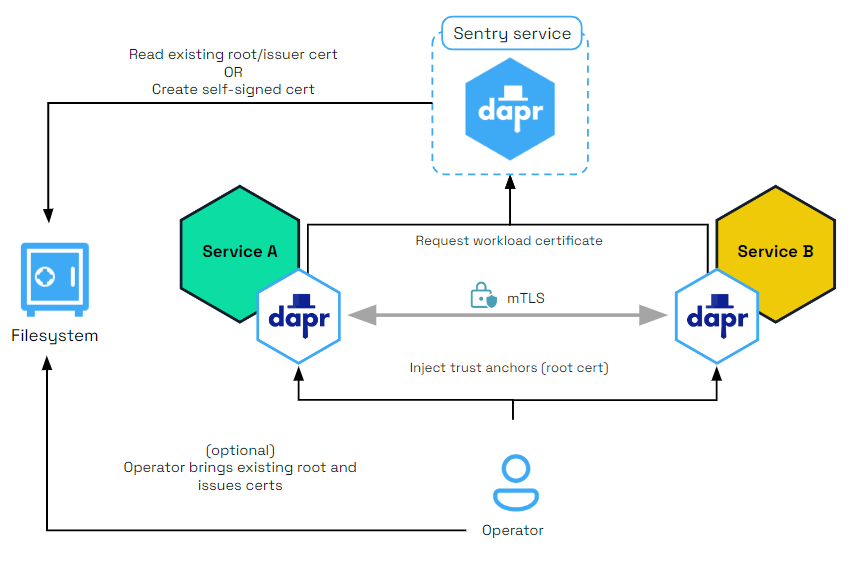
The diagram below shows how the Sentry system service issues certificates for applications based on the root/issuer certificate provided by an operator or generated by the Sentry service as stored in a file.
mTLS in Kubernetes mode
In a Kubernetes cluster, the secret that holds the root certificates is:
- Scoped to the namespace in which the Dapr components are deployed.
- Only accessible by the Dapr control plane system pods.
Dapr also supports strong identities when deployed on Kubernetes, relying on a pod’s Service Account token sent as part of the certificate signing request (CSR) to Sentry.
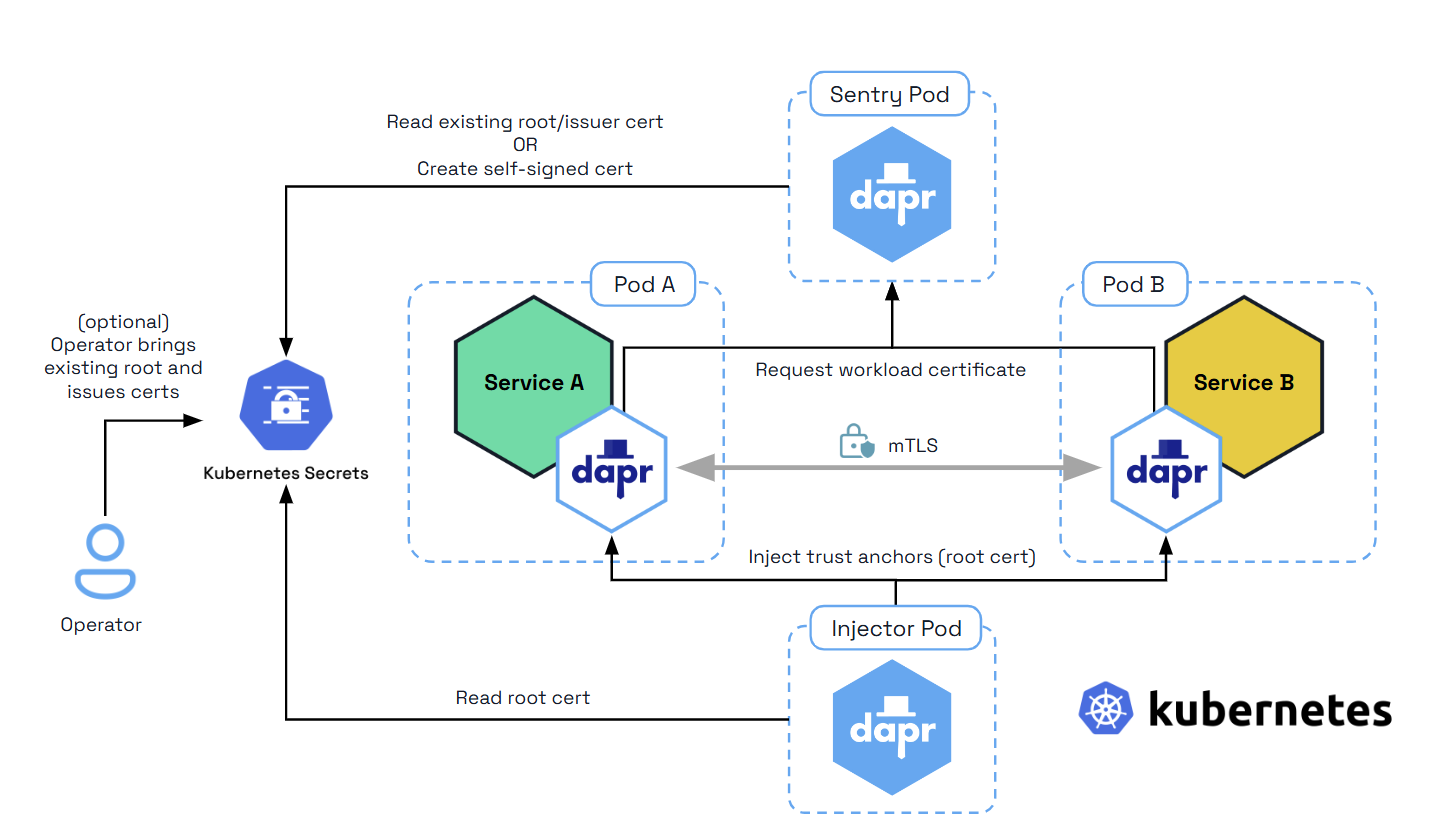
The diagram below shows how the Sentry system service issues certificates for applications based on the root/issuer certificate provided by an operator or generated by the Sentry service and stored as a Kubernetes secret
Preventing IP addresses on Dapr
To prevent Dapr sidecars from being called on any IP address (especially in production environments such as Kubernetes), Dapr restricts its listening IP addresses to localhost. Use the dapr-listen-addresses setting if you need to enable access from external addresses.
Secure Dapr to application communication
The Dapr sidecar runs close to the application through localhost, and is recommended to run under the same network boundary as the app. While many cloud-native systems today consider the pod level (on Kubernetes, for example) as a trusted security boundary, Dapr provides the app with API level authentication using tokens. This feature guarantees that, even on localhost:
- Only an authenticated application may call into Dapr
- An application can check that Dapr is calling it back
For more details on configuring API token security, read:
Secure Dapr to control plane communication
In addition to automatic mTLS between Dapr sidecars, Dapr offers mandatory mTLS between:
- The Dapr sidecar
- The Dapr control plane system services, namely:
- The Sentry service (a Certificate Authority)
- The Placement service (actor placement)
- The Kubernetes Operator service
When mTLS is enabled, Sentry writes the root and issuer certificates to a Kubernetes secret scoped to the namespace where the control plane is installed. In self-hosted mode, Sentry writes the certificates to a configurable file system path.
In Kubernetes, when Dapr system services start, they automatically mount and use the secret containing the root and issuer certs to secure the gRPC server used by the Dapr sidecar. In self-hosted mode, each system service can be mounted to a filesystem path to get the credentials.
When the Dapr sidecar initializes, it authenticates with the system pods using the mounted leaf certificates and issuer private key. These are mounted as environment variables on the sidecar container.
mTLS to system services in Kubernetes
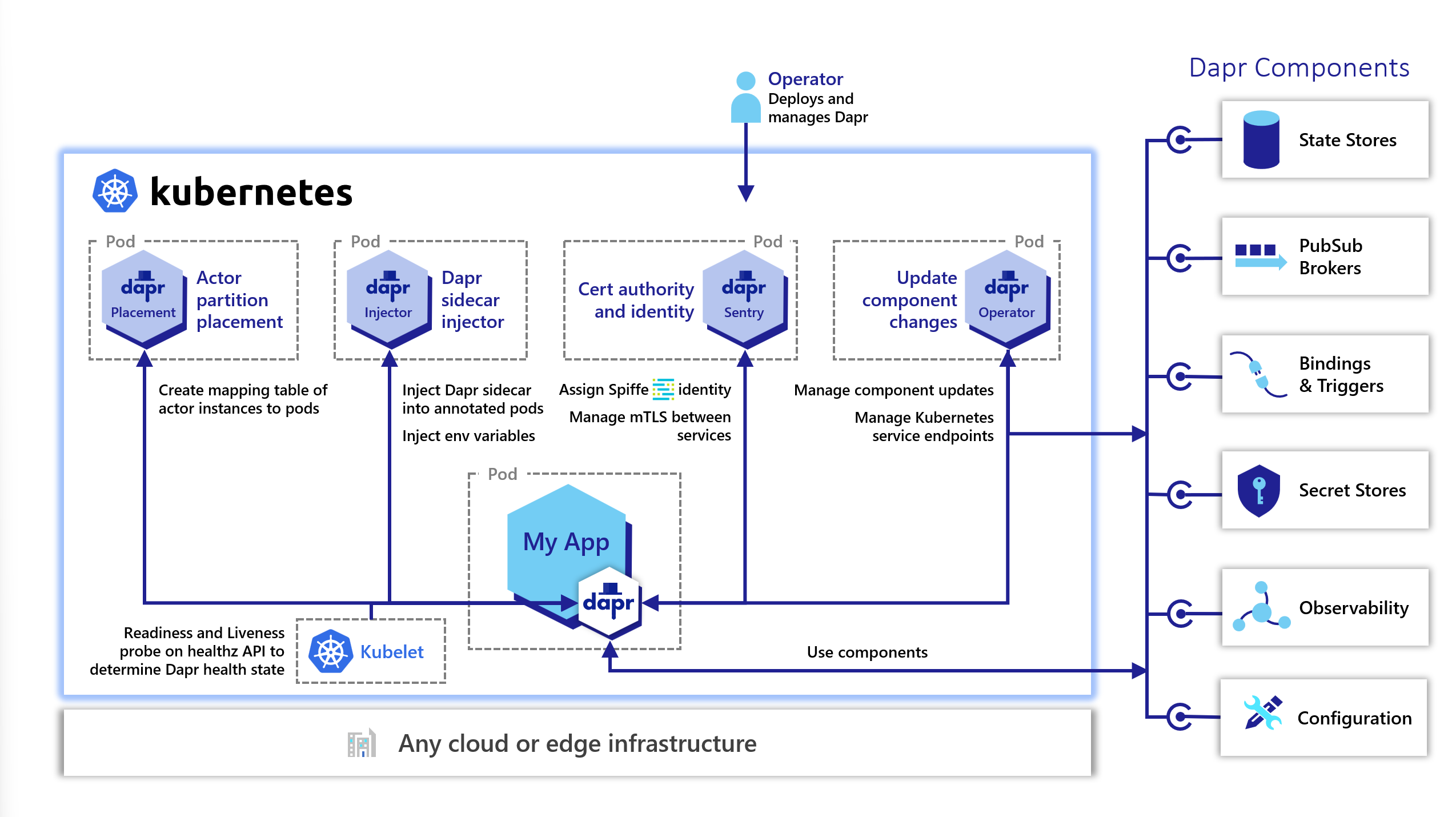
The diagram below shows secure communication between the Dapr sidecar and the Dapr Sentry (Certificate Authority), Placement (actor placement), and the Kubernetes Operator system services.
Operational Security
Dapr is designed for operators to manage mTLS certificates and enforce OAuth policies.
mTLS Certificate deployment and rotation
While operators and developers can bring their own certificates into Dapr, Dapr automatically creates and persists self-signed root and issuer certificates. Read Setup & configure mTLS certificates for more details.
Middleware endpoint authorization with OAuth
With Dapr OAuth 2.0 middleware, you can enable OAuth authorization on Dapr endpoints for your APIs. Read Configure endpoint authorization with OAuth for details. Dapr has other middleware components that you can use for OpenID Connect and OPA Policies. For more details, read about supported middleware.
Network security
You can adopt common network security technologies, such as network security groups (NSGs), demilitarized zones (DMZs), and firewalls, to provide layers of protection over your networked resources. For example, unless configured to talk to an external binding target, Dapr sidecars don’t open connections to the internet and most binding implementations only use outbound connections. You can design your firewall rules to allow outbound connections only through designated ports.
Run as non-root in Kubernetes
When running in Kubernetes, Dapr services ensure each process is running as non-root. This is done by checking the UID & GID of the process is 65532, and fatal erroring if it is not what is expected. If you must run a non-default UID & GID in Kubernetes, set the following env var to skip this check.
DAPR_UNSAFE_SKIP_CONTAINER_UID_GID_CHECK="true"
Security policies
Dapr has an extensive set of security policies you can apply to your applications. You can scope what they are able to do, either through a policy setting in the sidecar configuration, or with the component specification.
API access policy
In certain scenarios, such as with zero trust networks or when exposing the Dapr sidecar to external traffic through a frontend, it’s recommended to only enable the Dapr sidecar APIs currently used by the app. This reduces the attack surface and keeps the Dapr APIs scoped to the actual needs of the application. You can control which APIs are accessible to the application by setting an API allow list in configuration, as shown in the diagram below.
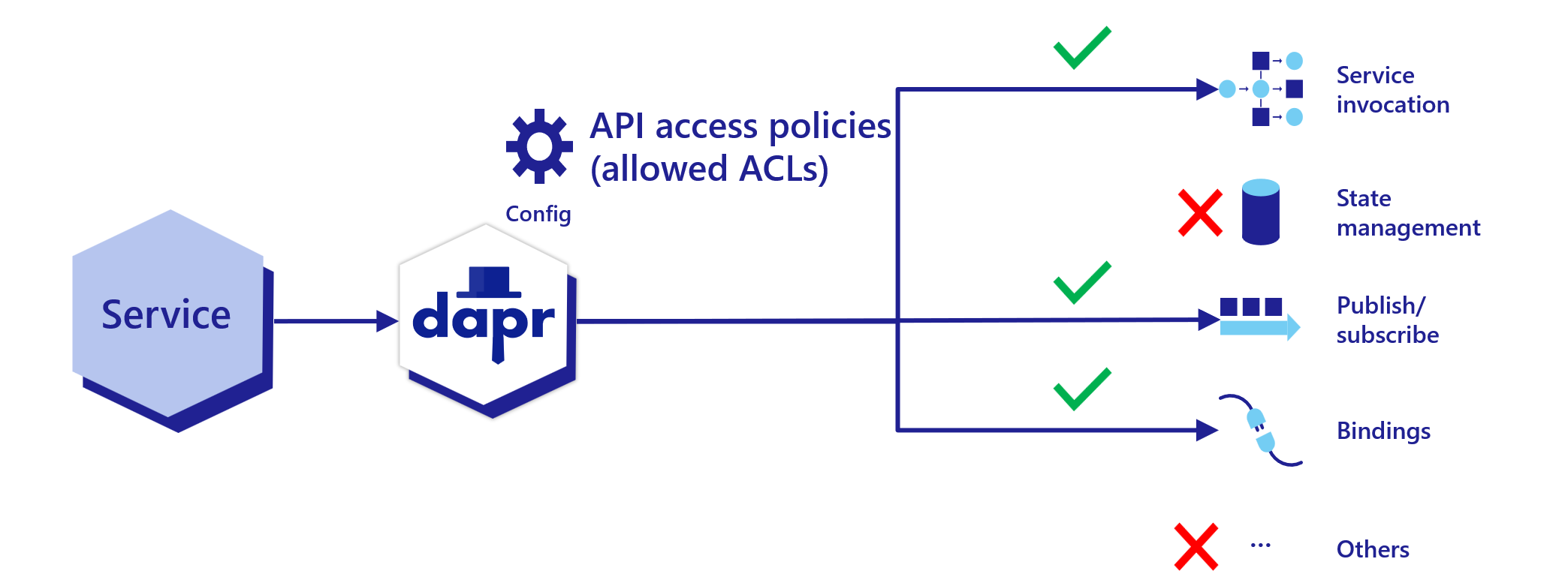
Read How-To: Selectively enable Dapr APIs on the Dapr sidecar for more details.
Secret scoping access policy
To limit the Dapr application’s access to secrets, you can define secret scopes. Add a secret scope policy to the application configuration with restrictive permissions. Read How To: Use secret scoping for more details.
Component application scoping access policy and secret usage
Dapr components can be namespaced. That means a Dapr sidecar instance can only access the components that have been deployed to the same namespace. Read How-To: Scope components to one or more applications using namespaces for more details.
Dapr provides application-level scoping for components by allowing you to specify which applications can consume specific components and deny others. Read restricting application access to components with scopes for more details.
Dapr components can use Dapr’s built-in secret management capability to manage secrets. Read the secret store overview and How-To: Reference secrets in components for more details.
Workflow access control
Dapr supports fine-grained access control for cross-app workflow and activity scheduling through the WorkflowAccessPolicy resource. A workflow access policy restricts which calling applications can schedule specific workflows and activities on a target application.
Workflow access policies are enforced on the callee side as a pure allow-list. For cross-app requests, the caller’s identity is taken from the SPIFFE identity embedded in the mTLS certificate, so mTLS must be active for cross-app enforcement. Self-calls (where the caller and target are the same app) are always permitted. Policies support glob pattern matching for workflow and activity names.
Read How-To: Apply workflow access policies for configuration details and examples.
Bindings security
Authentication with a binding target is configured by the binding’s configuration file. Generally, you should configure the minimum required access rights. For example, if you only read from a binding target, you should configure the binding to use an account with read-only access rights.
State security
State store encryption at rest
By default Dapr doesn’t transform the state data from applications. This means:
- Dapr doesn’t attempt to encrypt/decrypt state data
- Your application can adopt encryption/decryption methods of your choice, where the state data remains opaque to Dapr.
Dapr components can use a configured authentication method to authenticate with the underlying state store. Many state store implementations use official client libraries that generally use secured communication channels with the servers.
However, application state often needs to get encrypted at rest to provide stronger security in enterprise workloads or regulated environments. Dapr provides automatic client-side state encryption based on AES256. Read How-To: Encrypt application state for more details.
Dapr Runtime state
The Dapr runtime does not store any data at rest, meaning that Dapr runtime has no dependency on any state stores for its operation and can be considered stateless.
Using security capabilities in an example application
The diagram below shows a number of security capabilities placed in an example application hosted on Kubernetes. In the example, the Dapr control plane, the Redis state store, and each of the services have been deployed to their own namespaces. When deploying on Kubernetes, you can use regular Kubernetes RBAC to control access to management activities.
In the application, requests are received by the ingress reverse-proxy which has a Dapr sidecar running next to it. From the reverse proxy, Dapr uses service invocation to call onto Service A, which then publishes a message to Service B. Service B retrieves a secret in order to read and save state to a Redis state store.
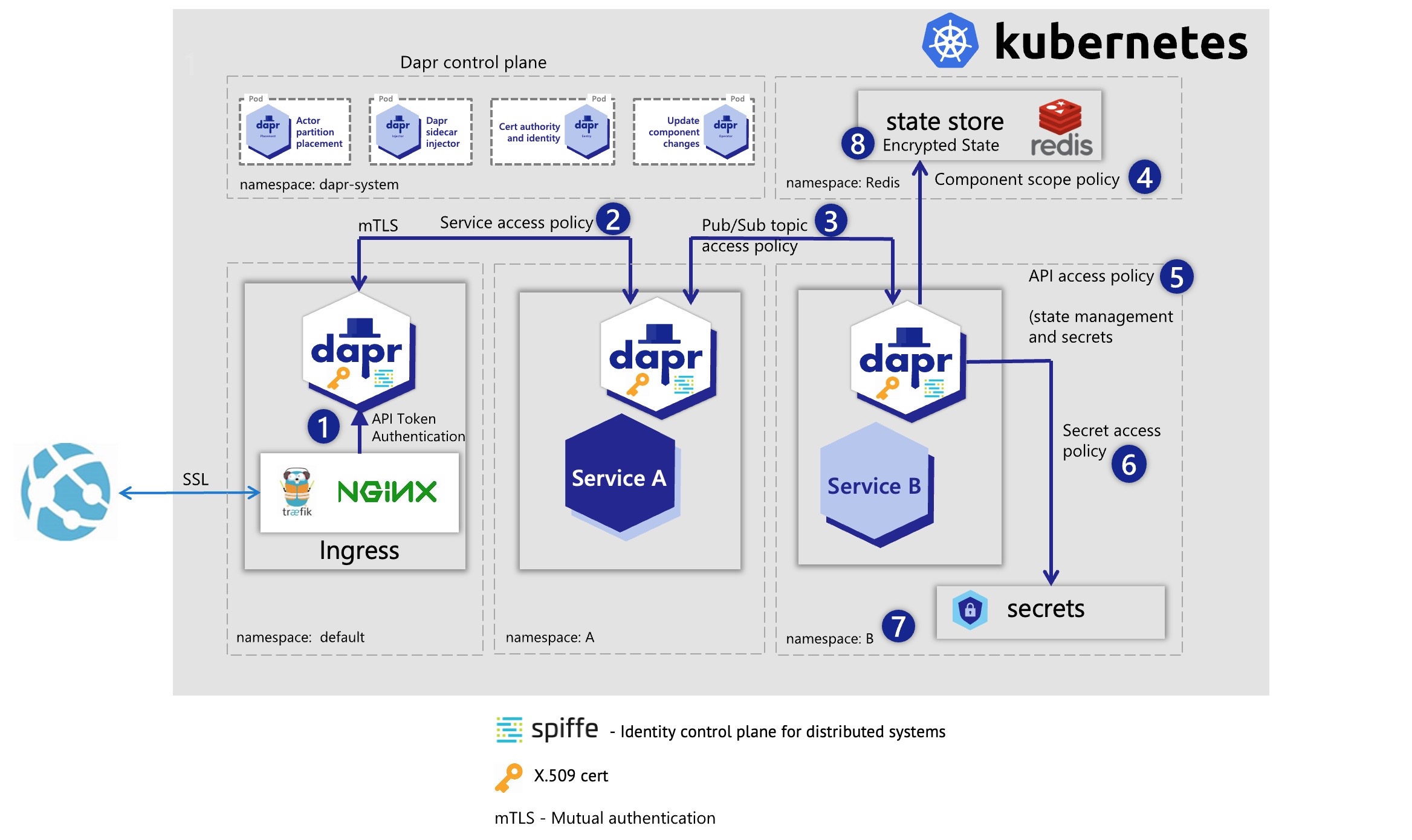
Let’s go over each of the security capabilities and describe how they are protecting this application.
- API Token authentication ensures the reverse-proxy knows it is communicating with the correct Dapr sidecar instance. This prevents forwarding messages to anything except this Dapr sidecar.
- Service invocation mTLS is used for authentication between the reverse proxy and Service A. A service access policy configured on Service A restricts it to only receive calls on a specific endpoint from the reverse proxy and no other services.
- Service B uses a pub/sub topic security policy to indicate it can only receive messages published from Service A.
- The Redis component definition uses a component scoping security policy to say only Service B is allowed to call it.
- Service B restricts the Dapr sidecar to only use the pub/sub, state management, and secrets APIs. All other API calls (for example, service invocation) would fail.
- A secrets security policy set in configuration restricts which secrets Service B can access. In this case, Service B can only read the secret needed to connect to the Redis state store component, and no others.
- Service B is deployed to namespace “B”, which further isolates it from other services. Even if the service invocation API was enabled on it, it could not be called accidentally by being in the same namespace as Service A. Service B must explicitly set the Redis Host namespace in its component YAML file to call onto the “Redis” namespace, otherwise this call also fails.
- The data in the Redis state store is encrypted at rest and can only be read using the correctly configured Dapr Redis state store component.
Threat model
Threat modeling is a process by which:
- Potential threats, like structural vulnerabilities or the absence of appropriate safeguards, can be identified and enumerated.
- Mitigation can be prioritized.
The Dapr threat model is below.
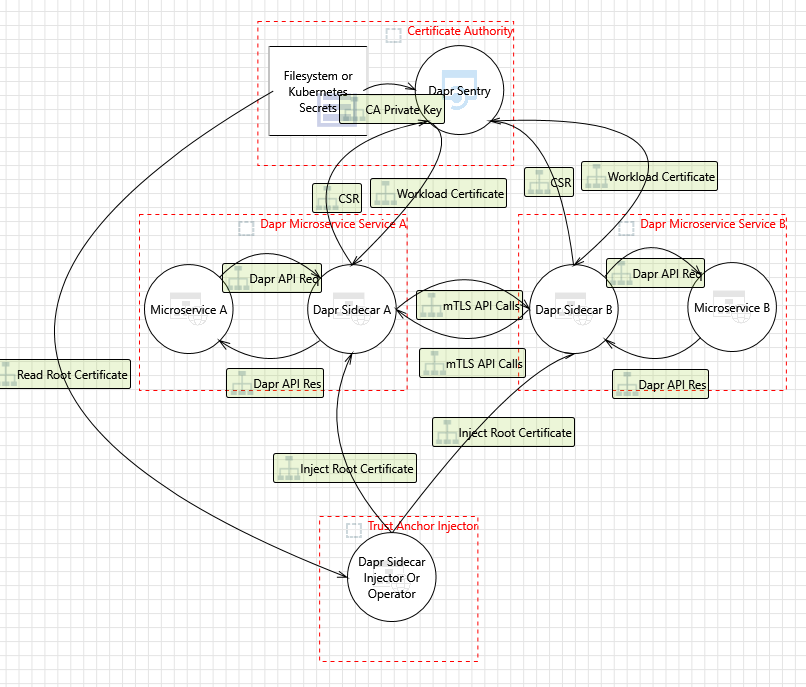
Security audit
September 2023
In September 2023, Dapr completed a security audit done by Ada Logics.
The audit was a holistic security audit with the following goals:
- Formalize a threat model of Dapr
- Perform manual code review
- Evaluate Dapr’s fuzzing suite against the formalized threat model
- Carry out a SLSA review of Dapr.
You can find the full report here.
The audit found 7 issues none of which were of high or critical severity. One CVE was assigned from an issue in a 3rd-party dependency to Dapr Components Contrib
June 2023
In June 2023, Dapr completed a fuzzing audit done by Ada Logics.
The audit achieved the following:
- OSS-Fuzz integration
- 39 new fuzzers for Dapr
- Fuzz test coverage for Dapr Runtime, Kit and Components-contrib
- All fuzzers running continuously after the audit has completed
You can find the full report here.
3 issues were found during the audit.
February 2021
In February 2021, Dapr went through a 2nd security audit targeting its 1.0 release by Cure53.
The test focused on the following:
- Dapr runtime codebase evaluation since last audit
- Access control lists
- Secrets management
- Penetration testing
- Validating fixes for previous high/medium issues
You can find the full report here.
One high issue was detected and fixed during the test.
As of February 16, 2021, Dapr has 0 criticals, 0 highs, 0 mediums, 2 lows, 2 infos.
June 2020
In June 2020, Dapr underwent a security audit from Cure53, a CNCF-approved cybersecurity firm.
The test focused on the following:
- Dapr runtime codebase evaluation
- Dapr components codebase evaluation
- Dapr CLI codebase evaluation
- Privilege escalation
- Traffic spoofing
- Secrets management
- RBAC
- Validating base assumptions: mTLS, scopes, API authentication
- Orchestration hardening (Kubernetes)
- DoS attacks
- Penetration testing
The full report can be found here.
Reporting a security issue
Visit this page to report a security issue to the Dapr maintainers.
Operational Security
7 - Isolation
How Dapr provides namespacing and isolation
Dapr namespacing provides isolation and multi-tenancy across many capabilities, giving greater security. Typically applications and components are deployed to namespaces to provide isolation in a given environment, such as Kubernetes.
Dapr supports namespacing in service invocation calls between applications, when accessing components, sending pub/sub messages in consumer groups, and with actors type deployments as examples. Namespacing isolation is supported in both self-hosted and Kubernetes modes.
To get started, create and configure your namespace.
In self-hosted mode, specify the namespace for a Dapr instance by setting the NAMESPACE environment variable.
On Kubernetes, create and configure the namespace:
kubectl create namespace namespaceA
kubectl config set-context --current --namespace=namespaceA
Then deploy your applications into this namespace.
Learn how to use namespacing throughout Dapr:
8 - Overview of the Dapr services
Learn about the services that make up the Dapr runtime
8.1 - Dapr sidecar (daprd) overview
Overview of the Dapr sidecar process
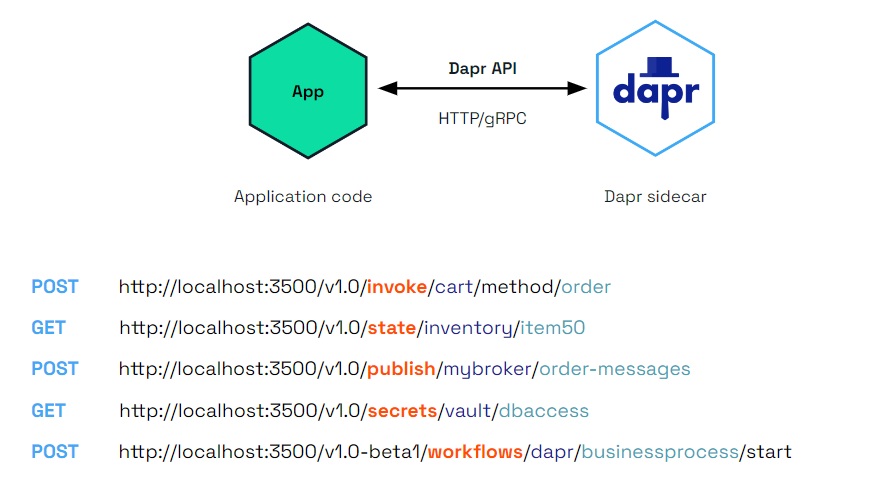
Dapr uses a sidecar pattern, meaning the Dapr APIs are run and exposed on a separate process, the Dapr sidecar, running alongside your application. The Dapr sidecar process is named daprd and is launched in different ways depending on the hosting environment.
The Dapr sidecar exposes:
- Building block APIs used by your application business logic
- A metadata API for discoverability of capabilities and to set attributes
- A health API to determine health status and sidecar readiness and liveness
The Dapr sidecar will reach readiness state once the application is accessible on its configured port. The application cannot access the Dapr components during application start up/initialization.
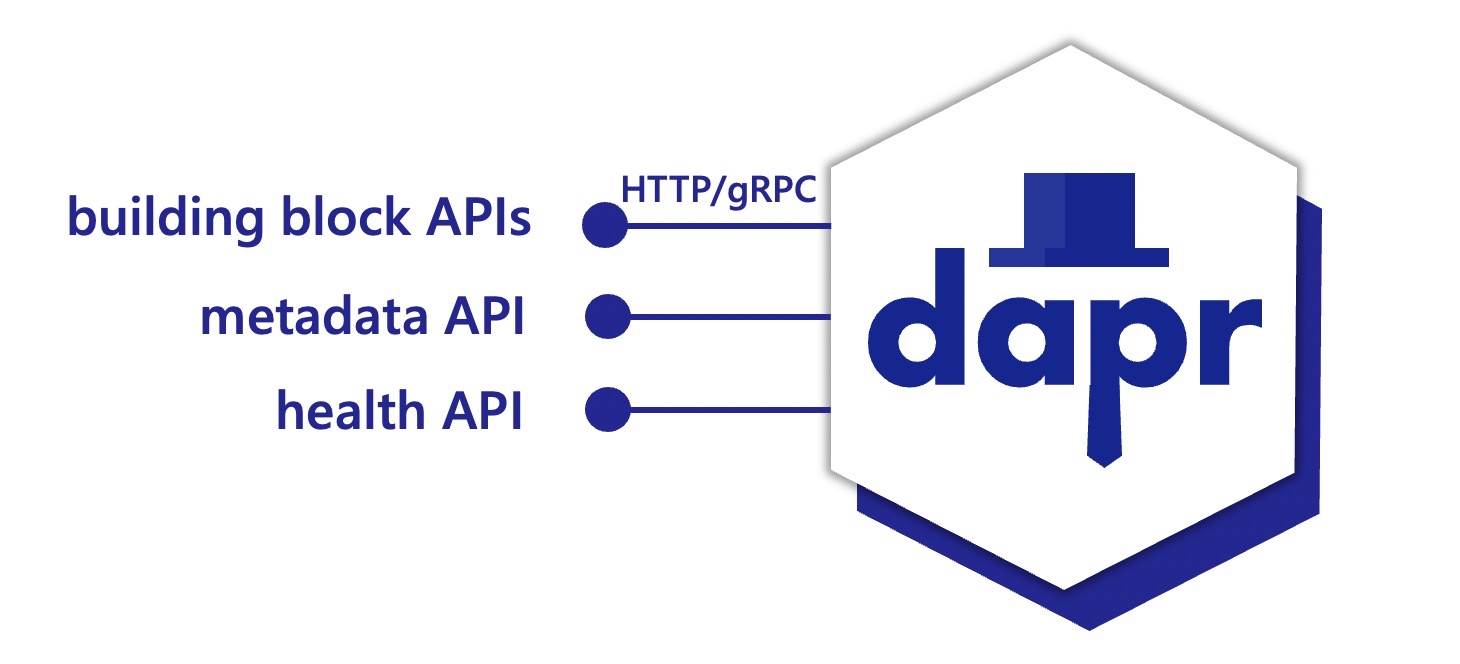
The sidecar APIs are called from your application over local http or gRPC endpoints.
Self-hosted with dapr run
When Dapr is installed in self-hosted mode, the daprd binary is downloaded and placed under the user home directory ($HOME/.dapr/bin for Linux/macOS or %USERPROFILE%\.dapr\bin\ for Windows).
In self-hosted mode, running the Dapr CLI run command launches the daprd executable with the provided application executable. This is the recommended way of running the Dapr sidecar when working locally in scenarios such as development and testing.
You can find the various arguments that the CLI exposes to configure the sidecar in the Dapr run command reference.
Kubernetes with dapr-sidecar-injector
On Kubernetes, the Dapr control plane includes the dapr-sidecar-injector service, which watches for new pods with the dapr.io/enabled annotation and injects a container with the daprd process within the pod. In this case, sidecar arguments can be passed through annotations as outlined in the Kubernetes annotations column in this table.
Native sidecars (Kubernetes 1.28+)
By default, daprd is injected as a regular container alongside your application. With Kubernetes native sidecars (KEP-753), daprd is instead injected as an init container with restartPolicy: Always. Refer to the Kubernetes sidecar containers documentation for details on behavior and lifecycle semantics.
Enable native sidecars globally via Helm:
dapr_sidecar_injector:
  nativeSidecar: true
Or per-pod via annotation:
annotations:
  dapr.io/enabled: "true"
  dapr.io/enable-native-sidecar: "true"
Running the sidecar directly
In most cases you do not need to run daprd explicitly, as the sidecar is either launched by the CLI (self-hosted mode) or by the dapr-sidecar-injector service (Kubernetes). For advanced use cases (debugging, scripted deployments, etc.) the daprd process can be launched directly.
For a detailed list of all available arguments run daprd --help or see this table which outlines how the daprd arguments relate to the CLI arguments and Kubernetes annotations.
Examples
Start a sidecar alongside an application by specifying its unique ID.
Note: --app-id is a required field, and cannot contain dots.
Specify the port your application is listening to
daprd --app-id myapp --app-port 5000
If you are using several custom resources and want to specify the location of the resource definition files, use the --resources-path argument:
daprd --app-id myapp --resources-path <PATH-TO-RESOURCES-FILES>
If you’ve organized your components and other resources (for example, resiliency policies, subscriptions, or configuration) into separate folders or a shared folder, you can specify multiple resource paths:
daprd --app-id myapp --resources-path <PATH-1-TO-RESOURCES-FILES> --resources-path <PATH-2-TO-RESOURCES-FILES>
Enable collection of Prometheus metrics while running your app
daprd --app-id myapp --enable-metrics
Listen to IPv4 and IPv6 loopback only
daprd --app-id myapp --dapr-listen-addresses '127.0.0.1,[::1]'
8.2 - Dapr Operator control plane service overview
Overview of the Dapr operator service
When running Dapr in Kubernetes mode, a pod running the Dapr Operator service manages Dapr component updates and provides Kubernetes services endpoints for Dapr.
Running the operator service
The operator service is deployed as part of dapr init -k, or via the Dapr Helm charts. For more information on running Dapr on Kubernetes, visit the Kubernetes hosting page.
Additional configuration options
The operator service includes additional configuration options.
Injector watchdog
The operator service includes an injector watchdog feature which periodically polls all pods running in your Kubernetes cluster and confirms that the Dapr sidecar is injected in those which have the dapr.io/enabled=true annotation. It is primarily meant to address situations where the Injector service did not successfully inject the sidecar (the daprd container) into pods.
The injector watchdog can be useful in a few situations, including:
Recovering from a Kubernetes cluster completely stopped. When a cluster is completely stopped and then restarted (including in the case of a total cluster failure), pods are restarted in a random order. If your application is restarted before the Dapr control plane (specifically the Injector service) is ready, the Dapr sidecar may not be injected into your application’s pods, causing your application to behave unexpectedly.
Addressing potential random failures with the sidecar injector, such as transient failures within the Injector service.
If the watchdog detects a pod that does not have a sidecar when it should have had one, it deletes it. Kubernetes will then re-create the pod, invoking the Dapr sidecar injector again.
The injector watchdog feature is disabled by default.
You can enable it by passing the --watch-interval flag to the operator command, which can take one of the following values:
--watch-interval=0: disables the injector watchdog (default value if the flag is omitted).--watch-interval=<interval>: the injector watchdog is enabled and polls all pods at the given interval; the value for the interval is a string that includes the unit. For example: --watch-interval=10s (every 10 seconds) or --watch-interval=2m (every 2 minutes).--watch-interval=once: the injector watchdog runs only once when the operator service is started.
If you’re using Helm, you can configure the injector watchdog with the dapr_operator.watchInterval option, which has the same values as the command line flags.
The injector watchdog is safe to use when the operator service is running in HA (High Availability) mode with more than one replica. In this case, Kubernetes automatically elects a “leader” instance which is the only one that runs the injector watchdog service.
However, when in HA mode, if you configure the injector watchdog to run “once”, the watchdog polling is actually started every time an instance of the operator service is elected as leader. This means that, should the leader of the operator service crash and a new leader be elected, that would trigger the injector watchdog again.
Watch this video for an overview of the injector watchdog:
8.3 - Dapr Placement control plane service overview
Overview of the Dapr Placement service
The Dapr Placement service is used to calculate and distribute distributed hash tables for the location of Dapr actors running in self-hosted mode or on Kubernetes. Grouped by namespace, the hash tables map actor types to pods or processes so a Dapr application can communicate with the actor. Anytime a Dapr application activates a Dapr actor, the Placement service updates the hash tables with the latest actor location.
Self-hosted mode
The Placement service Docker container is started automatically as part of dapr init. It can also be run manually as a process if you are running in slim-init mode.
Kubernetes mode
The Placement service is deployed as part of dapr init -k, or via the Dapr Helm charts. You can run Placement in high availability (HA) mode. Learn more about setting HA mode in your Kubernetes service.
For more information on running Dapr on Kubernetes, visit the Kubernetes hosting page.
Placement tables
There is an HTTP API /placement/state for Placement service that exposes placement table information. The API is exposed on the sidecar on the same port as the healthz. This is an unauthenticated endpoint, and is disabled by default. You need to set DAPR_PLACEMENT_METADATA_ENABLED environment or metadata-enabled command line args to true to enable it. If you are using helm you just need to set dapr_placement.metadataEnabled to true.
Usecase:
The placement table API can be used to retrieve the current placement table, which contains all the actors registered across all namespaces. This is helpful for debugging and allowing tools to extract and present information about actors.
HTTP Request
GET http://localhost:<healthzPort>/placement/state
HTTP Response Codes
| Code | Description |
|---|
| 200 | Placement tables information returned |
| 500 | Placement could not return the placement tables information |
HTTP Response Body
Placement tables API Response Object
| Name | Type | Description |
|---|
| tableVersion | int | The placement table version |
| hostList | Actor Host Info[] | A json array of registered actors host info. |
Actor Host Info
| Name | Type | Description |
|---|
| name | string | The host:port address of the actor. |
| appId | string | app id. |
| actorTypes | json string array | List of actor types it hosts. |
| updatedAt | timestamp | Timestamp of the actor registered/updated. |
Examples
curl localhost:8080/placement/state
{
    "hostList": [{
            "name": "198.18.0.1:49347",
            "namespace": "ns1",
            "appId": "actor1",
            "actorTypes": ["testActorType1", "testActorType3"],
            "updatedAt": 1690274322325260000
        },
        {
            "name": "198.18.0.2:49347",
            "namespace": "ns2",
            "appId": "actor2",
            "actorTypes": ["testActorType2"],
            "updatedAt": 1690274322325260000
        },
        {
            "name": "198.18.0.3:49347",
            "namespace": "ns2",
            "appId": "actor2",
            "actorTypes": ["testActorType2"],
            "updatedAt": 1690274322325260000
        }
    ],
    "tableVersion": 1
}
Disabling the Placement service
The Placement service can be disabled with the following setting:
global.actors.enabled=false
The Placement service is not deployed with this setting in Kubernetes mode. This not only disables actor deployment, but also disables workflows, given that workflows use actors. This setting only applies in Kubernetes mode, however initializing Dapr with --slim excludes the Placement service from being deployed in self-hosted mode.
For more information on running Dapr on Kubernetes, visit the Kubernetes hosting page.
Learn more about the Placement API.
8.4 - Dapr Scheduler control plane service overview
Overview of the Dapr scheduler service
The Dapr Scheduler service is used to schedule different types of jobs, running in self-hosted mode or on Kubernetes.
- Jobs created through the Jobs API
- Actor reminder jobs (used by the actor reminders)
- Actor reminder jobs created by the Workflow API (which uses actor reminders)
There is no concept of a leader Scheduler instance.
All Scheduler service replicas are considered peers.
All receive jobs to be scheduled for execution and the jobs are allocated between the available Scheduler service replicas for load balancing of the trigger events.
The diagram below shows how the Scheduler service is used via the jobs API when called from your application. All the jobs that are tracked by the Scheduler service are stored in the Etcd database.
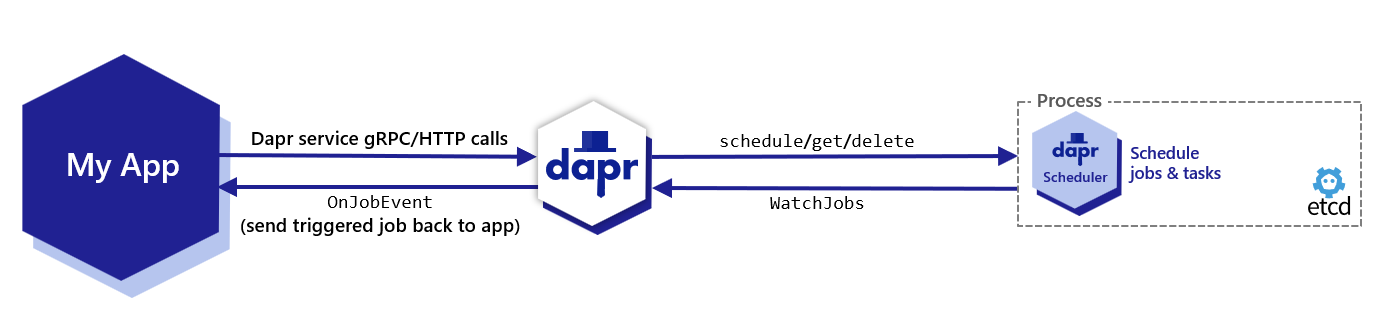
By default, Etcd is embedded in the Scheduler service, which means that the Scheduler service runs its own instance of Etcd.
See Scheduler service flags for more information on how to configure the Scheduler service.
Job Locality
Default Job Behavior
When the Scheduler service triggers jobs, they are sent back to a single replica for the same app ID that scheduled the job in a randomly load balanced manner.
This provides basic load balancing across your application’s replicas, which is suitable for most use cases where strict locality isn’t required.
Using Actor Reminders for Perfect Locality
For users who require perfect job locality (having jobs triggered on the exact same host that created them), actor reminders provide a solution.
To enforce perfect locality for a job:
- Create an actor type with a random UUID that is unique to the specific replica
- Use this actor type to create an actor reminder
This approach ensures that the job will always be triggered on the same host which created it, rather than being randomly distributed among replicas.
Job Triggering
Job Failure Policy and Staging Queue
When the Scheduler service triggers a job and it has a client side error, the job is retried by default with a 1s interval and 3 maximum retries.
For non-client side errors, for example, when a job cannot be sent to an available Dapr sidecar at trigger time, it is placed in a staging queue within the Scheduler service. Jobs remain in this queue until a suitable sidecar instance becomes available, at which point they are automatically sent to the appropriate Dapr sidecar instance.
Self-hosted mode
The Scheduler service Docker container is started automatically as part of dapr init. It can also be run manually as a process if you are running in slim-init mode.
The Scheduler can be run in both high availability (HA) and non-HA modes in self-hosted deployments. However, non-HA mode is not recommended for production use. If switching between non-HA and HA modes, the existing data directory must be removed, which results in loss of jobs and actor reminders. Run a back-up before making this change to avoid losing data.
Kubernetes mode
The Scheduler service is deployed as part of dapr init -k, or via the Dapr Helm charts. Scheduler always runs in high availability (HA) mode in Kubernetes deployments. Scaling the Scheduler service replicas up or down is not possible without incurring data loss due to the nature of the embedded data store. Learn more about setting HA mode in your Kubernetes service.
When a Kubernetes namespace is deleted, all the Job and Actor Reminders corresponding to that namespace are deleted.
Docker Compose Example
Here’s how to expose the etcd ports in a Docker Compose configuration for standalone mode.
When running in HA mode, you only need to expose the ports for one scheduler instance to perform backup operations.
version: "3.5"
services:
  scheduler-0:
    image: "docker.io/daprio/scheduler:1.18.0"
    command:
    - "./scheduler"
    - "--etcd-data-dir=/var/run/dapr/scheduler"
    - "--id=scheduler-0"
    - "--etcd-initial-cluster=scheduler-0=http://scheduler-0:2380,scheduler-1=http://scheduler-1:2380,scheduler-2=http://scheduler-2:2380"
    ports:
      - 2379:2379
    volumes:
      - ./dapr_scheduler/0:/var/run/dapr/scheduler
  scheduler-1:
    image: "docker.io/daprio/scheduler:1.18.0"
    command:
    - "./scheduler"
    - "--etcd-data-dir=/var/run/dapr/scheduler"
    - "--id=scheduler-1"
    - "--etcd-initial-cluster=scheduler-0=http://scheduler-0:2380,scheduler-1=http://scheduler-1:2380,scheduler-2=http://scheduler-2:2380"
    volumes:
      - ./dapr_scheduler/1:/var/run/dapr/scheduler
  scheduler-2:
    image: "docker.io/daprio/scheduler:1.18.0"
    command:
    - "./scheduler"
    - "--etcd-data-dir=/var/run/dapr/scheduler"
    - "--id=scheduler-2"
    - "--etcd-initial-cluster=scheduler-0=http://scheduler-0:2380,scheduler-1=http://scheduler-1:2380,scheduler-2=http://scheduler-2:2380"
    volumes:
      - ./dapr_scheduler/2:/var/run/dapr/scheduler
Managing jobs with the Dapr CLI
Dapr provides a CLI for inspecting and managing all scheduled jobs, regardless of type.
The CLI is the recommended way to view, back up, and delete jobs.
There are several different types of jobs which Scheduler manages:
app/{app-id}/{job-name}: Jobs created via the Jobs APIactor/{actor-type}/{actor-id}/{reminder-name}: Actor reminder jobs created via the Actor Reminders APIactivity/{app-id}/{instance-id}::{generation-name}::{activity-index}: Used internally for Workflow Activity remindersworkflow/{app-id}/{instance-id}/{random-name}: Used internally for Workflows.
Please see here for how to manage specifically reminders with the CLI.
List jobs
Example output:
NAME                                           BEGIN     COUNT  LAST TRIGGER
actor/myactortype/actorid1/test1               -3.89s    1      2025-10-03T16:58:55Z
actor/myactortype/actorid2/test2               -3.89s    1      2025-10-03T16:58:55Z
app/test-scheduler/test1                       -3.89s    1      2025-10-03T16:58:55Z
app/test-scheduler/test2                       -3.89s    1      2025-10-03T16:58:55Z
activity/test-scheduler/xyz1::0::1             -888.8ms  0
activity/test-scheduler/xyz2::0::1             -888.8ms  0
workflow/test-scheduler/abc1/timer-0-TVIQGkvu  +50.0h    0
workflow/test-scheduler/abc2/timer-0-OM2xqG9m  +50.0h    0
For more detail, use the wide output format:
dapr scheduler list -o wide
NAMESPACE  NAME                                           BEGIN                 EXPIRATION            SCHEDULE         DUE TIME                   TTL     REPEATS  COUNT  LAST TRIGGER
default    actor/myactortype/actorid1/test1               2025-10-03T16:58:55Z                        @every 2h46m40s  2025-10-03T17:58:55+01:00          100      1      2025-10-03T16:58:55Z
default    actor/myactortype/actorid2/test2               2025-10-03T16:58:55Z                        @every 2h46m40s  2025-10-03T17:58:55+01:00          100      1      2025-10-03T16:58:55Z
default    app/test-scheduler/test1                       2025-10-03T16:58:55Z                        @every 100m      2025-10-03T17:58:55+01:00          1234     1      2025-10-03T16:58:55Z
default    app/test-scheduler/test2                       2025-10-03T16:58:55Z  2025-10-03T19:45:35Z  @every 100m      2025-10-03T17:58:55+01:00  10000s  56788    1      2025-10-03T16:58:55Z
default    activity/test-scheduler/xyz1::0::1             2025-10-03T16:58:58Z                                         0s                                          0
default    activity/test-scheduler/xyz2::0::1             2025-10-03T16:58:58Z                                         0s                                          0
default    workflow/test-scheduler/abc1/timer-0-TVIQGkvu  2025-10-05T18:58:58Z                                         2025-10-05T18:58:58Z                        0
default    workflow/test-scheduler/abc2/timer-0-OM2xqG9m  2025-10-05T18:58:58Z                                         2025-10-05T18:58:58Z                        0
Get job details
dapr scheduler get app/my-app/job1 -o yaml
Delete jobs
Delete one or more specific jobs:
dapr scheduler delete app/my-app/job1 actor/MyActor/123/reminder1
Bulk delete jobs with filters:
dapr scheduler delete-all all
dapr scheduler delete-all app/my-app
dapr scheduler delete-all actor/MyActorType
Backup and restore jobs
In production environments, it’s recommended to perform periodic backups of this data at an interval that aligns with your recovery point objectives.
The Dapr CLI provides a command for exporting all Scheduler data to a specific binary file.
Use the -k flag when running in Kubernetes mode.
dapr scheduler export -o scheduler-backup.bin
dapr scheduler export -k -o scheduler-backup.bin
To restore data from a backup file:
dapr scheduler import -f scheduler-backup.bin
dapr scheduler import -k -f scheduler-backup.bin
Monitoring Scheduler’s etcd Metrics
Port forward the Scheduler instance and view etcd’s metrics with the following:
curl -s http://localhost:2379/metrics
Fine tune the embedded etcd to your needs by reviewing and configuring the Scheduler’s etcd flags as needed.
Disabling the Scheduler service
If you are not using any features that require the Scheduler service (Jobs API, Actor Reminders, or Workflows), you can disable it by setting global.scheduler.enabled=false.
For more information on running Dapr on Kubernetes, visit the Kubernetes hosting page.
Flag tuning
A number of Etcd flags are exposed on Scheduler which can be used to tune for your deployment use case.
External Etcd database
Scheduler can be configured to use an external Etcd database instead of the embedded one inside the Scheduler service replicas.
It may be interesting to decouple the storage volume from the Scheduler StatefulSet or container, because of how the cluster or environment is administered or what storage backend is being used.
It can also be the case that moving the persistent storage outside of the scheduler runtime completely is desirable, or there is some existing Etcd cluster provider which will be reused.
Externalising the Etcd database also means that the Scheduler replicas can be horizontally scaled at will, however note that during scale events, job triggering will be paused.
Scheduler replica count does not need to match the Etcd node count constraints.
To use an external Etcd cluster, set the --etcd-embed flag to false and provide the --etcd-client-endpoints flag with the endpoints of your Etcd cluster.
Optionally also include --etcd-client-username and --etcd-client-password flags for authentication if the Etcd cluster requires it.
--etcd-embed              bool         When enabled, the Etcd database is embedded in the scheduler server. If false, the scheduler connects to an external Etcd cluster using the --etcd-client-endpoints flag. (default true)
--etcd-client-endpoints   stringArray  Comma-separated list of etcd client endpoints to connect to. Only used when --etcd-embed is false.
--etcd-client-username    string       Username for etcd client authentication. Only used when --etcd-embed is false.
--etcd-client-password    string       Password for etcd client authentication. Only used when --etcd-embed is false.
Helm:
dapr_scheduler.etcdEmbed=true
dapr_scheduler.etcdClientEndpoints=[]
dapr_scheduler.etcdClientUsername=""
dapr_scheduler.etcdClientPassword=""
Etcd leadership election tuning
To improve the speed of election leadership of rescue nodes in the event of a failure, the following flag may be used to speed up the election process.
--etcd-initial-election-tick-advance Whether to fast-forward initial election ticks on boot for faster election. When it is true, then local member fast-forwards election ticks to speed up “initial” leader election trigger. This benefits the case of larger election ticks. Disabling this would slow down initial bootstrap process for cross datacenter deployments. Make your own tradeoffs by configuring this flag at the cost of slow initial bootstrap.
Helm:
dapr_scheduler.etcdInitialElectionTickAdvance=true
Storage tuning
The following options can be used to tune the embedded Etcd storage to the needs of your deployment.
A deeper understanding of what these flags do can be found in the Etcd documentation.
Note
Changing these flags can greatly change the performance and behaviour of the Scheduler, so caution is advised when modifying them from the default set by Dapr.
Changing these settings should always been done first in a testing environment, and monitored closely before applying to production.--etcd-backend-batch-interval string Maximum time before committing the backend transaction. (default "100ms")
--etcd-backend-batch-limit int Maximum operations before committing the backend transaction. (default 10000)
--etcd-compaction-mode string Compaction mode for etcd. Can be 'periodic' or 'revision' (default "revision")
--etcd-compaction-retention string Compaction retention for etcd. Can express time or number of revisions, depending on the value of 'etcd-compaction-mode' (default "1000000")
--etcd-experimental-bootstrap-defrag-threshold-megabytes uint Minimum number of megabytes needed to be freed for etcd to consider running defrag during bootstrap. Needs to be set to non-zero value to take effect. (default 100)
--etcd-max-snapshots uint Maximum number of snapshot files to retain (0 is unlimited). (default 10)
--etcd-max-txn-ops uint Maximum number of operations permitted in a single etcd transaction. (default 10000)
--etcd-max-wals uint Maximum number of write-ahead logs to retain (0 is unlimited). (default 10)
--etcd-snapshot-count uint Number of committed transactions to trigger a snapshot to disk. (default 100000)
Helm:
dapr_scheduler.etcdBackendBatchInterval="100ms"
dapr_scheduler.etcdBackendBatchLimit=10000
dapr_scheduler.etcdCompactionMode="revision"
dapr_scheduler.etcdCompactionRetention="1000000"
dapr_scheduler.etcdDefragThresholdMB=100
dapr_scheduler.etcdMaxSnapshots=10
dapr_scheduler.etcdMaxTxnOps=10000
8.5 - Dapr Sentry control plane service overview
Overview of the Dapr sentry service
The Dapr Sentry service manages mTLS between services and acts as a certificate authority. It generates mTLS certificates and distributes them to any running sidecars. This allows sidecars to communicate with encrypted, mTLS traffic. For more information read the sidecar-to-sidecar communication overview.
Self-hosted mode
The Sentry service Docker container is not started automatically as part of dapr init. However it can be executed manually by following the instructions for setting up mutual TLS.
It can also be run manually as a process if you are running in slim-init mode.
Kubernetes mode
The sentry service is deployed as part of dapr init -k, or via the Dapr Helm charts. For more information on running Dapr on Kubernetes, visit the Kubernetes hosting page.
Further reading
8.6 - Dapr Sidecar Injector control plane service overview
Overview of the Dapr sidecar injector process
When running Dapr in Kubernetes mode, a pod is created running the Dapr Sidecar Injector service, which looks for pods initialized with the Dapr annotations, and then creates another container in that pod for the daprd service
Running the sidecar injector
The sidecar injector service is deployed as part of dapr init -k, or via the Dapr Helm charts. For more information on running Dapr on Kubernetes, visit the Kubernetes hosting page.
Authorized service accounts
The sidecar injector’s admission webhook only processes requests from authorized Kubernetes service accounts. This controls which controllers and service accounts are allowed to trigger sidecar injection when creating or updating pods.
By default, the injector authorizes a set of well-known Kubernetes controllers (such as replicaset-controller, deployment-controller, statefulset-controller, and others), as well as users in the system:masters group. You can authorize additional service accounts by configuring the dapr_sidecar_injector.allowedServiceAccounts Helm value.
If a pod creation request comes from a service account that is not authorized, the injector skips sidecar injection for that pod silently.
Configuration
Service accounts are specified in namespace:name format. Multiple entries can be comma-separated. Glob patterns are supported using Go’s path.Match syntax:
| Pattern | Description | Example |
|---|
* | Matches any sequence of characters | my-ns:* matches all service accounts in my-ns |
? | Matches any single character | staging-?:* matches staging-1, staging-a, etc. |
[...] | Matches a character class | proj-*:sa-[abc]* matches service accounts starting with sa-a, sa-b, or sa-c |
Examples
Configure via Helm:
helm install dapr dapr/dapr --namespace dapr-system \
  --set dapr_sidecar_injector.allowedServiceAccounts="my-namespace:my-service-account,team-*:deploy-*"
Or in a Helm values file:
dapr_sidecar_injector:
  allowedServiceAccounts: "my-namespace:my-service-account,team-*:deploy-*"
Pattern examples:
| Pattern | Matches |
|---|
my-ns:my-sa | Exact match: service account my-sa in namespace my-ns |
my-ns:* | All service accounts in namespace my-ns |
team-*:deploy-* | Service accounts starting with deploy- in namespaces starting with team- |
*:* | All service accounts in all namespaces |
Note
The dapr_sidecar_injector.allowedServiceAccountsPrefixNames Helm value is deprecated as of v1.18. Migrate your entries to dapr_sidecar_injector.allowedServiceAccounts using glob patterns instead (for example, my-ns:my-prefix* replaces the previous prefix-matching behavior). The deprecated value still functions but logs a deprecation warning.9 - Dapr terminology and definitions
Definitions for common terms and acronyms in the Dapr documentation
This page details all of the common terms you may come across in the Dapr docs.
| Term | Definition | More information |
|---|
| App/Application | A running service/binary, usually one that you as the user create and run. | |
| Building block | An API that Dapr provides to users to help in the creation of microservices and applications. | Dapr building blocks |
| Component | Modular types of functionality that are used either individually or with a collection of other components, by a Dapr building block. | Dapr components |
| Configuration | A YAML file declaring all of the settings for Dapr sidecars or the Dapr control plane. This is where you can configure control plane mTLS settings, or the tracing and middleware settings for an application instance. | Dapr configuration |
| Dapr | Distributed Application Runtime. | Dapr overview |
| Dapr Actors | A Dapr building block that implements the virtual actor pattern for building stateful, single-threaded objects with identity, lifecycle, and concurrency management. | Actors overview |
| Dapr Agents | A developer framework built on top of Dapr Python SDK for creating durable agentic applications powered by LLMs. | Dapr Agents |
| Dapr control plane | A collection of services that are part of a Dapr installation on a hosting platform such as a Kubernetes cluster. This allows Dapr-enabled applications to run on the platform and handles Dapr capabilities such as actor placement, Dapr sidecar injection, or certificate issuance/rollover. | Self-hosted overview
Kubernetes overview |
| Dapr Workflows | A Dapr building block for authoring code-first workflows with durable execution that survive crashes, support long-running processes, and enable human-in-the-loop interactions. | Workflow overview |
| HTTPEndpoint | HTTPEndpoint is a Dapr resource use to identify non-Dapr endpoints to invoke via the service invocation API. | Service invocation API |
| MCPServer | A Dapr resource that declares a connection to an MCP (Model Context Protocol) server for durable tool execution via built-in workflow orchestrations. | MCPServer resource |
| Namespacing | Namespacing in Dapr provides isolation, and thus provides multi-tenancy. | Learn more about namespacing components, service invocation, pub/sub, and actors |
| Self-hosted | Windows/macOS/Linux machine(s) where you can run your applications with Dapr. Dapr provides the capability to run on machines in “self-hosted” mode. | Self-hosted mode |
| Service | A running application or binary. This can refer to your application or to a Dapr application. | |
| Sidecar | A program that runs alongside your application as a separate process or container. | Sidecar pattern |
10 - Frequently asked questions and answers
Learn more about Dapr concepts through frequently asked questions
10.1 - General Dapr questions and answers
Common questions asked about Dapr
How does Dapr compare to service meshes such as Istio, Linkerd or OSM?
Dapr is not a service mesh. While service meshes focus on fine-grained network control, Dapr is focused on helping developers build distributed applications. Both Dapr and service meshes use the sidecar pattern and run alongside the application. They do have some overlapping features, but also offer unique benefits. For more information please read the Dapr & service meshes concept page.
The Dapr project is focused on performance due to the inherent discussion of Dapr being a sidecar to your application. See performance results for updated performance numbers.
Actors
What is the relationship between Dapr, Orleans and Service Fabric Reliable Actors?
The actors in Dapr are based on the same virtual actor concept that Orleans started, meaning that they are activated when called and deactivated after a period of time. If you are familiar with Orleans, Dapr C# actors will be familiar. Dapr C# actors are based on Service Fabric Reliable Actors (which also came from Orleans) and enable you to take Reliable Actors in Service Fabric and migrate them to other hosting platforms such as Kubernetes or other on-premises environments.
Moreover, Dapr is about more than just actors. It provides you with a set of best-practice building blocks to build into any microservices application. See Dapr overview.
Differences between Dapr and an actor framework
Virtual actor capabilities are one of the building blocks that Dapr provides in its runtime. With Dapr, because it is programming-language agnostic with an http/gRPC API, the actors can be called from any language. This allows actors written in one language to invoke actors written in a different language.
Creating a new actor follows a local call like http://localhost:3500/v1.0/actors/<actorType>/<actorId>/…. For example, http://localhost:3500/v1.0/actors/myactor/50/method/getData calls the getData method on the newly created myactor with id 50.
The Dapr runtime SDKs have language-specific actor frameworks. For example, the .NET SDK has C# actors. The goal is for all the Dapr language SDKs to have an actor framework. Currently .NET, Java, Go and Python SDK have actor frameworks.
Does Dapr have any SDKs I can use if I want to work with a particular programming language or framework?
To make using Dapr more natural for different languages, it includes language specific SDKs for Go, Java, JavaScript, .NET, Python, PHP, Rust and C++. These SDKs expose the functionality in the Dapr building blocks, such as saving state, publishing an event or creating an actor, through a typed language API rather than calling the http/gRPC API. This enables you to write a combination of stateless and stateful functions and actors all in the language of your choice. And because these SDKs share the Dapr runtime, you get cross-language actor and functions support.
What frameworks does Dapr integrate with?
Dapr can be integrated with any developer framework. For example, in the Dapr .NET SDK you can find ASP.NET Core integration, which brings stateful routing controllers that respond to pub/sub events from other services.
Dapr is integrated with the following frameworks;
10.2 - Dapr and service meshes
How Dapr compares to and works with service meshes
Dapr uses a sidecar architecture, running as a separate process alongside the application and includes features such as service invocation, network security, and distributed tracing. This often raises the question: how does Dapr compare to service mesh solutions such as Linkerd, Istio and Open Service Mesh among others?
How Dapr and service meshes compare
While Dapr and service meshes do offer some overlapping capabilities, Dapr is not a service mesh, where a service mesh is defined as a networking service mesh. Unlike a service mesh which is focused on networking concerns, Dapr is focused on providing building blocks that make it easier for developers to build applications as microservices. Dapr is developer-centric, versus service meshes which are infrastructure-centric.
In most cases, developers do not need to be aware that the application they are building will be deployed in an environment which includes a service mesh, since a service mesh intercepts network traffic. Service meshes are mostly managed and deployed by system operators, whereas Dapr building block APIs are intended to be used by developers explicitly in their code.
Some common capabilities that Dapr shares with service meshes include:
- Secure service-to-service communication with mTLS encryption
- Service-to-service metric collection
- Service-to-service distributed tracing
- Resiliency through retries
Importantly, Dapr provides service discovery and invocation via names, which is a developer-centric concern. This means that through Dapr’s service invocation API, developers call a method on a service name, whereas service meshes deal with network concepts such as IP addresses and DNS addresses. However, Dapr does not provide capabilities for traffic behavior such as routing or traffic splitting. Traffic routing is often addressed with ingress proxies to an application and does not have to use a service mesh. In addition, Dapr provides other application-level building blocks for state management, pub/sub messaging, actors, and more.
Another difference between Dapr and service meshes is observability (tracing and metrics). Service meshes operate at the network level and trace the network calls between services. Dapr does this with service invocation. Moreover, Dapr also provides observability (tracing and metrics) over pub/sub calls using trace IDs written into the Cloud Events envelope. This means that metrics and tracing with Dapr is more extensive than with a service mesh for applications that use both service-to-service invocation and pub/sub to communicate.
The illustration below captures the overlapping features and unique capabilities that Dapr and service meshes offer:
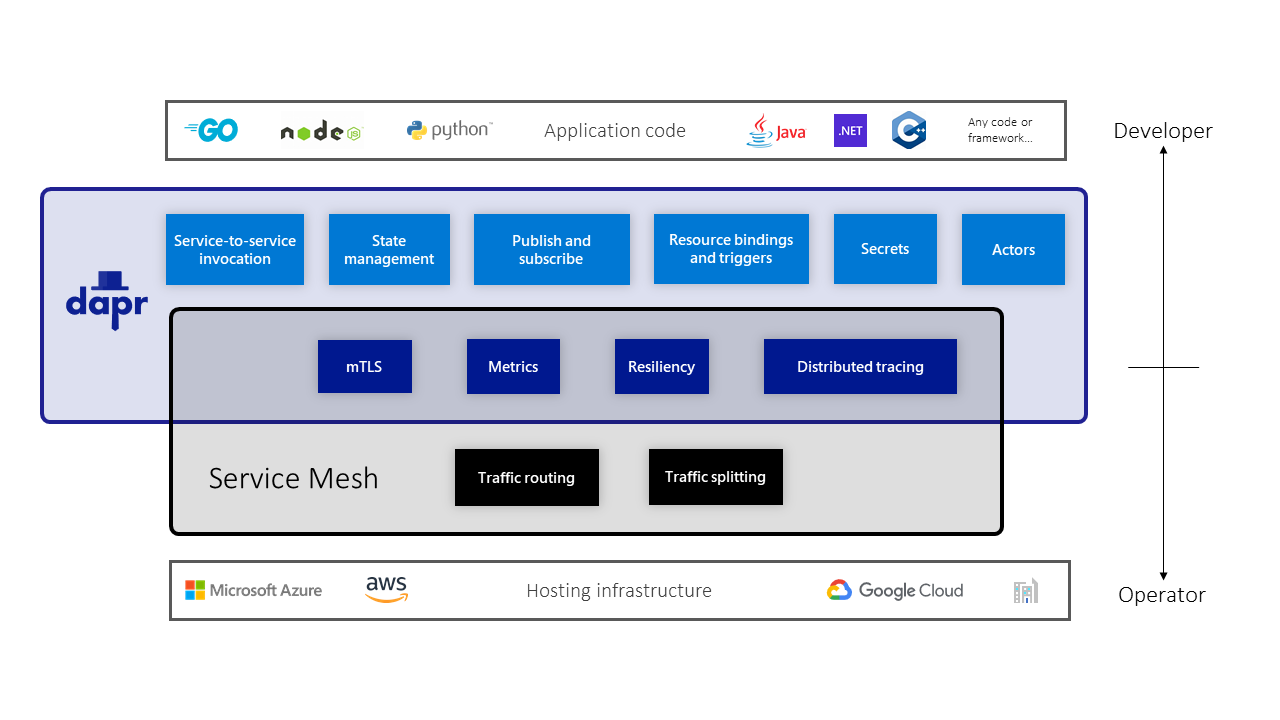
Using Dapr with a service mesh
Dapr does work with service meshes. In the case where both are deployed together, both Dapr and service mesh sidecars are running in the application environment. In this case, it is recommended to configure only Dapr or only the service mesh to perform mTLS encryption and distributed tracing.
Watch these recordings from the Dapr community calls showing presentations on running Dapr together with different service meshes:
When to use Dapr or a service mesh or both
Should you be using Dapr, a service mesh, or both? The answer depends on your requirements. If, for example, you are looking to use Dapr for one or more building blocks such as state management or pub/sub, and you are considering using a service mesh just for network security or observability, you may find that Dapr is a good fit and that a service mesh is not required.
Typically you would use a service mesh with Dapr where there is a corporate policy that traffic on the network must be encrypted for all applications. For example, you may be using Dapr in only part of your application, and other services and processes that are not using Dapr in your application also need their traffic encrypted. In this scenario a service mesh is the better option, and most likely you should use mTLS and distributed tracing on the service mesh and disable this on Dapr.
If you need traffic splitting for A/B testing scenarios you would benefit from using a service mesh, since Dapr does not provide these capabilities.
In some cases, where you require capabilities that are unique to both, you will find it useful to leverage both Dapr and a service mesh; as mentioned above, there is no limitation to using them together.